
Home › News › Knight Online OTP login failed
Knight Online OTP login failed with unknown issue: how to fix it
Updated 15 June 2026 · Reading time 6 minutes · Knight Online login help
In Knight Online, this specific OTP error triggers due to three main reasons:
- Time Zone Mismatch: Your PC or mobile phone’s clock is out of sync with the AnyOTP server (which operates on UTC +3).
- 10 Incorrect Attempts: If you enter a mismatched code 10 consecutive times, the AnyOTP system automatically blocks your account for security.
- Server Outages: Occasionally, regional server crashes can disrupt the OTP verification process.
Quick answer
The Knight Online message OTP login failed with unknown issue, please contact customer service means the one time password you entered was rejected by the login server without a specific reason. In most cases the code was expired, the device clock was out of sync, or a VPN flagged the login. Fix it by setting your phone and PC to automatic time, turning off any VPN, and entering a fresh code within its 30 to 60 second window. If it still fails, the block is on your account and only Knight Online customer service can release it.
The OTP screen rejects the code and shows an unknown issue prompt
What this error actually means
OTP stands for one time password. When you log in, Knight Online sends a short code to your email, phone, or authenticator app, and you type it back to prove the sign in is really you. The error appears when the server receives your code but refuses to accept it, and the system cannot match it to a clear reason. So instead of a precise message, the game falls back to a generic unknown issue line and points you to customer service.
The good news is that most of these failures are not a banned account. They are small mismatches between your device and the server. The steps below clear the common ones first, then tell you exactly when the problem is on the account side and support has to step in.
Common causes at a glance
How the OTP login error happens
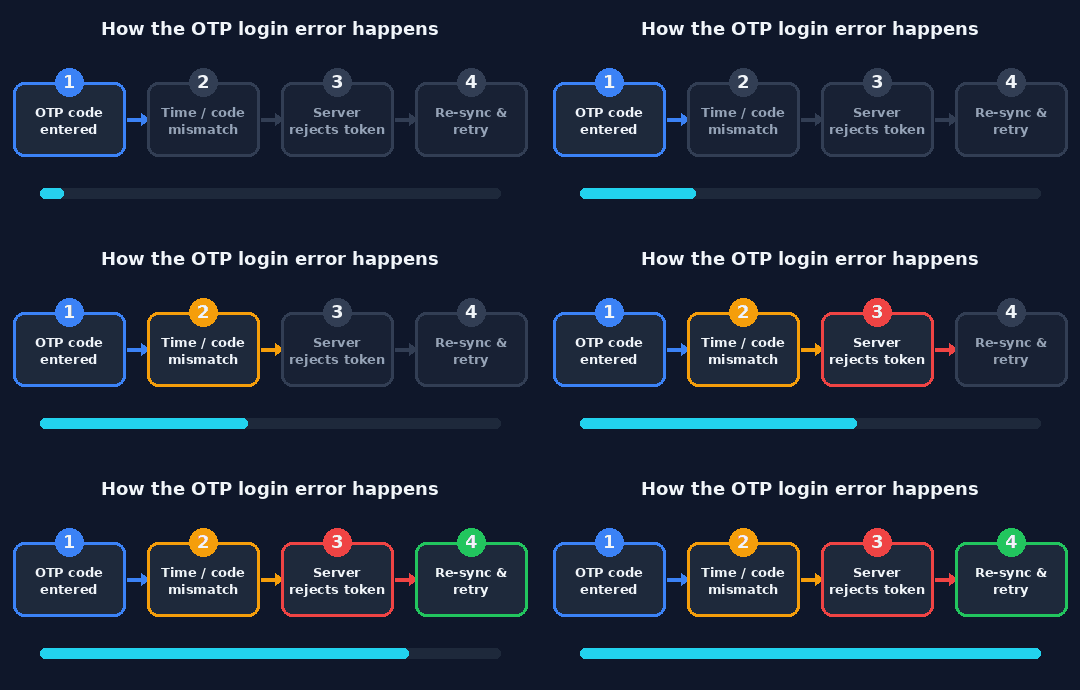
The login fails when your code and the server time do not line up
Step by step fix
Step 1. Read the newest OTP code
Open the email, SMS, or authenticator app linked to your account and use the most recent code only. Old codes are dead on arrival, which is the single most common cause of this error.
Step 2. Set date and time to automatic
On both your phone and PC, turn on automatic date, time, and time zone. Time based codes break the moment your clock drifts, even by a minute, so this fixes a surprising number of cases on its own.
Step 3. Enter a fresh code fast
Request or generate a new code and type it within its window, usually 30 to 60 seconds. Type the digits by hand to avoid stray spaces from copy and paste.
Step 4. Turn off VPN, proxy, and IP changers
Disable anything that changes your location, then retry. A sudden jump from one country to another looks suspicious to the login server and can block the OTP.
Step 5. Clear the launcher and sign in again
Fully close the launcher, clear its cache or remove the saved login, then reopen it and sign in with a brand new code. This clears a stuck session that keeps replaying a dead code.
Step 6. Contact customer service
If none of the above works, the issue is on the account side and only support can release it. Send your account name, the exact error text, the date and time it happened, and a screenshot. See the checklist below for what to include.
Cause and fix summary
What to send customer service
When the fixes do not work, a complete first message gets you unblocked faster. Include all of the following so support does not have to ask twice.
✓ Your account name or registered email
✓ The exact error text, OTP login failed with unknown issue
✓ The date and time it happened, with your time zone
✓ A screenshot of the error window
✓ The steps you already tried from this guide
Frequently asked questions
What does OTP login failed with unknown issue mean in Knight Online?
It means the one time password you sent was rejected by the login server, and the server could not give a specific reason. It usually points to a wrong or expired code, a clock that is out of sync, a flagged IP, or a temporary account hold.
Why does it tell me to contact customer service?
The game shows that line when the failure is not something the client can fix on its own. If basic fixes do not work, the account may be locked, under review, or the OTP setting may be broken on the server, and only support can release it.
Can a wrong date and time really cause an OTP error?
Yes. Time based codes are generated from the clock. If your phone or PC clock drifts by even a minute, the code looks valid on your screen but is invalid on the server, so set both to automatic time.
I never set up OTP, why am I being asked for it?
Knight Online can prompt OTP after a new device login, a suspicious sign in, or a security update. Check the email registered to your account for the code or a setup link before assuming it is a bug.
How long does customer service take to fix it?
Response times vary, but most account side OTP unlocks are handled within one to three business days. Sending your account name, the exact error text, and a screenshot in the first message speeds it up.
The short version
Nine times out of ten, the Knight Online OTP login failed error is a fresh code plus a correct clock away from being solved. Fix the time, drop the VPN, and enter a new code quickly. If the server still refuses you, stop retrying and send customer service the full details above, because at that point the lock lives on your account and only they hold the key.

Pingback: Valuable 5 Pence Coin Error: Rare UK 5p Errors Worth Checking - Seminarsonly.com