
What Does “On Error GoTo 0” Do in VBA?
VBA On Error GoTo 0 immediately disables any active error handler in the current procedure and restores Visual Basic for Applications to its default run-time behavior. Once executed, subsequent runtime errors trigger Excel’s standard modal debugging dialog instead of jumping to a custom label or skipping lines via On Error Resume Next. Crucially, it clears the global Err object (resetting Err.Number to 0), preventing unhandled faults from propagating silently through your codebase.
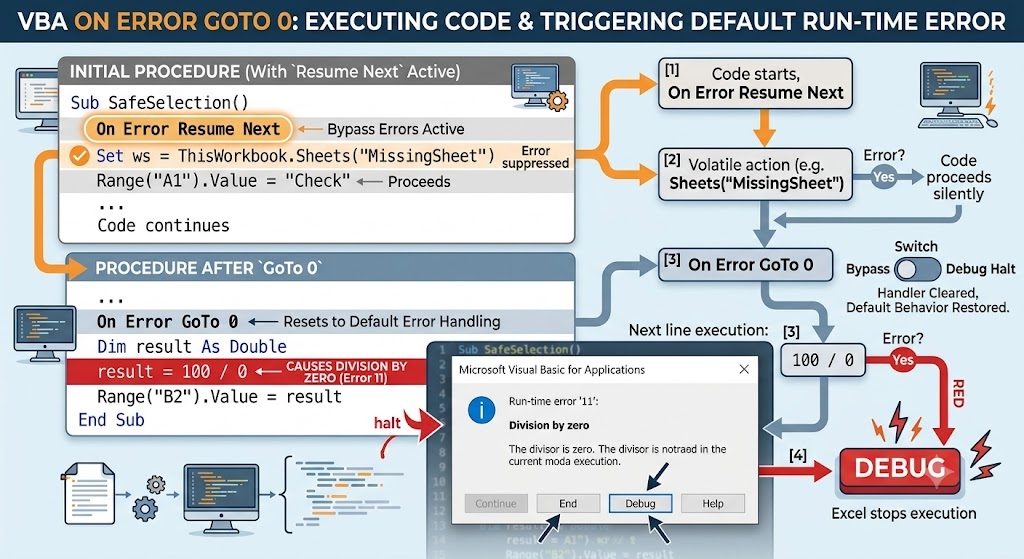
On Error GoTo 0 disables error bypass and re-enables standard debug halts.Why Line Label “0” Matters in VBA Architecture
In early dialects of BASIC, numbers were mandatory line labels. In modern Visual Basic for Applications, 0 remains a reserved language token rather than a literal code label. Setting error trapping to 0 tells the VBE execution engine that no user-defined handler exists for the remainder of the routine scope.
Software engineers often describe On Error GoTo 0 as a circuit breaker. Leaving an open-ended error suppressor like On Error Resume Next active across an entire procedure creates silent failures: loops terminate early without notice, variables hold stale values, and data pipelines corrupt downstream records.
Comparing VBA Error-Handling Directives
| Directive | Primary Action | Impact on Err Object | Best Used For |
|---|---|---|---|
| On Error GoTo 0 | Disables custom handler; restores default crash/debug prompt | Clears Err.Number to 0 |
Closing inline try/catch blocks |
| On Error Resume Next | Ignores run-time error and executes next code line | Retains error code until cleared | Testing expected failures (e.g., sheet lookup) |
| On Error GoTo [Label] | Jumps execution directly to designated line label | Populates Err.Description & Number |
Centralized subroutine recovery and cleanup |
| Err.Clear | Resets numeric and descriptive fields of Err |
Explicitly zeroes properties | Resetting state inside an active handler |
The Industry-Standard “Guarded Sandbox” Pattern
According to the official Microsoft Office VBA Specification, error handling scopes apply strictly to the calling procedure. Best practices dictate opening error suppression for precisely one statement and resetting it immediately.
Dim targetSheet As Worksheet‘ Step 1: Open temporary suppression sandbox
On Error Resume Next
Set targetSheet = ThisWorkbook.Sheets(“Q4_Audit”)‘ Step 2: Check if an error occurred
If targetSheet Is Nothing Then
MsgBox “Worksheet ‘Q4_Audit’ does not exist.”, vbExclamation, “Missing Resource”
End If‘ Step 3: MUST CLOSE suppression immediately
On Error GoTo 0
‘ Subsequent bugs here will halt normally rather than failing quietly
targetSheet.Range(“A1”).Value = 100 / 0 ‘ Halts with Error 11: Division by Zero
End Sub
Key Behavioral Nuances Every Developer Should Know
- Scope Isolation:
On Error GoTo 0only alters behavior within the subroutine or function in which it is written. It does not cascade into nested function calls. - Dual Functionality: It operates both as a directive switch (turning off trapping) and as a call to
Err.Clearsimultaneously. - Unwind Limitation: Calling
On Error GoTo 0inside an active error handler section (after execution has jumped to a label) will unbind the handler, but does not execute an implicitResume. - Defensive Programming: Never place business calculations between
On Error Resume NextandOn Error GoTo 0. Keep the sandbox restricted to one or two volatile operations (such as opening external workbooks, connecting to an API, or referencing unset dictionary keys).
Quick Answer: Key Takeaways
- Turn off suppression: Use it to cancel
On Error Resume Nextimmediately after risky operations. - Reset error records: Automatically clears numeric codes and descriptions in the
Errobject. - Standard debugging: Re-enables native Excel runtime alert popups for clean development and testing.
- Local scope: Affects only the routine it sits inside; surrounding execution contexts remain isolated.
