
How to Enter a Quizlet Live Join Code (Browser & App)
Joining an active session takes less than twenty seconds on mobile phones, Chromebooks, iPads, or desktop PCs. Follow these exact steps:
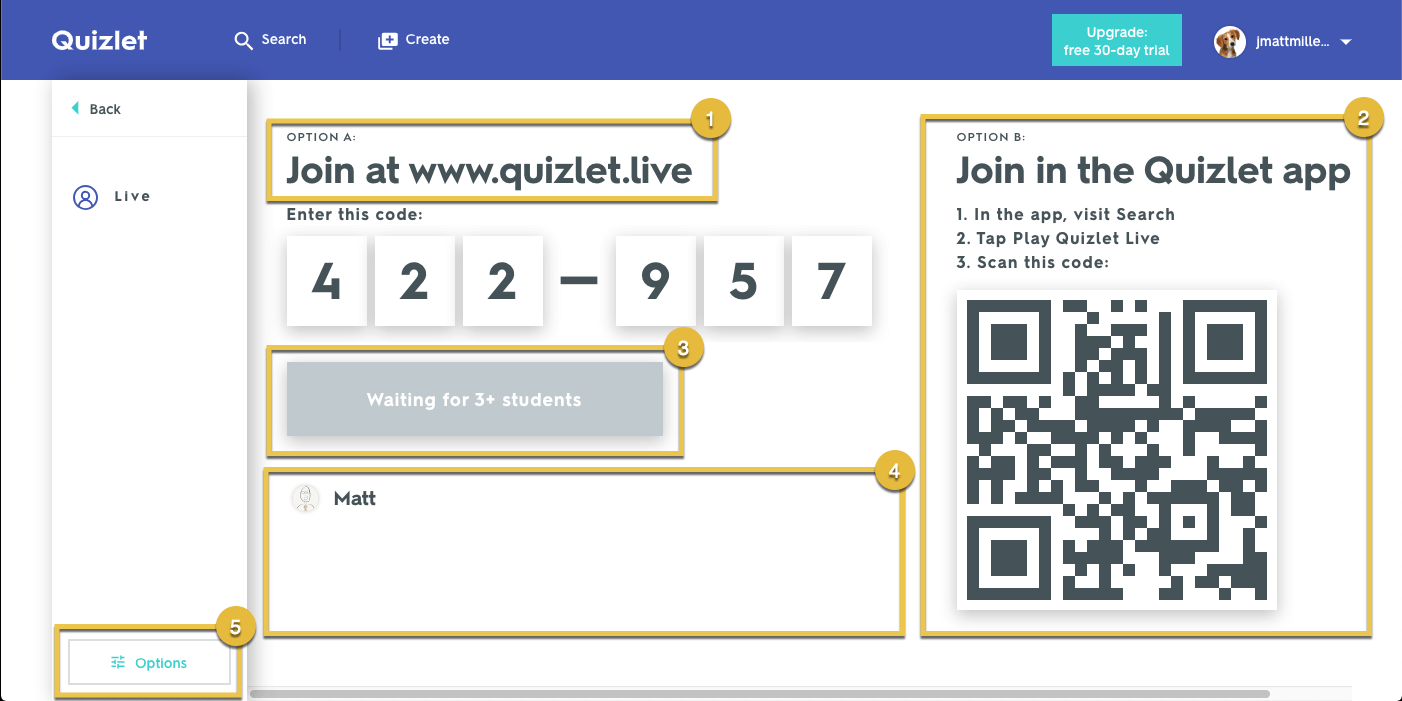
- Open the Join Portal: Launch any web browser and open quizlet.com/live (short address:
quizlet.live). - Type the 6-Digit PIN: Read the 6-digit code shown on the host’s projector screen and enter it into the numeric prompt field.
- Submit Your Nickname: Enter an identifiable name so your teacher or host can confirm your seat before starting.
- Alternate Mobile App Route: Inside the official Quizlet app (iOS or Android), tap the Search icon, select Play Quizlet Live, and choose between typing the numeric PIN or scanning the on-screen QR code with your camera.
Comparing Quizlet Live Connection Methods
Depending on classroom tech availability, hosts and participants can choose among three entry workflows:
Team Mode vs. Individuals Mode: What Happens After You Join?
Once the lobby reaches the minimum player requirement (at least 4 players for teams, or 2 for individuals mode), the host clicks Create Game:
- Classic Teams Mode: Quizlet automatically sorts players into animal-themed squads (e.g., Tigres, Pandas). Team members must sit together: all teammates see the same question, but only one member has the matching card on their screen, requiring active verbal communication.
- Individuals Mode: Every participant competes independently on their own device, race-style, to hit 12 consecutive correct answers first.
- Streak Reset Penalty: In both modes, a single incorrect response resets the player’s or team’s score back to zero, emphasizing precision over pure speed.
Troubleshooting: Why Isn’t Your Join Code Working?
- Expired Lobby: Quizlet Live codes expire immediately once the game concludes or if the host closes the setup tab. Ask the host to refresh or launch a new game.
- Digit Transposition: Codes consist purely of 6 numeric digits (no letters or symbols). Double-check commonly confused numbers like 1 and 7, or 0 and 8.
- School Firewall Restrictions: If the lobby hangs on “Connecting…”, ensure school internet security rules whitelist the domain
*.quizlet.comand enable WebSockets. - Inappropriate Name Filter: Quizlet’s automatic profanity filter prevents offensive handles from entering the game. If rejected, pick a simpler first name.
Best Practices for Teachers & Hosts
For instructors leading review games, Quizlet Live functions best when study sets contain at least 12 unique terms with unambiguous definitions. For more configuration assistance, visit the Quizlet Help Center to configure student accessibility adjustments and term-definition display preferences.
Quick Answers: Quizlet Live FAQ
- Where do I get a Quizlet Live join code? The code is displayed exclusively on the host’s screen when they select “Live” from their study set.
- Do students need a Quizlet account to join? No. Students only need the 6-digit code and a nickname; no account or password is required.
- How many digits is a Quizlet Live code? Exactly 6 numeric digits (e.g., 422-957).
- Can I join a Quizlet Live game late? No. Once the host launches the game from the lobby, new participants cannot enter until the round resets.
