
Quick Answer: Fixing the McAfee Download Error
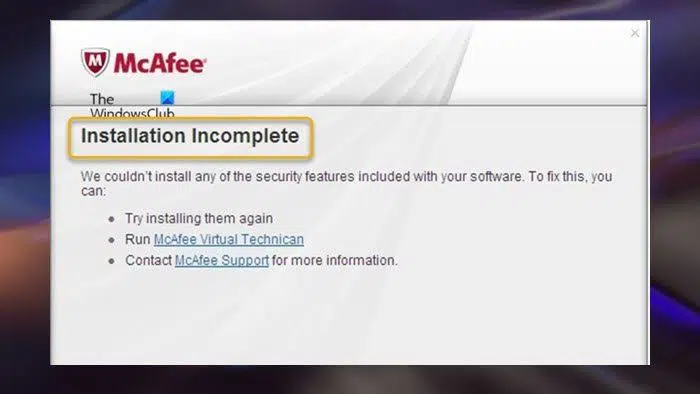
If your McAfee installation fails or shows errors like 12152 or Installation Incomplete, follow these immediate steps:
- Check McAfee Servers: Error 12152 or 7305 means the McAfee servers are overloaded. Wait 1-2 hours and try the download again.
- Remove Old Antivirus Software: Conflicting software (like Norton or Avast) or leftovers of an old McAfee version will block the installation.
- Run the MCPR Tool: Download the official McAfee Consumer Product Removal (MCPR) tool to wipe all hidden, corrupted installation files.
- Run as Administrator: Always right-click the setup file and select Run as Administrator to give the installer the necessary system permissions.
Securing your PC is a top priority, but running into a McAfee download error can stop you in your tracks. Whether you are greeted by an “Installation Incomplete” window, a blank screen during setup, or cryptic error codes like 12152, these roadblocks are incredibly frustrating.
Fortunately, these issues are rarely a sign of a broken computer. They usually stem from leftover registry files, conflicting security software, or temporary server outages on McAfee’s end. In this comprehensive guide, we will break down the exact causes and provide expert, step-by-step solutions to ensure your antivirus installs flawlessly.
Common Causes of McAfee Installation Failures
Understanding why your download or installation is failing makes troubleshooting much easier. The most frequent culprits include:
- Server Overload (Error 12152 / 7305): Your PC is fine, but the McAfee download servers are struggling to process requests.
- Conflicting Security Software: Windows Defender or third-party antivirus programs actively block the new McAfee installer from modifying system files.
- Corrupt Remnants: If a previous McAfee installation was uninstalled incorrectly, hidden folders and registry keys prevent the new version from unpacking.
How to Fix Windows Update Error: Ultimate 2026 Troubleshooting Guide
Troubleshooting Matrix for McAfee Errors
Identify your specific error below and apply the recommended fix.
The Ultimate Fix: How to Use the MCPR Tool
If you keep hitting a wall, the McAfee Consumer Product Removal (MCPR) tool is your best friend. It aggressively targets and removes all remnants of McAfee software that standard Windows uninstallation leaves behind.
- Download the latest version of the MCPR tool directly from the Official McAfee Support Website.
- Double-click the
MCPR.exefile to launch it. - Accept the EULA and enter the case-sensitive captcha code.
- Wait for the tool to display “Removal Complete” (this can take up to 20 minutes).
- Crucial step: Restart your PC. The cleanup is not finalized until the computer reboots.
Looking for more help with Windows software issues? Read our internal guide on How to Fix Corrupted Windows Registry Errors safely.
Related Topics
- “McAfee error code 12152”
Keyword Intent: Root Cause Analysis. Answer: This code specifically points to a server-side issue. The McAfee download servers are temporarily overloaded. The fix is simply to wait an hour and try downloading the installer again. - “McAfee installation incomplete”
Keyword Intent: Troubleshooting. Answer: This happens when the installer lacks permission to write to certain system folders, or old antivirus files block it. Using the MCPR tool and running the setup as an Administrator usually bypasses this. - “MCPR tool download”
Keyword Intent: Utility Search. Answer: The McAfee Consumer Product Removal tool is the official uninstaller provided by McAfee. It is essential for clearing corrupted registry keys before attempting a fresh installation. - “McAfee blank screen during install”
Keyword Intent: GUI Error Fix. Answer: A blank, white, or unresponsive installer window usually signifies a UI glitch. You can bypass this by executing a “silent install” via the Windows Command Prompt. - “Why won’t McAfee download on my new laptop”
Keyword Intent: New PC Setup. Answer: New laptops often come pre-installed with trial versions of other antivirus software (like Norton or Defender). You must completely uninstall the bloatware before the McAfee installer will run successfully.
TL;DR – Key Takeaways for McAfee Install Errors
- Server Errors (12152/7305): These are not your fault. McAfee’s servers are busy. Wait an hour and retry.
- Clean the Slate: Never install McAfee if another antivirus is still active. Uninstall competitors first.
- Use MCPR: If you get an “Incomplete Installation” error, use the official MCPR tool to wipe corrupted registry files.
- Admin Rights: Always right-click the setup file and select Run as Administrator to prevent Windows from blocking the installation.
