
https //wss.kseb.in Bill Payment Online KSEB Kerala
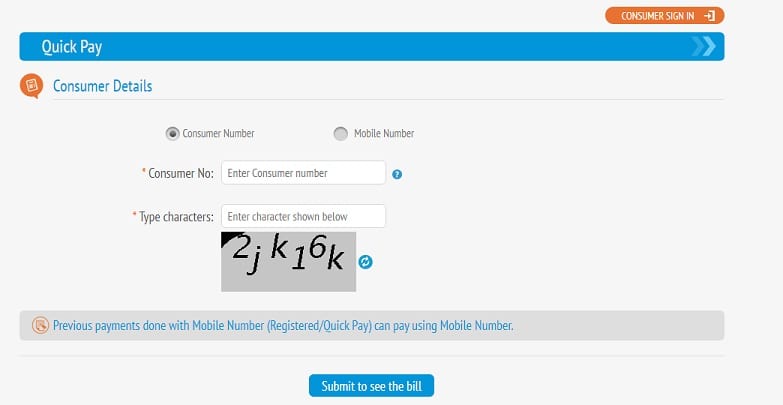
To pay your Kerala State Electricity Board (KSEB) bill online, Visit the KSEB Web Self Service Quick Pay page at https://wss.kseb.in/selfservices/quickpay. Enter your consumer number or registered mobile number. Click “Submit To See The Bill.”
Now you can view, download, and print your Kerala electricity bill using the KSEB bill view page in the Kerala State Electricity Board official website – www.kseb.in
Details you need to view your KSEB bill are,
• Your electrical section
• Your consumer number
KSEB Bill Online Payment
To pay your Kerala State Electricity Board (KSEB) bill online, you have a few options:
-
Quick Pay (Without Login):
- Visit the KSEB Web Self Service Quick Pay page.
- Enter your consumer number or registered mobile number.
- Click “Submit To See The Bill.”
- Your outstanding bill details will be displayed on the screen.
-
Registered User Login:
- Visit the KSEB Web Self Service.
- Log in with your credentials.
- Go to the “View bill” option to check your bill status.
- Enter your 13-digit consumer number or registered mobile number.
- Click “Submit” to proceed with the bill payment.
-
Other Payment Options:
- Use Bharat Bill Payment System-enabled websites or apps like Paytm, PhonePe, Google Pay, Mobikwik, PayU, or Amazon Pay.
- Pay in cash at the cash counter in any Electrical Section Office or collection center.
Also Read : Railwire Bill Payment
Remember that installment bills can only be paid through the counter, and due amounts will be updated the next day for bills paid today. If you need further assistance, you can reach out to the 24X7 Customer Care Center by calling 1912 or 0471-2555544, or email ccckseb@gmail.com.
How can I check my bill history?
To check your KSEB bill payment history, follow these steps:
1) Visit the KSEB Web Self Service.
2) Log in using your username and password.
3) Click on the “Sign In” button.
4) Your account dashboard will be displayed.
5) Choose the “History” option on the left side of the screen.
6) Under the “History” section, select the “Payment History” option.
7) The entire payment history will be displayed, organized by month.
Feel free to explore your payment records and download any receipts you need. If you have any further questions, don’t hesitate to ask! 😊🔌📄
