Skip to content
Seminarsonly.com
  • Home
  • About
  • Contact Us
  • Disclaimer
  • Privacy Policy
  • facebook.com
  • twitter.com
  • t.me
  • instagram.com
  • youtube.com
Subscribe
Home ยป https://beneficiary.nha.gov.in | Login and Register for Ayushman Card
https://beneficiary.nha.gov.in Login
Posted inLogin

https://beneficiary.nha.gov.in | Login and Register for Ayushman Card

Posted by Freddy John June 8, 2025

Log in to beneficiary.nha.gov.in, then select the ‘Add Family Member’ link to add a beneficiary to your Ayushman NHA account. You can finish the new member registration process by simply requesting their Aadhaar card and other required credentials.

The Ayushman Card is provided to eligible families under the Pradhan Mantri Jan Arogya Yojana (PMJAY). You do not need to register separately for the Ayushman Card. If your family is eligible, you will be automatically included in the scheme.

Adding a new member to your Ayushman Bharat family

Here’s how you can do it:

1. Online Method (if available in your state):

โ€ข Visit the NHA Ayushman Bharat Portal: Go to beneficiary.nha.gov.in and log in with your mobile number and OTP.

โ€ข Access your dashboard: Once logged in, you should see an option to “Add Family Member.”

โ€ข Provide Aadhaar details: Enter the Aadhaar number of the family member you want to add.

โ€ข Fill in the form: Complete the form with the required details, such as name, gender, relationship to you, and date of birth.

โ€ข Upload documents: You might need to upload supporting documents like a ration card or birth certificate.

โ€ข Submit the form: After filling in all the details and uploading the documents, submit the form.
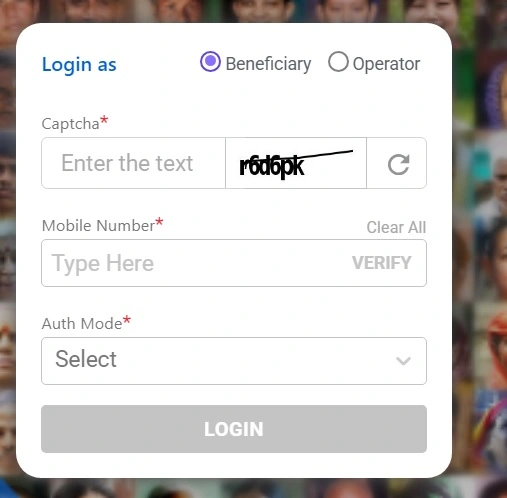
https://beneficiary.nha.gov.in Login

2. Offline Method:

โ€ข Visit a Common Service Center (CSC) or your nearest government hospital: They can help you with the process.

โ€ข Carry necessary documents: Take the following documents for the new member:

    • Aadhaar Card.
    • Ration Card (if applicable).
    • Birth Certificate or Age Proof.
    • Address Proof.
    • Your existing Ayushman Bharat card or family details.

โ€ข Fill out the application form: The CSC operator will provide you with an application form to add a new member.

โ€ข Submit the form and documents: Submit the filled-out form along with the necessary documents to the CSC operator. They will verify your details and update your family list in the system.

How to Check Eligibilty

You can check your eligibility and find out if your family is included in the scheme by following these steps:

1. Visit the official PMJAY website: Go to pmjay.gov.in.

2. Check your eligibility: Look for the ‘Am I Eligible’ tab or a similar option on the homepage.

3. Enter your details: You will usually need to provide your mobile number and possibly some other identifying information like your ration card number or Aadhaar number.

4. Submit and check results: After submitting your details, the website will tell you if your family is eligible for the Ayushman Card.

If your family is eligible, you can get your Ayushman Card created at a nearby Common Service Center (CSC) or by contacting your local health authority. You will need to provide some basic documents like your Aadhaar card, ration card, and any other identification documents as required.

Last updated on June 8, 2025
Freddy John
View All Posts

Post navigation

Previous Post
starz.com/settings/manage devices | Manage Devices with your STARZ Account
Next Post
Pago De Mujeres Con Bienestar 2025

Recent Posts

  • Social Security Electronic Benefits Update: Paper Checks Are Gone โ€” Here’s What to Do
  • When Did Social Security Numbers Start? The Complete 1936 Story
  • How to Request a New Social Security Card (Free, Online & By Mail)
  • Social Security Max Contribution 2026: New $184,500 Limit Explained
  • How to Replace My Social Security Card: Free Online Method (2026)

Archives

  • June 2026
  • April 2026
  • March 2026
  • February 2026
  • January 2026
  • December 2025
  • November 2025
  • October 2025
  • September 2025
  • August 2025
  • July 2025
  • June 2025
  • May 2025
  • April 2025
  • March 2025
  • February 2025
  • January 2025
  • December 2024
  • November 2024
  • October 2024
  • September 2024
  • August 2024
  • July 2024
  • June 2024
  • May 2024
  • April 2024
  • March 2024
  • February 2024
  • January 2024
  • December 2023
  • November 2023
  • October 2023
  • September 2023
  • August 2023
  • July 2023
  • June 2023
  • May 2023
  • April 2023
  • March 2023
  • February 2023
  • January 2023
  • December 2022
  • November 2022
  • October 2022
  • September 2022
  • August 2022
  • July 2022
  • June 2022
  • May 2022
  • April 2022
  • March 2022
  • February 2022
  • January 2022
  • December 2021
  • November 2021
  • October 2021
  • September 2021
  • August 2021
  • July 2021
  • June 2021
  • May 2021
  • July 204

Categories

  • activate
  • Australia
  • BF6
  • Canada
  • Card
  • Error Fix
  • Games
  • India
  • Ireland
  • Italy
  • Kerala
  • Login
  • Lottery
  • Minecraft
  • news
  • Property
  • Result
  • Scam
  • Science Fair
  • Server
  • Social Security
  • South Africa
  • TV
  • UK
  • USA
  • Whois
Search
Categories
  • activate
  • Australia
  • BF6
  • Canada
  • Card
  • Error Fix
  • Games
  • India
  • Ireland
  • Italy
  • Kerala
  • Login
  • Lottery
  • Minecraft
  • news
  • Property
  • Result
  • Scam
  • Science Fair
  • Server
  • Social Security
  • South Africa
  • TV
  • UK
  • USA
  • Whois
Archives
  • June 2026
  • April 2026
  • March 2026
  • February 2026
  • January 2026
  • December 2025
  • November 2025
  • October 2025
  • September 2025
  • August 2025
  • July 2025
  • June 2025
  • May 2025
  • April 2025
  • March 2025
  • February 2025
  • January 2025
  • December 2024
  • November 2024
  • October 2024
  • September 2024
  • August 2024
  • July 2024
  • June 2024
  • May 2024
  • April 2024
  • March 2024
  • February 2024
  • January 2024
  • December 2023
  • November 2023
  • October 2023
  • September 2023
  • August 2023
  • July 2023
  • June 2023
  • May 2023
  • April 2023
  • March 2023
  • February 2023
  • January 2023
  • December 2022
  • November 2022
  • October 2022
  • September 2022
  • August 2022
  • July 2022
  • June 2022
  • May 2022
  • April 2022
  • March 2022
  • February 2022
  • January 2022
  • December 2021
  • November 2021
  • October 2021
  • September 2021
  • August 2021
  • July 2021
  • June 2021
  • May 2021
  • July 204
Copyright 2026 โ€” Seminarsonly.com. All rights reserved.
Scroll to Top