
Last updated: September 2026 | Author: Freddy John, Gaming & Tech Desk
⚡ Quick Answer
- The “player count error” / servers-down message on Battlefield 6 is almost always EA App or matchmaking-side, not your PC — it shows up as error code 1:8600 (also written 1:86001S:66003S:…O:0B).
- It appears when the game can’t verify your live player/session count with EA’s authentication servers, usually during peak login hours or after a patch.
- First fix: log out of the EA App and your platform account fully, then log back in — this resolves it for most players in under 5 minutes.
- Check live Battlefield 6 server status before troubleshooting your own network — if EA’s side is down, no local fix will work.
- If servers are “up” but you still can’t join, it’s usually a stale DNS cache, NAT type, or an unfinished background update.
What Does the Battlefield 6 Player Count Error Actually Mean?
When Battlefield 6 throws a “player count” style error or a blank “servers down” screen, it’s not describing how many people are online — it’s a session-authentication failure. The game client pings EA’s backend to confirm your account, your licence, and the live population of a server browser slot before it lets you queue into Conquest, Breakthrough, or any live-service mode.
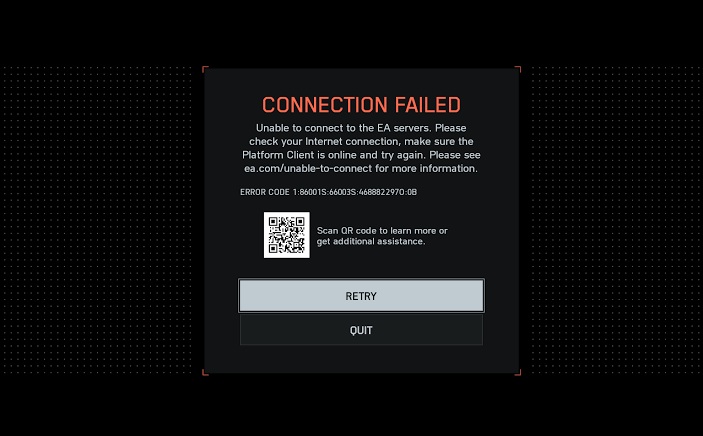
Most players see this as error code 1:8600, sometimes shown in the longer form 1:86001S:66003S:468882297O:0B. It’s the same family of error that has followed EA’s Frostbite-based titles for years, and it resurfaces on Battlefield 6 whenever login traffic spikes or backend maintenance is running.
Why It Happens More Often Now
- Battlefield 6 launched in October 2025 to a record concurrent-player peak, and login/authentication load has stayed uneven ever since — especially around new season drops.
- Player counts have cooled significantly since launch, which paradoxically makes queue and matchmaking errors more noticeable during off-peak hours when fewer full lobbies are forming.
- EA App “missing content” and “purchase to play” bugs have caused similar access failures in the past, and support threads often lump them in with the player-count error.
- Scheduled maintenance ahead of season content (Naval Warfare, server browser, and leaderboard features on the 2026 roadmap) has triggered short outage windows.
How to Port Forward Battlefield & Get Open NAT (PC, PS5, Xbox)
Is Battlefield 6 Down Right Now? How to Check
Before trying any fix, confirm whether the problem is on EA’s end. Don’t skip this step — it saves you from resetting your router over an outage you can’t control.
| Check This | What It Tells You |
|---|---|
| Official Battlefield status account (X/Twitter) | Confirms acknowledged, wide-scale outages first |
| Third-party status trackers (crowd-reported) | Shows regional spikes in “can’t connect” reports in real time |
| EA Help site service status page | Lists officially confirmed maintenance windows |
| A different platform (console vs PC) | Tells you if the outage is cross-platform or limited to your device |
If a status tracker and the official account both show elevated reports, stop troubleshooting locally and wait — this is on EA’s infrastructure, not your setup.
Step-by-Step Fix for Error Code 1:8600
If server status looks normal but you’re still stuck, work through these in order — most players resolve it within the first two steps.
| Step | What To Do |
|---|---|
| 1 | Fully log out of the EA App and your platform account (Steam, PSN, or Xbox), then restart the EA App and log back in. |
| 2 | Verify/repair game files through the EA App library menu to rule out a corrupted install. |
| 3 | Flush your DNS cache and switch to a public DNS (e.g., 1.1.1.1) if your ISP’s DNS is slow to resolve EA’s auth servers. |
| 4 | Check your NAT type in network settings — a Strict/Type 3 NAT commonly triggers session-sync errors during matchmaking. |
| 5 | Confirm the EA account you’re logged into actually owns a licensed copy of Battlefield 6 — cross-purchase and gifted copies occasionally fail this check after a season update. |
| 6 | If you’re on PC, temporarily disable VPN or proxy software, which can interfere with the authentication handshake. |
When to Just Wait It Out
- If the error started suddenly for a large number of players at once, it’s a backend issue — EA typically resolves these within one to a few hours.
- Season launch days and major patch days carry the highest risk of this error, purely from login volume.
- Compensation (boosters, battle pass time) has been issued before for major outage-related access failures — keep an eye on official channels if downtime is extended.
Frequently Asked Questions
What is Battlefield 6 error code 1:8600?
It’s an EA authentication error that fires when the game can’t confirm your session or player-count status with EA’s servers, usually during login spikes or maintenance.
Does this mean my account was banned?
No. This error is connection- and authentication-related, not a ban or suspension flag. Bans display a different, explicit message.
Why does it happen more on weekends or evenings?
Peak login volume during North American and European evening hours puts more load on EA’s authentication layer, which is when session-sync errors like this spike.
Is this different across PC, PlayStation, and Xbox?
The underlying cause is the same across platforms since Battlefield 6 uses shared cross-platform authentication, though console players should also check their platform’s own network status page.
📌 TL;DR
- Battlefield 6’s “player count” error is EA-side session authentication failure, most often shown as error code 1:8600.
- Always check live server status first before troubleshooting your own PC or console.
- Log out/in of the EA App fixes it for most players; verify files, flush DNS, and check NAT type if it persists.
- It’s not a ban — it’s a connectivity/auth hiccup that typically clears within hours during confirmed outages.
