
| 🏠 Home › News › Sage Log In Error 502 | Sage Service Status |
 |
|
⚡ QUICK ANSWER Sage Log In Error 502 (Bad Gateway) appears when a Sage gateway server receives an invalid response from an upstream server during sign-in. It is a server-side problem in over 90% of cases — not your password. First, check status.sage.com. If services are green, hard-refresh (Ctrl + F5), clear your cache, switch browsers, disable your VPN, and retry after 10–15 minutes. |
It’s 9 a.m., invoices are waiting, payroll is due — and instead of your dashboard, Sage greets you with a cold “502 Bad Gateway”. Take a breath. This error looks scarier than it is. In this guide, you’ll learn exactly what Sage Error 502 means, how to check the live Sage service status in 10 seconds, and seven proven fixes that get most users back into Sage 50, Sage 200, Sage Intacct, or Sage Business Cloud within minutes.
🟢 Step 0: Check the Sage Service Status First
Before touching a single setting on your machine, find out whether the problem is on Sage’s side. Sage publishes a live, official health dashboard covering Sage ID logins, Sage Business Cloud, Sage 50 connected services, Sage 200, payroll and banking feeds.
🔍 Check Sage Service Status Now → If you see an active incident on Sage ID or your product — stop. The fix is on Sage’s side; retry after the “Resolved” update. |

🧩 What Is Sage Log In Error 502, Really?
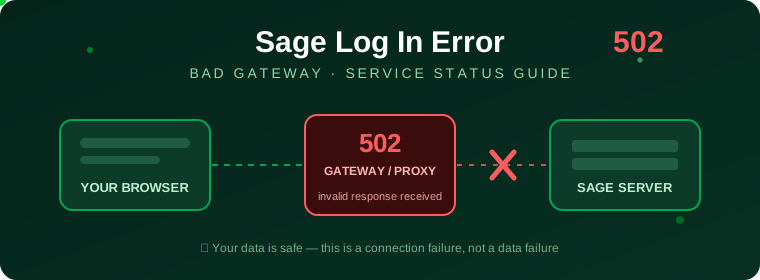
HTTP 502 Bad Gateway is part of the 5xx family of server errors. When you sign in, your request travels: Your browser → Sage’s gateway/load balancer → the authentication server. If the gateway asks the upstream authentication server for a response and gets garbage, nothing, or a timeout back, it shows you a 502. Translation: the middleman couldn’t get a valid answer. Your credentials never even got checked — which is exactly why resetting your password almost never fixes a 502.
|
🔌 Gateway-level failure A proxy or load balancer got an invalid reply from the server behind it. |
🔐 Not a credentials issue Your username and password were never rejected — they were never checked. |
🛡️ Your data is safe The failure happens before any company data is touched. Nothing is lost. |
⚠️ Top Causes of Sage Error 502 (Ranked)
| Cause | Side | How Common |
|---|---|---|
| Sage server overload or outage — too many simultaneous logins (month-end, payroll day) | Sage | 🔴🔴🔴🔴🔴 Very common |
| Scheduled maintenance on Sage ID or upstream services | Sage | 🔴🔴🔴🔴 Common |
| CDN / load balancer hiccup between regions | Sage | 🔴🔴🔴 Moderate |
| Corrupted browser cache / cookies serving a stale or broken login session | You | 🔴🔴🔴 Moderate |
| VPN, proxy or firewall mangling the gateway handshake | You / IT | 🔴🔴 Occasional |
| On-premise misconfiguration — e.g. Sage 200’s configuration database or IIS app pool stopped on your own server | You / IT | 🔴🔴 Occasional |
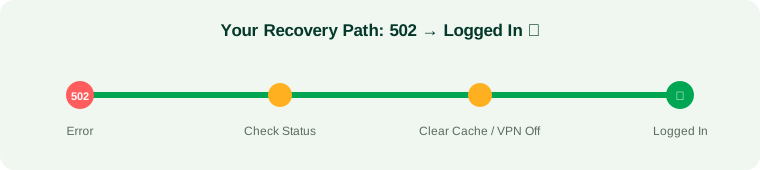
🛠️ 7 Fixes for Sage Log In Error 502 (In Order)
| 1 |
Confirm it’s not a Sage outage Open status.sage.com. An amber or red badge on Sage ID or your product means the 502 is Sage’s to fix. Subscribe to incident updates and wait — repeated login attempts during an outage can even temporarily lock your account. |
| 2 |
Hard refresh the login page Press Ctrl + F5 (Windows) or Cmd + Shift + R (Mac). This forces the browser to skip its cached copy and request a fresh page from the gateway — often enough when the incident has already been fixed upstream. |
| 3 |
Clear cache & cookies, then retry Go to your browser’s privacy settings → Clear browsing data → select Cookies and Cached images and files for the last 24 hours. Restart the browser and sign in again. A corrupted Sage ID session cookie is a sneaky and surprisingly frequent 502 trigger. |
| 4 |
Switch browser, device or incognito mode Open an incognito/private window or a completely different browser (Edge, Firefox, Chrome). If login works there, the original browser’s extensions or stored data were the culprit. Trying your phone on mobile data also instantly tells you if your office network is the problem. |
| 5 |
Disable VPN, proxy or aggressive firewall filtering Corporate VPNs and web-filtering proxies sit between you and Sage’s gateway — and when they mis-handle the TLS handshake, the gateway returns 502. Temporarily disconnect the VPN and retry. If it works, ask IT to whitelist *.sage.com and *.sageone.com. |
| 6 |
Flush DNS and restart your router Stale DNS can point you at a dead Sage gateway node. On Windows, open Command Prompt and run ipconfig /flushdns, then power-cycle your router for 30 seconds. |
| 7 |
Product-specific server checks (Sage 200 / Sage 50 desktop) Sage 200: a 502 at logon often means the Sage200Configuration database or the IIS application pool on your own server isn’t running — start them in SQL Server / IIS Manager. Sage 50 desktop: restart the Actian PSQL Workgroup Engine service (Win + R → services.msc) on the data server, which refreshes the database connection that handles logins. |
 |
📊 502 vs 500 vs 503: Know the Difference
| Error | Meaning | Best Action |
|---|---|---|
| 502 Bad Gateway | Gateway received an invalid response from the upstream Sage server | Check status.sage.com, clear cache, retry shortly |
| 500 Internal Server | The server itself hit an unexpected error in its own code | Nothing you can do locally — report to Sage support if persistent |
| 503 Service Unavailable | Server is overloaded or in maintenance — temporarily refusing requests | Wait for the maintenance window to end, then retry |
|
💡 PRO TIP FOR BUSY ACCOUNTANTS Bookmark status.sage.com and subscribe to email/SMS incident alerts. On payroll days and at month-end, Sage’s login servers carry peak traffic — knowing about an incident before you waste 30 minutes troubleshooting locally is the single best time-saver in this entire guide. |
Also Read : How to Sell Tickets on StubHub as a Guest
❓ Frequently Asked Questions
|
What does Sage Log In Error 502 mean? It means a Sage gateway or proxy received an invalid response from an upstream server while processing your sign-in. It’s a server-side connection failure — your username and password were never actually evaluated. |
|
How do I check the Sage service status? Visit the official dashboard at status.sage.com. It shows real-time health for Sage ID logins, Sage Business Cloud, Sage 50 connected services, Sage 200, Sage Intacct, payroll and more — plus a full incident history. |
|
Is Error 502 my fault or Sage’s fault? Usually Sage’s: server overload, a failed upstream service, or maintenance. But a corrupted browser cache, an aggressive VPN/proxy, or stale DNS on your side can trigger or prolong it — that’s why the local fixes above are still worth two minutes. |
|
How long does Sage Error 502 usually last? Most incidents clear within 15–60 minutes once Sage restarts or scales the affected service. If status.sage.com shows an active incident, wait for the “Resolved” update rather than hammering the login page. |
|
How do I fix 502 in Sage 50 or Sage 200 specifically? After the standard browser fixes: for Sage 200, verify the Sage200Configuration database and IIS app pool are running on your server; for Sage 50 desktop, restart the Actian PSQL Workgroup Engine service on the machine that hosts your company data. |
|
Will I lose my accounting data because of Error 502? No. The error occurs before you ever reach your company file. Ledgers, invoices and payroll records stay untouched — everything will be exactly as you left it once you’re back in. |
✅ The Bottom Line
Sage Log In Error 502 is a traffic jam, not a car crash. Your data is intact, your credentials are fine, and in nine cases out of ten the fix is simply: check status.sage.com, clear your cache, kill the VPN, and give it fifteen minutes. If the dashboard glows green and the error survives every step in this guide, raise a ticket with Sage support and mention exactly when the 502 appears — that timestamp helps their engineers trace the failing gateway node fast.
| Disclaimer: Seminarsonly is an independent informational website and is not affiliated with, endorsed by, or connected to Sage Group plc. Sage, Sage 50, Sage 200, Sage Intacct and Sage Business Cloud are trademarks of their respective owners. Always use official Sage channels (status.sage.com and sage.com support) for account-specific assistance. |

Pingback: Easypaisa Error Code 404 Easy Fix | Network Error Please Try Again - Seminarsonly.com