
Vyve Broadband Outage : Outage Information – Vyve Broadband
Vyve recommends customers that experience frequent power outages or intermittent power outages in their area purchase an APC UPS Battery Backup and Surge Protector.
These devices will keep your equipment online and powered for a period of time during power outages.
These are available for purchase through various vendors.
To set up your FREE MyVyve Account, follow these steps:
- Open a web browser and go to https://www.vyvebroadband.com.
- Click on MyVyve Account at the top of the screen.
- Click on Register for the first time and follow the onscreen prompts.
- Please note that you will need to have your Vyve account number on hand to complete the registration process.
To set up your FREE watchTVeverywhere account, follow these steps:
- Open a web browser and go to https://www.wtve.net.
- Click on the drop down arrow and select Vyve Broadband as your TV provider.
- Click on Register and follow the onscreen prompts.
- Please note that you will need to have your Vyve account number on hand to complete the registration process.
Below is our how-to video on registering for watchTVeverywhere
To reset your watchTVeverywhere password, follow these steps:
- Visit https://www.wtve.net and click on Log In.
- Click on Forgot Your Password.
- Enter your email address and click on Lookup.
- An email containing a password reset link will be sent.
- Open the email and click on the link to reset your password.
- Enter the desired password, then enter it again to confirm.
- Click on Submit. Your new password will be saved.
My TV isn’t working. What should I do?
If your TV isn’t working, try the following troubleshooting steps:
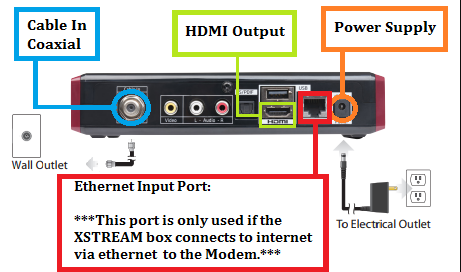
- Check the connections on the back of your set-top box and TV set.
- If your set-top box is connected via HDMI cable, See Image Below:

- If your set-top box is connected via composite cable, See Image Below:
- If your set-top box is connected via HDMI cable, See Image Below:
- Check your TV input settings. To change this setting, use the INPUT or SOURCE button on your TV remote or the buttons located on your TV set.
- If your set-top box is connectecd via HDMI cable, verify that your TV is set to HDMI1, HDMI2, etc., depending on which port the HDMI cable is connected to on your TV.
- If your set-top box is connected via composite cable, verify that your TV is set to CH 3.
- Try resetting your XSTREAM set-top box.
- Unplug the power cord from the back of your set-top box.
- Untwist the coaxial cable from the CABLE IN port.
- Remove the HDMI cable, or untwist the coaxial cable from the TO TV port.
- Wait for at least 30 seconds before reconnecting your set-top box.
- Reconnect the coaxial cable to the CABLE IN port.
- Reconnect the HDMI cable, or twist the coaxial cable into the TO TV port.
- Reconnect the power cord to the back of your set-top box.


Comments are closed