Qlink Tablet Activation : Activate My Phone – Q Link Wireless
The Q Link Tablet is available to Q Link Wireless ACP customers that haven’t already used their ACP device discount. The tablet price includes a $10.01 one-time co-payment and is subject to product availability.
You have two options: either select the tablet or purchase a new phone and add a tablet to your order. By adding a tablet, you can receive a $50 discount on your phone purchase. To take advantage of this offer, simply choose the $50 option and click on “Buy Now”.
Confirm the purchase, and you will receive your tablet within 2-3 business days.
Make sure to check your account status by logging on to Q Link Wireless.com.
Is there a monthly fee for my tablet?
You don’t have to pay a monthly fee for the Q Link Tablet. Instead, you just need to make a one-time co-payment of $10.01. This offer is only available to eligible Affordable Connectivity Program (ACP) customers who haven’t used their ACP Device Discount and is subject to product availability.
To migrate to the new network successfully, you will need to replace your old SIM Card and install the new one we shipped you. Unlocking is a process to allow your phone to connect to a new network. Even if your phone is paid off, it might still be locked.
How can I unlock my phone?
Call your current provider to unlock your phone. Make sure you meet the requirements listed below:
Your phone must be paid off.
Your phone can’t be flagged as lost or stolen.
Your phone can’t be involved with fraud.
Once installed, you will be connected to America’s largest 4LTE/5G network!
Set up your FREE service on your phone in a matter of minutes.
The SIM Card Kit includes everything you need to install your new SIM Card.
Locate your SIM Card which may be found underneath your phone’s back cover or in a tray on the side or top panel. Use the SIM Card ejector tool included in your SIM Kit to remove your current SIM.
Select the right SIM Card size to fit into your phone’s tray. Insert your new SIM Card into your phone’s SIM slot, close the tray, and turn your phone on.
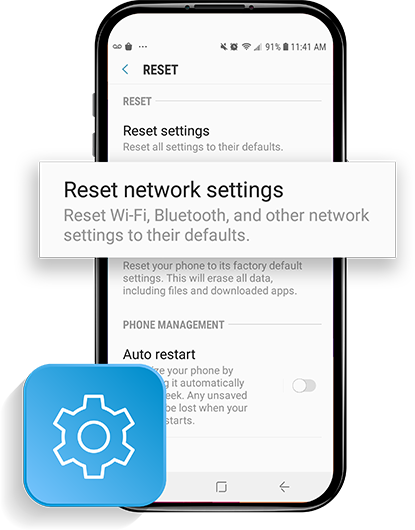
Reset your network
To reset your network, you will need to go into your phone’s settings
For Android, go to Settings & tap Reset or Network Settings. Tap Network Reset and follow the prompts
For iPhone, go to Settings, tap General. Scroll down and tap Reset & Select Tap Network Reset Settings. Enter your iPhone password & confirm the reset.
Still having data issues on your Android? Click here for more help.
Transfer your phone number
How should I prepare to port in my number?
To port in your number, you’ll have to keep your current number active, pay any remaining balances with your current carrier, make sure your phone is unlocked, and have no existing ports initiated.
Can I keep my temporary number?
Yes, you can keep the temporary number associated with your new SIM Card if you would like or, you can transfer your existing number you know and love by following our quick port-in instructions to stay connected more easily to your friends and family.
Download the App
Manage your account by downloading the My Mobile Account App from the Android Google Play Store or iPhone App Store and follow all prompts. Then, log in using your Q Link phone number. You can also manage your account by visiting qlinkwireless.com/login.
If you don’t know your Q Link phone number, you can find it in your phone settings.
Locate Settings > Tap About Phone or About Device > Status > Select My Phone Number.
Go to Contacts > Select My Card.
This process could take anywhere from 20 minutes to one business day. We recommend transferring your number on a day you do not need your phone for anything time sensitive.
If you don’t have a phone, it’s okay! Q Link Wireless offers extremely discounted Android Smartphones. Our inventory is based entirely upon stock and availability and varies from one month to the next.
Don’t want to go over budget? Q Link offer SmartPay Leasing which helps you get the phone and accessories you want today while paying them off overtime.
If you have more questions, give us a call! Customer Service is available Monday-Friday, 8am-8pm, as well as Saturday and Sunday 9am-6pm, EST at 1-(855) 754-6543.
Chat support is available 7 days a week, Sunday through Saturday from 9am to 12am EST
Freddy John is a Tech Support Specialist with 8+ years of experience troubleshooting government digital services, authentication systems, and enterprise IT infrastructure. Passionate about making technology accessible and helping users resolve complex login issues quickly.
📧 contact@seminarsonly.com | | facebook.com/seminarsonly | twitter.com/seminarsonly |
🌐 seminarsonly.com





Comments are closed