
Error 43 on Pokémon Center means too many connections are open at once. Here is the one tab trick that keeps your queue spot, plus why it happens and how to stop it.
Pokémon Center error 43: the “too many connections” fix that keeps your queue spot
You waited weeks for the drop, the queue finally moved, and then the screen slapped you with “Error 43: too many connections are open simultaneously.” Frustrating does not even cover it. Here is the good news though. You almost certainly did not lose your place, and you do not need to close everything and start over. There is a small trick that gets most people right back in, and once you understand why error 43 shows up, you can dodge it on the next restock too.
Quick answer
Pokémon Center error 43 means too many connections from your side hit the server at once, usually from extra tabs, multiple devices, or hammering refresh during a busy drop. Do not close the error tab. Instead, open a brand new tab, leave the error 43 tab open in the background, and go to pokemoncenter.com again. It usually picks the queue back up exactly where you left off. To stop it happening, use one tab on one device, kill any VPN, and never refresh while you wait.
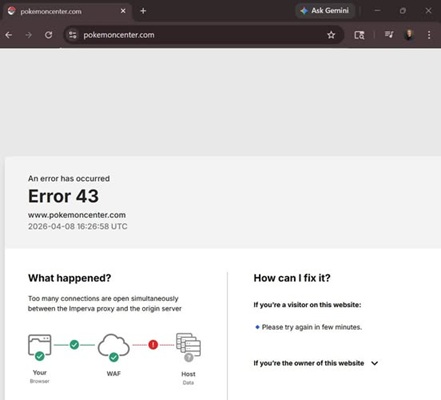
So what is error 43 actually telling you
Pokémon Center runs a virtual queue during big releases like Elite Trainer Boxes, new TCG sets, and limited plushies. The queue keeps the store from collapsing when thousands of people show up at the same second. To do that, the system limits how many live connections a single visitor can hold open at once.
When you cross that limit, you get error 43. The key word is “your” connections. This is not a ban, and it is not the site being down for everyone. It is the server saying you, specifically, have too many threads going at the same time. That is why the fix is almost always about trimming down to a single clean connection rather than fighting the website.
Why you keep getting it
| What you did | Why it triggers error 43 |
|---|---|
| Opened multiple tabs | Each tab holds its own connection, so two or three tabs can blow past the limit on their own. |
| Queued on phone and laptop | Two devices on the same drop double your open connections and look greedy to the server. |
| Kept refreshing the page | Every refresh opens a fresh connection before the old one closes, stacking them up fast. |
| Running a VPN or proxy | Shared VPN exits pool many users into one route, so the server counts traffic that is not even yours. |
| Heavy browser extensions | Prefetchers and some shopping bots fire background requests that add to your connection count. |
| Peak drop traffic | When the site is slammed, the connection cap gets stricter, so small habits tip you over. |
The new tab trick that saves your spot
This is the one most people miss, and it works far more often than closing the browser. Do it in this exact order.
Step 1: Leave the error 43 tab open
Do not close it. That tab is still holding your place in the line. Closing it is what actually loses your spot.
Step 2: Open one new tab
Just one. Same browser, same window. You are giving yourself a clean connection without piling on more.
Step 3: Go back to pokemoncenter.com
Type the address into the new tab and load it. Most of the time it picks the queue right back up from where it stalled, no restart needed.
Step 4: Once it loads, close the error tab
After the fresh tab is moving again, you can quietly close the stuck one. Now you are down to a single clean connection, which is exactly what the server wants.
If the trick does not work
| Try this | How it helps |
|---|---|
| Close every other tab | Drops your open connection count back under the limit. |
| Pick one device only | Stop queuing on phone and laptop at once. Choose one and stick with it. |
| Turn off your VPN | Removes the shared route that inflates your connection count. |
| Clear cache and cookies | Wipes stale session data that can keep old connections half open. |
| Use incognito or another browser | Starts a clean session with no extensions firing extra requests. |
Before the next drop
Pick one device, one browser, one tab. Get on a stable wired or strong Wi-Fi connection, switch off your VPN, and close anything else that touches the internet. Then join the queue and just let it sit. The hardest part is resisting the urge to refresh, but that patience is what keeps error 43 away.
Frequently asked questions
Does error 43 mean I lost my place in the queue?
Usually not. As long as you keep the error tab open and reload the site in a new tab, the queue normally resumes from the same spot. You only tend to lose your place if you close everything and start fresh.
Is error 43 a ban or is the site down?
Neither. It is a per visitor connection limit, not an account ban and not a full outage. It is telling you that you have too many connections open at once, which you can fix on your end.
Will a VPN help me get past error 43?
No, it usually makes it worse. Shared VPN servers route lots of people through one connection, so the site counts traffic that is not yours. Turn the VPN off before you join the queue.
Can I queue on my phone and laptop to improve my odds?
It backfires. Two devices double your open connections and are a fast way to trigger error 43. Pick one device and let it ride.
Should I keep refreshing until it loads?
Please do not. Each refresh opens a new connection before the last one closes, which is one of the top causes of error 43. Let the page sit and it will move on its own.

Pingback: Pokémon Access Denied Error 15: Fast Fix Guide (2026) - Seminarsonly.com