
Quick Answer
To fix the hulu vpn error, disconnect your current VPN, clear your browser or app cache, and reconnect to a premium, streaming-optimized US server. If the issue persists, disable IPv6 and WebRTC in your browser settings to prevent location leaks.
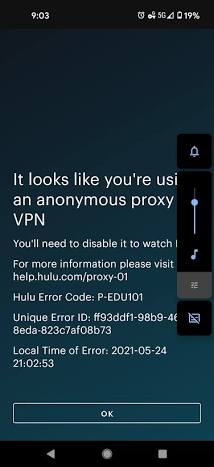
Sitting down to watch your favorite show only to be greeted by the message, “You appear to be using an anonymous proxy tool” is incredibly frustrating. This hulu vpn error happens because Hulu actively blocks IP addresses associated with Virtual Private Networks (VPNs) and proxy servers to enforce their geographical broadcasting rights.
Fortunately, you don’t have to stay locked out. Here is exactly how to fix the issue, optimize your streaming setup, and get back to binge-watching.
Why Does Hulu Block VPNs?
Hulu’s streaming library is primarily restricted to the United States and Japan. To comply with licensing agreements, Hulu uses advanced detection systems to ensure viewers are physically located in those regions. When their system detects multiple users streaming from the exact same IP address—a common occurrence with shared VPN servers—it flags that IP as an “anonymous proxy” and blocks it.
Common Hulu Error Codes Related to VPNs
- Error BYA-403-011 or P-EDU101: Directly indicates the use of an anonymous proxy or VPN.
- Error 16 / Invalid Region: Shows up on iOS devices when the server flags your IP as being routed through a proxy.
- Error RUNUNK13 / P-DEV320: Often points to a shaky internet link or a faulty VPN handoff where communication with the backend API fails.
Step-by-Step Fixes for the Hulu VPN Error
Follow these proven steps to bypass the proxy wall:
- Switch Your VPN Server: The IP address you are currently using has likely been blacklisted. Disconnect your VPN, choose a different US-based server (preferably one labeled for streaming), and reconnect.
- Clear Your Cache and Cookies: Hulu stores location data in your browser cache. Clear your browser’s cookies and cache to ensure Hulu isn’t holding onto the error from your previous session. For mobile, clear the Hulu app cache in your device settings.
- Disable WebRTC and Geolocation: Browsers like Chrome and Firefox can leak your real IP address through WebRTC. Disable this feature in your browser settings to prevent location leaks.
- Check Your DNS Settings: A mismatch between your IP address and DNS requests will trigger a block. Ensure you are using your VPN provider’s exclusive DNS servers rather than public ones like Google’s.
How to Fix Error Code 0x80070035 (The Network Path Was Not Found)
Quick Comparison: VPN Types vs. Hulu Success Rate
| Proxy/VPN Type | Hulu Block Risk | Recommendation |
|---|---|---|
| Free VPNs | Extremely High | Avoid. IPs are almost always blacklisted. |
| Standard Premium VPNs | Moderate | Requires frequent server switching. |
| Streaming-Optimized VPNs | Low | Best choice. IPs are refreshed regularly. |
If you continue to have trouble, it’s worth reviewing Hulu’s official proxy error guidelines or reading our Error Fix comprehensive Guide.
TL;DR
- The Hulu VPN error occurs because the platform detects and blacklists shared IP addresses.
- To fix it instantly: change your VPN server, clear your browser cache, and disable location tracking.
- Always use a premium VPN with dedicated streaming servers to avoid interruptions.
