
⚡ Quick Answer
The Tarkov 1000 Backend Error means your game client cannot communicate with Battlestate Games’ backend servers. The fastest fix is to: (1) Check the EFT server status page, (2) Restart the game and launcher via Task Manager, and (3) Clear your player loadout. If those fail, clear the game cache or temporarily disable Windows Firewall.
📋 Table of Contents
What Is the Tarkov 1000 Backend Error?
The “1000 – Backend Error” in Escape from Tarkov is a critical connection failure that appears when your game client cannot reach the Battlestate Games backend servers. You might see this message at the login/loading screen (“Loading profile data…”) or suddenly during an active raid — both of which are equally infuriating.
The error message typically reads:
ERROR
1000 — Backend error
Critical error receiving profile data. Please restart the game.
According to Battlestate Games’ official support page, this error arises due to data processing failures on the game servers. However, community research and player reports have surfaced several client-side triggers as well, meaning the fix is often in your hands — not just waiting for a server restart.
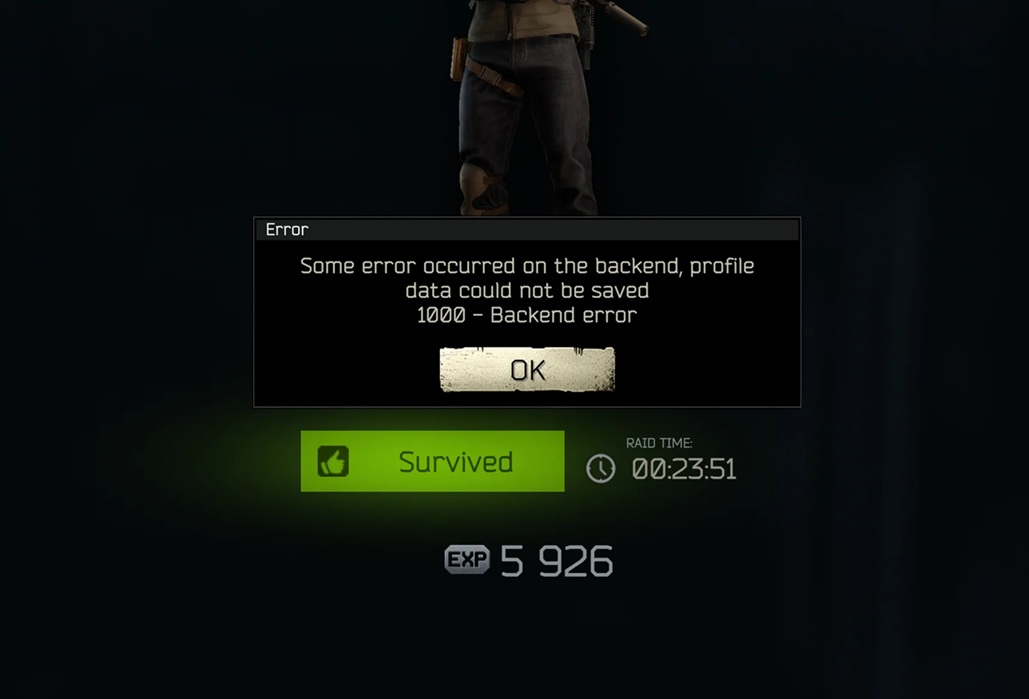
Screenshot of the “1000 – Backend Error” message in Escape from Tarkov
Alt text: “Escape from Tarkov 1000 Backend Error message on loading screen”
Also Read : 2887 Crystal Ridge Rd Encinitas CA 92024-6616 Property Records
Root Causes — Why Does Error 1000 Happen?
Understanding the cause is half the battle. Error 1000 in Tarkov is triggered by a breakdown in communication between your game client and the Battlestate Games datacenters. Here are all the confirmed causes:
8 Confirmed Fixes for Tarkov Error 1000 (Step-by-Step)
Work through these fixes in order. Each one is confirmed by Battlestate Games support or community troubleshooting. Start from the top — the first 3 fixes resolve the majority of cases.
✅ Check Tarkov Server Status
Before doing anything else, confirm the servers are actually online. If they’re down, no client-side fix will work.
How to check:
- Visit the official EFT status page: escapefromtarkov.com/support
- Check Down Detector for community reports
- Follow @bstategames on Twitter/X for real-time outage announcements
- If servers are down: wait 15–30 minutes and retry
🔄 Force Restart the Game & Launcher
Temporary glitches in the game client or launcher cause broken server connections. A proper force-restart clears this.
Step-by-step:
- Press Ctrl + Shift + Esc to open Task Manager
- Find all processes related to Escape from Tarkov and BattlEye
- Right-click each → End Task
- Also end the Battlestate Games Launcher process
- Wait 30 seconds, then relaunch the BSG Launcher and start EFT
🗑️ Clear the Tarkov Game Cache
Corrupted cache data is one of the most common causes of Error 1000. Clearing it forces a fresh connection and profile reload. This does NOT delete your progress or inventory.
Method A — Via the BSG Launcher:
- Open the Battlestate Games Launcher
- Click the gear icon (Settings) in the top right
- Click “Browse” to open game folder, then locate the cache folder
- Delete everything inside the cache folder
- Restart the game
Method B — Manual deletion:
Press Win + R, paste the path above, hit Enter, then delete all files inside.
⚔️ Clear Your PMC Loadout / Inventory
This is the #1 cause when Error 1000 happens specifically on raid extraction or every time you try to load a raid. Certain items are incompatible with the backend profile system and cause data processing failures.
Known bugged items in 2025:
- M700 rifle equipped with a Razor scope
- Cultist knives (found in raid)
- Certain helmets with face shields
- Specific ammunition types in bugged states
How to fix:
- Go to your PMC character screen
- Remove all equipped gear: vest, weapon, armor, helmet, backpack
- Attempt to start a raid with an empty loadout
- If it works, re-equip items one by one to find the bugged item
- Discard or sell the problematic item
🛡️ Disable Windows Firewall Temporarily
Windows Defender Firewall sometimes blocks Tarkov’s outbound connections to game servers, triggering Error 1000.
- Press Win + S, search for “Windows Defender Firewall”
- Click “Turn Windows Defender Firewall on or off”
- Set both Private and Public to “Turn off”
- Launch Tarkov and test
- If it works: re-enable the firewall and add Tarkov as an exception instead
To add Tarkov as a Firewall Exception:
- Go to Firewall → “Allow an app or feature”
- Click Change Settings → Allow another app
- Browse to the Tarkov installation folder and add EscapeFromTarkov.exe
- Also add the BSG Launcher and BattlEye executables
🔍 Verify Game File Integrity
Corrupted or missing game files can prevent proper server communication. The BSG Launcher has a built-in integrity checker.
- Open the Battlestate Games Launcher
- Click on Escape from Tarkov in the game list
- Click the “Integrity Check” button (may appear as “Check”)
- Wait for the process to complete — it will automatically download any missing or corrupted files
- Restart the game after completion
🌍 Switch Server Region
If your selected server region is overloaded or experiencing issues, switching to a different region can restore connectivity.
- In Tarkov, open Settings → Game tab
- Find the Server selection option
- Switch to a different region (e.g., from EU to US, or to Asia)
- Sort by ping and select the region with the lowest latency
- Save and restart a raid
🌐 Flush DNS & Reset Network Stack
Stale DNS cache or corrupted network configurations can block Tarkov from resolving the game server IP addresses correctly.
- Press Win + X → select “Windows Terminal (Admin)” or “Command Prompt (Admin)”
- Run each command below, pressing Enter after each:
ipconfig /registerdns
ipconfig /release
ipconfig /renew
netsh int ip reset
netsh winsock reset
Restart your PC after running these commands, then relaunch Tarkov.
📊 Fix Summary — Quick Reference
*Estimated success rates based on community reports. Combine fixes for best results.
Expert Tips & Pro Strategies
Expert Tip #1 — Hardcore Player Strategy
“Always keep a backup loadout preset without any freshly looted items. If you start getting Error 1000 mid-wipe, you can quickly switch to a clean preset and identify whether a new loot item is the culprit. This saves hours of troubleshooting.”
Expert Tip #2 — Network Optimization
“Use a wired Ethernet connection instead of Wi-Fi when playing Tarkov. Wi-Fi fluctuations cause packet loss that triggers backend errors. If you must use Wi-Fi, sit as close to your router as possible and disable other devices using the same band.”
Expert Tip #3 — Avoid These Mistakes
Do NOT repeatedly spam the “Connect” button when you see Error 1000. This can cause a temporary IP rate-limit from the Tarkov servers, making the situation worse. Wait at least 10–15 minutes before retrying after a server-related error.
How to Prevent Error 1000 in the Future
Prevention is always better than troubleshooting mid-wipe. Follow these practices to significantly reduce the chance of encountering Error 1000:
🔄
Regularly Clear Cache
Clear your Tarkov cache at least once per week, especially after major patches or wipe events.
🎒
Test Looted Items Carefully
When you loot a rare item (especially modded weapons or knives), equip them one at a time and test before going deep into another raid.
📡
Use a Stable Connection
Always use wired internet for Tarkov. Check your ISP connection stability before long play sessions.
📰
Follow Official Channels
Follow @bstategames on Twitter/X and the EFT subreddit for real-time server status, known bug lists, and maintenance windows.
🛡️
Whitelist Tarkov in Firewall
After each game update, re-verify that EscapeFromTarkov.exe, BattlEye, and the BSG Launcher are still in your firewall exceptions list.
🎮
Keep Drivers Updated
Keep your GPU drivers and Windows updated. Outdated drivers sometimes cause software conflicts that lead to backend connection failures.
🆘 When Nothing Works — Contact BSG Support
If all 8 fixes fail and the error persists, the issue is likely on the server side or involves a deeply corrupted account profile. In this case:
- Submit a technical support ticket at escapefromtarkov.com/support
- Include your account email, error screenshot, and a description of when it occurs
- Mention which fixes you’ve already tried
- BSG support can manually correct profile data or remove bugged items server-side
Frequently Asked Questions
Conclusion
The Tarkov 1000 Backend Error is one of the most frustrating interruptions in Escape from Tarkov — but it’s almost always fixable. In the vast majority of cases, the fix comes down to three things: checking server status, restarting the game cleanly, and clearing corrupted cache or loadout items.
For those persistent cases where the error hits specifically on extraction or after looting certain items, clearing your PMC gear one item at a time is the definitive diagnostic approach. The Battlestate Games support team can also intervene directly if the issue is with your server-side profile.
Follow the prevention tips in this guide to keep Error 1000 from becoming a regular interruption — and get back into the raids where you belong.
🎮 Good Luck in the Raid, PMC
Still getting Error 1000? Drop a comment below describing when it occurs and which fix worked for you. Your experience helps other Tarkov players get back into the action faster.
Written by Seminarsonly.com Gaming Expert & Technical Troubleshooter
Last updated: June 4, 2026 · Verified against EFT patch 0.14+ · Sources: Battlestate Games official support, community player reports, Keen Gamer, Appuals, MiniTool

Pingback: 2887 Crystal Ridge Rd Encinitas CA 92024-6616 Property Records - Seminarsonly.com