Skip to content
Seminarsonly.com
  • Home
  • About
  • Contact Us
  • Disclaimer
  • Privacy Policy
  • facebook.com
  • twitter.com
  • t.me
  • instagram.com
  • youtube.com
Subscribe
Home ยป https //fritzbox Login : How do I login to Fritzbox?
Posted inLogin

https //fritzbox Login : How do I login to Fritzbox?

Posted by Freddy John December 29, 2024

https //fritzbox Login : How do I login to Fritzbox?

To log in to your Fritzbox, go to http://fritz.box. You’ll be prompted to enter your Fritzbox password. This can be found on the underside of your router.

Follow these steps:

1. Connect to your Fritzbox: Ensure your computer, smartphone, or tablet is connected to your Fritzbox network either via Wi-Fi or Ethernet cable.

2. Open a web browser: Launch your preferred web browser (e.g., Chrome, Firefox, Safari).

3. Enter the address: In the address bar, type either:

  • http://fritz.box
  • http://192.168.178.1 (default IP address)
  • http://169.254.1.1 (fallback IP address)

4. Log in:ย You’ll be prompted to enter your Fritzbox password. This can be found on the underside of your router.

5. Access the interface: Once logged in, you’ll have access to the Fritzbox user interface where you can configure settings, manage connections, and view information about your network.
FRITZ

Additional Notes:

  • You don’t need an active internet connection to access the Fritzbox interface
  • If you’ve changed the default password and forgotten it, you may need to reset your Fritzbox to factory defaults to regain access.

Opening the FRITZ!Box user interface

You can easily open the user interface on all computers, smartphones, or tablets connected to the FRITZ!Box (for exampleย over Wi-Fi) by entering the addressย http://fritz.boxย in a web browser. After you enter theย FRITZ!Box password, you can configure all of the FRITZ!Box functions and view detailed information about the product, your access, and connections in the user interface.

You do not have to set up the FRITZ!Box to open the user interface. Internet access is also not required.

Please note:

1. You can either enter http://fritz.boxย or the IP address of the FRITZ!Box (http://192.168.178.1ย in the factory settings) to open the user interface. In addition, you can always use the emergency IPย http://169.254.1.1ย to access the FRITZ!Box.

2. It is not possible to open the user interface via the guest access.

  • Entering the complete address in the address field

3. Always enter the complete address http://fritz.box. If you enter the address without the “http://”, for example, the web browser may start a web search instead of opening the user interface.

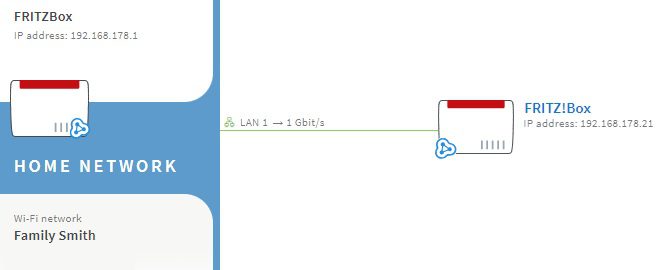
4. If you connected two FRITZ!Boxes with each other, you can use the Mesh Overview of the first FRITZ!Box (Mesh Master) to easily open the user interface of the second FRITZ!Box (Mesh Repeater). You can also use the Mesh Overview of theย Mesh Masterย to open the user interfaces of all theย Mesh Repeatersย (FRITZ!Repeaters and FRITZ!Powerline devices) in the home network.

Last updated on December 29, 2024
Freddy John
View All Posts

Post navigation

Previous Post
https //globe.com.ph/sim Registration : Globe SIM Registration
Next Post
Mukhyamantri Mahila Samman Yojana Registration Link Mukhyamantri Mahila Samman Yojana

Recent Posts

  • Social Security Electronic Benefits Update: Paper Checks Are Gone โ€” Here’s What to Do
  • When Did Social Security Numbers Start? The Complete 1936 Story
  • How to Request a New Social Security Card (Free, Online & By Mail)
  • Social Security Max Contribution 2026: New $184,500 Limit Explained
  • How to Replace My Social Security Card: Free Online Method (2026)

Archives

  • June 2026
  • April 2026
  • March 2026
  • February 2026
  • January 2026
  • December 2025
  • November 2025
  • October 2025
  • September 2025
  • August 2025
  • July 2025
  • June 2025
  • May 2025
  • April 2025
  • March 2025
  • February 2025
  • January 2025
  • December 2024
  • November 2024
  • October 2024
  • September 2024
  • August 2024
  • July 2024
  • June 2024
  • May 2024
  • April 2024
  • March 2024
  • February 2024
  • January 2024
  • December 2023
  • November 2023
  • October 2023
  • September 2023
  • August 2023
  • July 2023
  • June 2023
  • May 2023
  • April 2023
  • March 2023
  • February 2023
  • January 2023
  • December 2022
  • November 2022
  • October 2022
  • September 2022
  • August 2022
  • July 2022
  • June 2022
  • May 2022
  • April 2022
  • March 2022
  • February 2022
  • January 2022
  • December 2021
  • November 2021
  • October 2021
  • September 2021
  • August 2021
  • July 2021
  • June 2021
  • May 2021
  • July 204

Categories

  • activate
  • Australia
  • BF6
  • Canada
  • Card
  • Error Fix
  • Games
  • India
  • Ireland
  • Italy
  • Kerala
  • Login
  • Lottery
  • Minecraft
  • news
  • Property
  • Result
  • Scam
  • Science Fair
  • Server
  • Social Security
  • South Africa
  • TV
  • UK
  • USA
  • Whois
Search
Categories
  • activate
  • Australia
  • BF6
  • Canada
  • Card
  • Error Fix
  • Games
  • India
  • Ireland
  • Italy
  • Kerala
  • Login
  • Lottery
  • Minecraft
  • news
  • Property
  • Result
  • Scam
  • Science Fair
  • Server
  • Social Security
  • South Africa
  • TV
  • UK
  • USA
  • Whois
Archives
  • June 2026
  • April 2026
  • March 2026
  • February 2026
  • January 2026
  • December 2025
  • November 2025
  • October 2025
  • September 2025
  • August 2025
  • July 2025
  • June 2025
  • May 2025
  • April 2025
  • March 2025
  • February 2025
  • January 2025
  • December 2024
  • November 2024
  • October 2024
  • September 2024
  • August 2024
  • July 2024
  • June 2024
  • May 2024
  • April 2024
  • March 2024
  • February 2024
  • January 2024
  • December 2023
  • November 2023
  • October 2023
  • September 2023
  • August 2023
  • July 2023
  • June 2023
  • May 2023
  • April 2023
  • March 2023
  • February 2023
  • January 2023
  • December 2022
  • November 2022
  • October 2022
  • September 2022
  • August 2022
  • July 2022
  • June 2022
  • May 2022
  • April 2022
  • March 2022
  • February 2022
  • January 2022
  • December 2021
  • November 2021
  • October 2021
  • September 2021
  • August 2021
  • July 2021
  • June 2021
  • May 2021
  • July 204
Copyright 2026 โ€” Seminarsonly.com. All rights reserved.
Scroll to Top