
Hit a wall of error 429 too many requests and have no idea why? You are not blocked, banned, or hacked. The server is simply telling you to slow down. This guide explains what the 429 status code means, why it happens, and exactly how to fix it, whether you are a visitor, a developer hitting an API, or the owner of the site throwing the error.
QUICK ANSWER
HTTP error 429 too many requests means you sent more requests than a server allows in a set time window, so it is temporarily rate limiting you. As a visitor, wait 1 to 5 minutes and retry. As a developer, read the Retry-After header and back off, then add exponential backoff and caching. As a site owner, tune your rate-limit rules and whitelist trusted traffic. It is almost always temporary, not a permanent ban.
On this page
What is error 429 too many requests
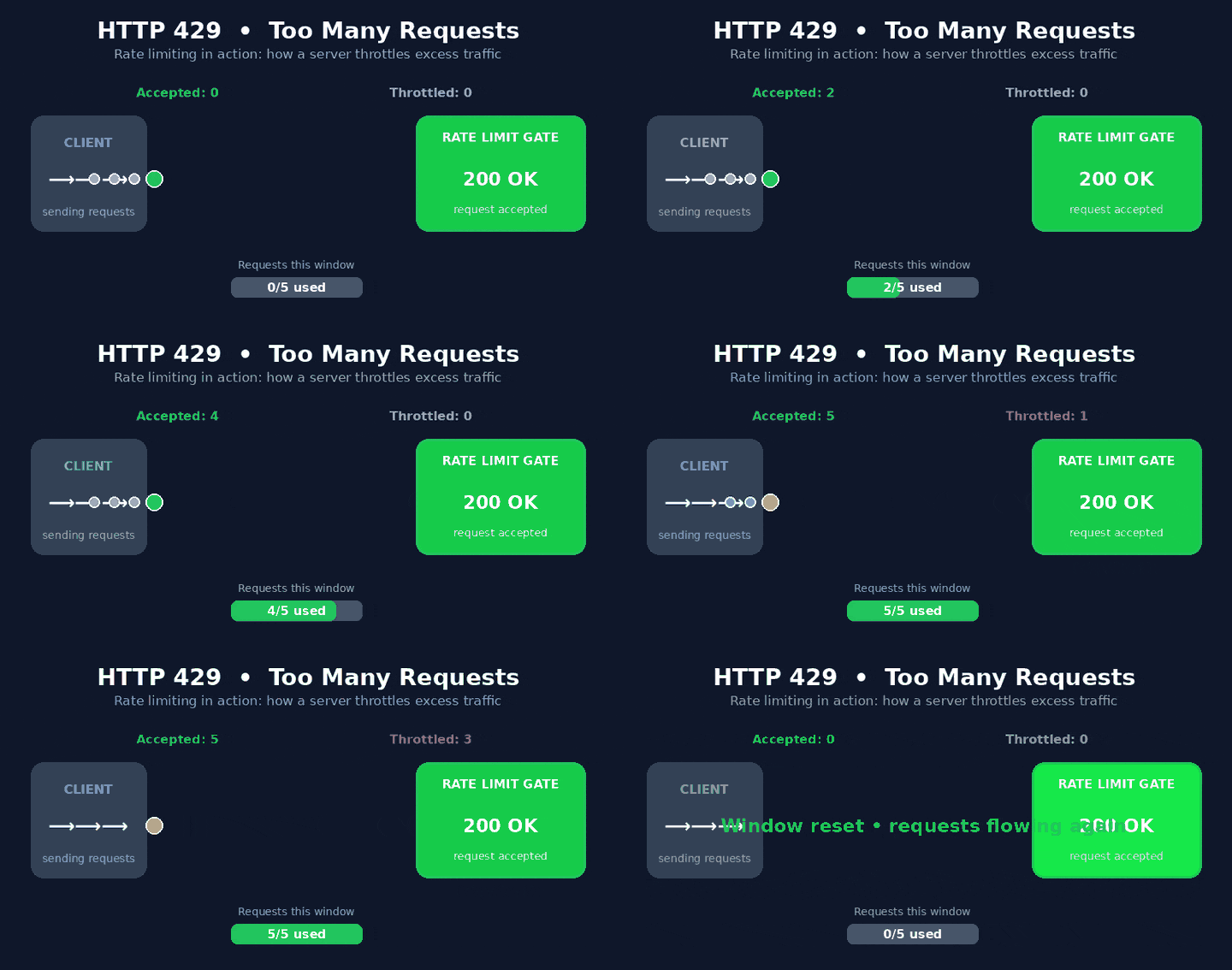
The 429 status code is a client error response defined in RFC 6585. It tells the client, that is your browser, app, or script, that it has sent too many requests in a given amount of time. The mechanism behind it is called rate limiting, and almost every serious website and API uses it to stay fast and fair for everyone.
Here is the key thing most people miss: a 429 is not the same as a 403 or a 503. A 403 Forbidden means you are not allowed. A 503 Service Unavailable means the server itself is down or overloaded. A 429 means the server is healthy and you are allowed, you are just going too fast. Before 429 existed, servers had to reuse generic 403 and 503 codes, which made it impossible to tell a permanent block from a temporary speed limit.
In plain English: 429 is a polite “please slow down,” not a “go away.” The fix is almost always about timing, not permission.
How rate limiting actually works
Rate limiting tracks how many requests arrive from a single source inside a time window. That source is usually your IP address, but it can also be your user account, an API key, or a browser fingerprint. When the count crosses the limit, every extra request gets a 429 until the window resets.
The three common limiting algorithms
| Algorithm | How it counts | Feels like |
|---|---|---|
| Fixed window | 100 requests per minute, resets on the clock | Simple, but bursts at window edges |
| Sliding window | Rolling count over the last 60 seconds | Smoother, fairer pacing |
| Token bucket | Tokens refill over time, each request spends one | Allows short bursts, then throttles |
Common causes of the 429 error
A 429 can come from many directions. Here are the usual suspects, grouped by who tends to trigger them.
| Cause | Who hits it | Typical trigger |
|---|---|---|
| Refreshing too fast | Visitors | Hammering reload or rapid clicks |
| API loops without pacing | Developers | Fetching many resources in a tight loop |
| Login or brute-force protection | Everyone | Too many failed sign-in attempts |
| Bots and scrapers | Site owners | Aggressive crawlers from one IP |
| Misbehaving plugin or script | Site owners | Code that pings an endpoint on a timer |
| Shared IP address | Office and VPN users | Many people behind one public IP |
The headers a 429 sends back
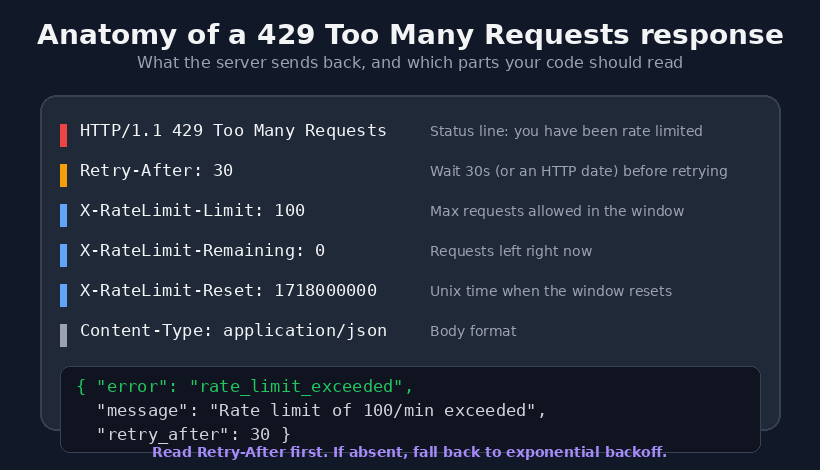
A well-built API does not just say no. It tells you how long to wait and how much budget you have left. These headers are the difference between guessing and knowing.
| Header | What it tells you |
|---|---|
| Retry-After | Seconds to wait, or an exact HTTP date, before retrying |
| X-RateLimit-Limit | Maximum requests allowed in the current window |
| X-RateLimit-Remaining | Requests you have left right now |
| X-RateLimit-Reset | When the window resets, often as a Unix timestamp |
Heads up: header names vary. Some APIs drop the X- prefix and use RateLimit-Limit. Always check the provider docs rather than assuming.
Fix it as a visitor
If you just want the website to work again, try these in order. Most 429 blocks clear within one to five minutes.
- Wait and retry. This is the real fix. Give it a couple of minutes before refreshing.
- Stop hammering reload. Each refresh is a new request that resets the clock against you.
- Clear cookies and cache for that site, then reload once.
- Switch network or disable VPN. A shared or VPN IP may be carrying other people’s traffic into the same limit.
- Disable noisy extensions that auto-refresh or prefetch pages in the background.
Royal Mail Click and Drop Down? Problems & Troubleshooting Guide
Fix it as a developer
When your code calls an API, a 429 is a signal to handle, not an error to crash on. The gold standard is: respect Retry-After when present, and fall back to exponential backoff when it is not.
Respect Retry-After, then back off
import time, requests

def get_with_retry(url, max_tries=5):
    delay = 1
    for attempt in range(max_tries):
        r = requests.get(url)
        if r.status_code != 429:
            return r
        # Prefer the server's own guidance
        wait = r.headers.get("Retry-After")
        sleep_for = int(wait) if wait and wait.isdigit() else delay
        time.sleep(sleep_for)
        delay *= 2          # exponential backoff fallback
    return r                 # give up after max_tries
Four habits that prevent 429s
- Cache responses so you never re-fetch data that has not changed.
- Batch requests using bulk endpoints instead of one call per item.
- Queue and throttle outbound calls to a steady, safe rate.
- Add jitter to backoff so many clients do not retry at the same instant.
Pro tip: log every 429 with its endpoint and timestamp. The pattern usually reveals one loop or one job that needs pacing.
Fix it as a site owner
If legitimate visitors are seeing 429s on your own site, your rate limiting is too aggressive or something is generating abnormal traffic. Work through these checks.
- Review server and firewall logs for the IPs, user agents, and endpoints that trigger the block.
- Tune the limit so normal humans never reach it, while bursts from bots still do.
- Always send Retry-After on your 429 responses so well-behaved clients can recover gracefully.
- Whitelist trusted traffic such as your own monitoring, payment webhooks, and known partners.
- Audit plugins and cron jobs that may be pinging an endpoint far more often than you think.
- Put a CDN or WAF in front to absorb spikes and filter malicious bursts before they reach origin.
Important: a sudden flood of 429s can also be the first visible sign of a scraping or DDoS attempt. If the pattern looks abnormal, treat it as a security event, not just a tuning problem.
Real rate limits by platform
Limits change over time, so always confirm in the current docs, but these published figures show how different the thresholds can be.
| Platform | Example published limit |
|---|---|
| GitHub API (unauthenticated) | 60 requests per hour |
| Shopify Admin API | About 2 requests per second |
| Cloudflare API | 1,200 requests per 5 minutes per user |
| Typical login protection | A few attempts per minute per IP |
Frequently asked questions
Is error 429 permanent?
No. It is almost always temporary and clears once the time window resets, usually within one to five minutes. Repeatedly ignoring it can sometimes lead to longer temporary blocks.
How long should I wait after a 429?
If a Retry-After header is present, follow it exactly. If not, wait one to two minutes before retrying, and increase the wait on each further attempt.
Does a 429 hurt my SEO?
It can, if search engine crawlers repeatedly hit 429s on your pages. That slows indexing and can reduce how often your content is refreshed in search. Make sure legitimate crawlers are not caught by aggressive limits.
Is 429 caused by malware?
Not directly, but abnormal request floods can be a symptom of bot activity or a compromised plugin. If the traffic pattern looks unusual, investigate it as a possible security issue.
What is the difference between 429 and 503?
A 429 means you specifically are going too fast while the server is healthy. A 503 means the server itself is overloaded or down for everyone. Different cause, different fix.
About the author
Freddy John is a digital entrepreneur and the founder of Wings Infotech, with a background in mechanical engineering and an MBA. He has spent years building and troubleshooting web properties, APIs, and content platforms, and writes practical, tested guides on web errors and developer workflows. This article is grounded in the official HTTP specification (RFC 6585), MDN Web Docs, and current rate-limit documentation from major API providers.
TL;DR
- What it is: 429 means too many requests in too little time. Rate limiting, not a ban.
- Visitor fix: wait 1 to 5 minutes, stop refreshing, clear cache, try a different network.
- Developer fix: read Retry-After, add exponential backoff with jitter, cache and batch calls.
- Owner fix: tune limits, always send Retry-After, whitelist trusted traffic, watch for bots.
- Remember: 429 is temporary and fixable. It protects healthy servers from overload.

Pingback: Error code 5.6.8.4.7-p9.8: Is it real? (How to stay safe) - Seminarsonly.com