
Are you seeing the Gemini Error 1076? Learn what causes the “Something went wrong (1076)” message, check Google’s server status, and find quick troubleshooting steps to restore your AI chats.
Quick Answer: How to Fix Gemini Error 1076
The “Something went wrong (1076)” error in Google Gemini is primarily a server-side connection timeout or database overload. It prevents users from generating new responses. To resolve it quickly:
- Resubmit Immediately: Click submit again right away; sometimes the pathway establishes on the second try.
- Start a New Chat: The AI can hit a wall with specific threads. A fresh chat often bypasses the error.
- Check Server Status: Visit the Google Workspace Status Dashboard. If there’s a global outage, you will simply need to wait for Google to fix it.
- Clear Browser Cache: Corrupted cookies can block the secure handshake with Gemini’s servers.
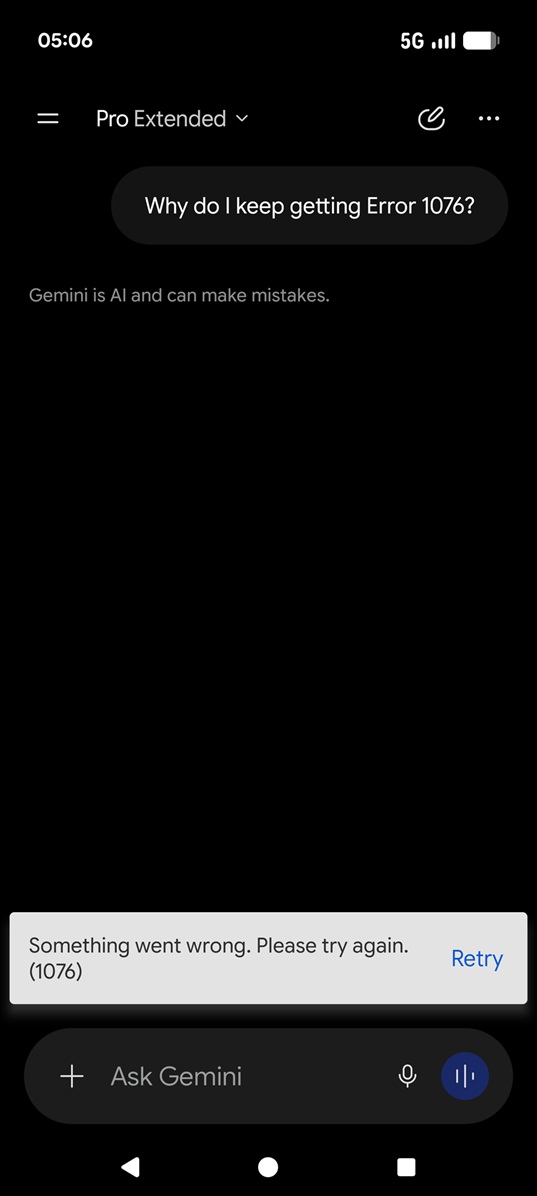
If you rely on Google Gemini for coding, writing, or daily productivity, seeing the dreaded “Something went wrong (1076)” or “Error 1099” message can bring your workflow to a grinding halt. You type out the perfect prompt, hit enter, and instead of a brilliant AI response, you are met with a frustrating red error box.
You aren’t alone. This specific error has plagued thousands of users, most notably during a massive global outage in June 2026. Let’s dive into exactly what Error 1076 is, the technical reasons behind it, and the actionable steps you can take to get Gemini back up and running.
What Causes the Gemini 1076 Error?
According to Google’s engineering team, Error 1076 is fundamentally a handshake or initial connection timeout error. This means your browser’s request to Gemini’s servers took slightly too long, causing the connection to abort.
However, during widespread outages, the root cause is much deeper. In major incidents, the error is triggered by extreme read contention within Google’s foundational database. When too many users send prompts at once, it can create a “hot shard” condition—overloading specific database partitions that manage the AI’s tool deployments. When the database fails to retrieve the necessary metadata, the cache hit rate drops, and the system throws Error 1076 to the user.
| Error Code | Primary Meaning | Where it Appears |
|---|---|---|
| Error 1076 | Connection timeout / Backend database overload | Gemini Web Interface & Chrome Extension |
| Error 1099 | Tool catalog retrieval failure | Google Workspace (Docs, Gmail AI tools) |
| Error 13 | Mobile server connection failure | Gemini iOS & Android Apps |
Step-by-Step Troubleshooting Guide
While massive database failures require Google’s engineers to fix, local browser glitches can also trigger Error 1076. If Google’s status dashboard shows all systems are operational, try these proven troubleshooting steps:
1. The “Double-Tap” Submit Method
Because Error 1076 is often a timeout, the pathway to the server might be partially established when the error triggers. If you quickly hit Submit again immediately after seeing the error, the prompt will often push through successfully.
2. Start a Fresh Chat Thread
Gemini can sometimes “hit a wall” with a specific conversation, especially if the context window is highly overloaded with massive blocks of code or text. Click New Chat in the left-hand sidebar and paste your prompt there. This clears the immediate memory cache.
3. Disable Ad-Blockers and VPNs
Strict ad-blockers and Virtual Private Networks (VPNs) can interfere with the secure handshake between your browser and Google’s Workspace servers. Temporarily pause your VPN or disable extensions like uBlock Origin to see if normal functionality returns.
4. Clear Browser Data and Cookies
A corrupted cache can easily cause the “Something went wrong” message. If you are using Chrome:
- Click the three dots in the top right corner.
- Navigate to Settings > Privacy and security > Clear browsing data.
- Select Cookies and other site data and Cached images and files.
- Click Clear data and restart your browser.
For Google Workspace UsersIf you are using a company account, Error 1076 might be related to your organization’s IT settings. Your IT administrator should check the Google Workspace Dashboard to ensure Gemini services are fully enabled and that no custom data region policies are conflicting with the AI’s server access. |
When to Just Wait It Out
If you’ve tried all the steps above and are still seeing the 1076 error alongside other users on social media, it is highly likely a server-side Google outage. During these times, no amount of cache-clearing will help. The best course of action is to monitor the official Google channels, take a break, and wait for the backend infrastructure to be optimized and restored.

Pingback: 9now com au Connect your TV Activate Code | Activate 9Now on Your TV - Seminarsonly.com