
Quick Answer
WOW51900319 is a network disconnect error in World of Warcraft that means your game client lost its connection to Blizzard’s servers. It’s rarely caused by your account — the fastest fixes are flushing your DNS cache, renewing your IP address, disabling “Optimize network for speed,” and running Scan and Repair in the Battle.net app. Try these in order before contacting Blizzard support.
TL;DR
- WOW51900319 = “You have been disconnected from the server” — a network/connection error, not corrupted data.
- Check Blizzard’s realm status first — it may not be your PC at all.
- Flush DNS, release/renew IP, and disable network speed optimization in-game.
- Update network drivers and run Battle.net’s Scan and Repair.
- If it persists on one character only, reset the WoW user interface (Cache/Interface/WTF folders).
What Is the WOW51900319 Error?
The WOW51900319 error shows up as a pop-up message reading: “You have been disconnected from the server. (WOW51900319).” Many players first notice it right after a content patch, and it can affect a single character while others on different servers play normally.
It is a connection error, not a sign of a corrupted account or banned character. In most cases it’s caused by something between your PC and Blizzard’s servers — your router, your DNS cache, your network drivers, or occasionally a server-side hiccup on Blizzard’s end.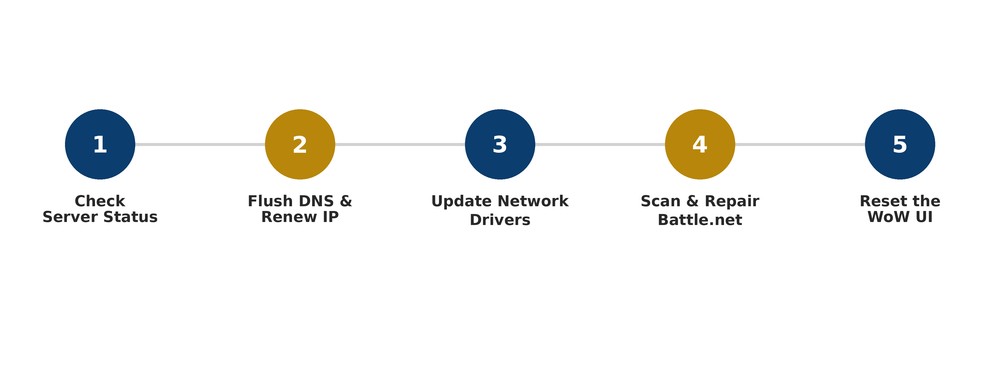
Common Causes
Before you start troubleshooting, it helps to know what’s actually behind the disconnect. Here’s a quick breakdown:
| Possible Cause | How Common | Fix Below |
|---|---|---|
| Stale DNS cache / IP conflict | Very common | Fix 1 |
| “Optimize network for speed” setting | Common | Fix 2 |
| Outdated or corrupted network drivers | Common | Fix 3 |
| Corrupted Battle.net/game files | Occasional | Fix 4 |
| Corrupted UI/addon files (single character only) | Occasional | Fix 5 |
| Server-side outage or maintenance | Occasional | Fix 6 |
Error Prepping Navigation Data: What It Means & How to Fix It
6 Ways to Fix WOW51900319
Fix 1: Flush DNS and Renew Your IP Address
This clears out any stale network data that could be blocking your connection to WoW’s servers.
- Right-click the Start button and open Command Prompt (Admin).
- Run
ipconfig /flushdns - Run
ipconfig /release - Run
ipconfig /renew, then relaunch WoW.
Fix 2: Turn Off “Optimize Network for Speed”
WoW’s own network-speed setting can conflict with certain routers and ISPs. In-game, go to System > Network and disable this option, then reconnect.
Fix 3: Update Your Network Drivers
Outdated network adapter drivers are one of the most frequently reported causes. Open Device Manager, expand Network Adapters, and update your adapter driver — or check your manufacturer’s website for the latest version.
Fix 4: Scan and Repair via Battle.net
- Close World of Warcraft completely.
- Open the Battle.net app.
- Click the gear icon next to World of Warcraft, then select Scan and Repair.
Fix 5: Reset the WoW User Interface
If the error keeps hitting one specific character while others are fine, corrupted UI or addon files are the likely culprit.
- Close WoW and Battle.net completely.
- In Battle.net, select WoW > Options > Show in Explorer.
- Open the _retail_ (or _classic_) folder.
- Rename the Cache, Interface, and WTF folders (add “Old” to each), then relaunch.
Fix 6: Check for a Server-Side Outage
If none of the above help, the issue may not be on your end at all. Check Blizzard’s official realm status page or the Blizzard Customer Support account before spending more time troubleshooting locally. For related connection and login errors, our gaming error-fix hub on SeminarsOnly News covers other common Battle.net issues you might run into.
Frequently Asked Questions
Is WOW51900319 caused by a ban or account issue?
No. It’s a network disconnect error, unrelated to account standing or bans.
Why does it only happen on one character?
This usually points to corrupted UI or addon files tied to that character’s saved settings rather than a server-wide problem.
What should I try first?
Start with the DNS flush and IP renew (Fix 1) — it resolves the error for many players in under five minutes.
Where can I check if it’s a server problem?
Visit Blizzard’s official support site to check realm status and any active service alerts before troubleshooting further.
