
https //moutamadris.men.gov.ma /moutamadris/Account 2024
To access the services, you’ll need your Massar number and the corresponding secret code, which you’ll receive from the general supervisor, the principal, or the school director in printed form.
Once you have these details, visit the following website: Moutamadris Login at https://massarservice.men.gov.ma/moutamadris/Account. If you encounter any issues or need further assistance, feel free to ask.
What services can I access through Moutamadris?
Through the Moutamadris system, you can access various services related to educational management. Here are some of the key features:
- Student Information: View student profiles, attendance records, and academic performance.
- Teacher Management: Access teacher profiles, schedules, and assignments.
- Classroom Management: Assign students to classes, manage class schedules, and track classroom activities.
- Administrative Tasks: Handle administrative tasks such as enrollment, transfers, and student records.
- Communication: Communicate with parents, students, and teachers through the system.
Remember that specific features may vary depending on your role (student, teacher, or administrator).
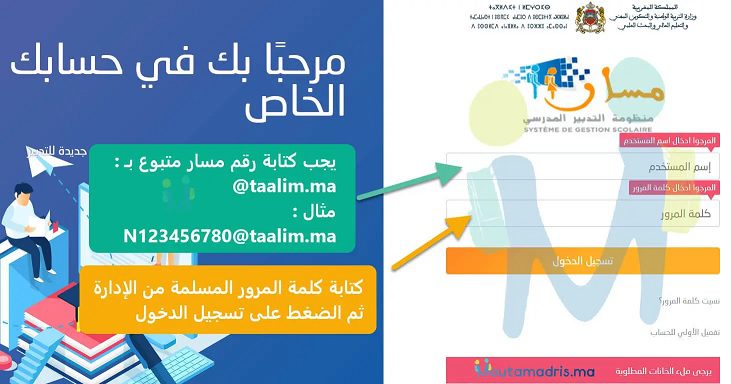
Parents can access student progress reports through the Moutamadris system. These reports provide information about their child’s academic performance, attendance, and other relevant details. Parents can log in using their credentials and navigate to the appropriate section to view these reports.
Progress reports
Progress reports are typically updated at the end of each grading period. The frequency may vary depending on the educational institution, but common intervals include quarterly or semester-based updates. If you need more specific details about your school’s schedule, I recommend checking with your child’s teacher or the school administration
Progress reports typically include essential information about a student’s academic performance. Here are the key details you’ll find:
- Grades: Subject-specific grades or marks for assignments, tests, and exams.
- Attendance: The student’s attendance record (days present and absent).
- Behavior: Notes on behavior, participation, and engagement in class.
- Comments: Personalized comments from teachers about the student’s progress.
- Goals: Areas for improvement and suggestions for growth.
Remember that the exact format and content may vary by school or district.


