
How To Change Instant Transfer Card on Apple Pay
To make an Instant Transfer, Go to your card info – On iPhone: open the Wallet app, tap your Apple Cash card, tap the More button, then tap Transfer to Bank. You can Instant transfer money from your Apple Cash card instantly or within 1 to 3 business days.
How to transfer money to your bank or eligible debit card
When you transfer money from your Apple Cash card, you can either use a bank transfer to send funds to your bank account in 1 to 3 days or you can use Instant Transfer to send funds instantly to an eligible Mastercard or Visa debit card.
You can also send money to an individual in Messages or Wallet.
Transfer instantly to an eligible debit card
First, make sure that your iPhone or iPad has the latest version of iOS or iPadOS and add an eligible debit card4 in the Wallet app.
Then, make an Instant Transfer:
- Go to your card info:
- On iPhone: open the Wallet app, tap your Apple Cash card, tap the More button , then tap Transfer to Bank .
- On iPad: open the Settings app, tap Wallet & Apple Pay, tap your Apple Cash card, then tap Transfer to Bank .
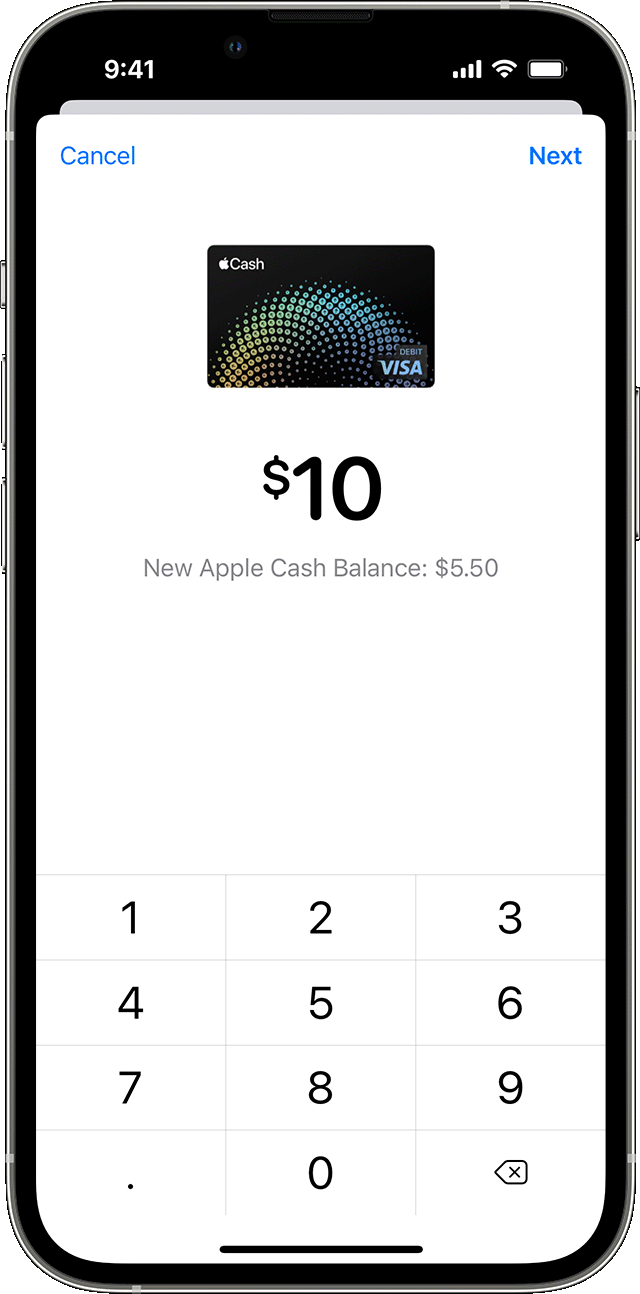
- Enter an amount and tap Next.
- Tap Instant Transfer.
- If you haven’t added an eligible debit card, tap Add Card and follow the instructions on your screen to add a Mastercard or Visa debit card.
- Tap Transfer. Then tap > to select the debit card that you want to transfer funds to and select the billing information for your chosen debit card.
Your funds should transfer within 30 minutes.
Transfer in 1 to 3 business days to a bank account
- Go to your card info:
- On iPhone: Open the Wallet app, tap your Apple Cash card, tap the More button
 , then tap Transfer to Bank
  .5
.5 - On iPad: Open the Settings app, tap Wallet & Apple Pay, tap your Apple Cash card, then tap Transfer to Bank .
- On iPhone: Open the Wallet app, tap your Apple Cash card, tap the More button
- Enter an amount and tap Next.
- Tap 1-3 Business Days. If you don’t have a bank account set up, follow the instructions on your screen to add one.
- Tap Transfer. Then confirm with Face ID, Touch ID, or passcode.
 , then tap Transfer to Bank
  .5
.5Your funds should transfer within 1 to 3 business days.
If you’re under 18 years old and part of Apple Cash Family
Children less than 13 years old can transfer funds from their Apple Cash account to a bank account.1
Teens at least 13 years old can transfer funds to their bank account or an eligible debit card using Instant Transfer.

How to update your bank account information
- Go to your card info:
- On iPhone: Open the Wallet app, tap your Apple Cash card, tap the More button , then tap Card Details .
- On iPad: Open the Settings app, tap Wallet & Apple Pay, then tap your Apple Cash card.
- On iPhone: Open the Wallet app, tap your Apple Cash card, tap the More button
- Tap Bank Account, then tap the bank account you want to update.
- To delete your banking information, tap Delete Bank Account Information. Tap again to confirm. After deleting, you can add your bank information again or add different information.
- To edit your bank information, tap next to your routing number or account number, add your information, then confirm the numbers and tap Next.6
 .
.When you update your information on one device, it automatically updates on all of the devices that are signed in with your Apple ID.
About transfer limits
You can transfer up to $10,000 per transfer and up to $20,000 within a seven-day period from Apple Cash to your bank account. You can only transfer your money to a bank account in the United States. There are no fees to transfer your money from Apple Cash to your bank account, unless you use an Instant Transfer.
Related Searches
How To Transfer Money from Apple Pay to Debit Card Already in Wallet Instantly, Instant Transfer Card on Apple Pay to Debit Card, Instant Transfer Card on Apple Pay Reddit, How To Add Bank Account to Apple Pay Without Card, Apple Pay Instant Transfer Not Working, How To Transfer Money from Apple Pay to Cash App Instantly, How To Get Money Off Apple Pay Without Card, Can’t Add Bank Account to Apple Pay
