
Quick Answer: How to Fix Error 1015
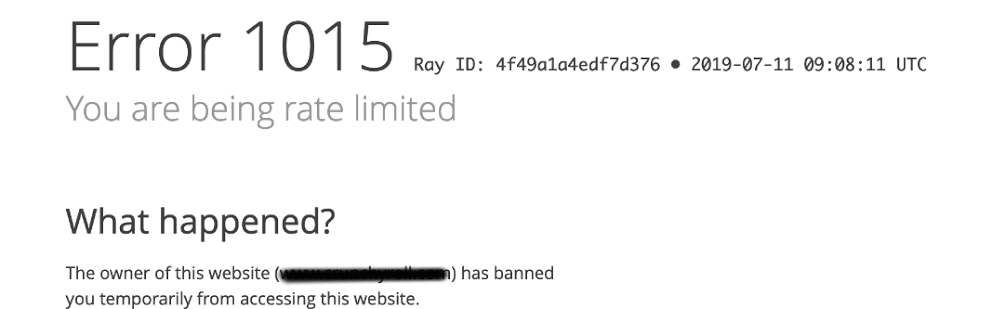
Error 1015: You are being rate limited happens when you send too many requests to a Cloudflare-protected website in a short timeframe. To fix it immediately:
- Wait it out: Most temporary blocks expire within 15 minutes to 1 hour.
- Switch Networks: Disconnect from Wi-Fi and use cellular data to get a fresh IP address.
- Disable Extensions: Turn off aggressive auto-refreshers or scraper extensions.
- Use a VPN: If you are on a shared network, a VPN can provide a new, unblocked IP address.
Navigating the web is usually seamless, but suddenly hitting a blank screen with the message “Error 1015: You are being rate limited” can bring your browsing or automated tasks to a grinding halt. This error is a strict security mechanism enforced by Cloudflare, one of the internet’s largest web infrastructure and security companies.
Whether you are a regular user trying to buy concert tickets, or a developer trying to scrape data, this guide will explain exactly why you are being blocked and how you can bypass the restriction.
What Causes Cloudflare Error 1015?
When a website uses Cloudflare, it benefits from a Web Application Firewall (WAF). The WAF acts as a bouncer, monitoring how many times a single IP address asks the server to load a page. If you exceed the specific threshold set by the website owner, Cloudflare throws Error 1015.
The most common triggers include:
- Excessive Page Refreshing: Manually mashing the F5 key during a high-demand event (like a sneaker drop).
- Shared IP Networks: Being on a corporate, school, or public Wi-Fi where hundreds of users are browsing the same site simultaneously.
- Web Scraping & Bots: Running automated scripts without proper delays or proxy rotation.
How to Fix War Thunder Connection Error 80130182 (Quick Guide)
How to Bypass Error 1015 for Scrapers and Developers
If you are a developer hitting this error while extracting data, simply waiting 15 minutes won’t solve your underlying architecture problem. You need to implement anti-detection mechanisms.
Need to clear out bad session data? Check out our internal guide on How to Safely Clear Browser Cache and Cookies. For official server configurations, refer to the Cloudflare Developer Documentation on Error 1015.
Top 5 Searches & Keywords Explained
- “Error 1015 Cloudflare bypass”
Keyword Intent: Troubleshooting / Development. Answer: Bypassing the error requires changing your IP footprint. Regular users can do this by switching from Wi-Fi to a cellular network. Developers must utilize rotating residential proxy networks. - “How long does you are being rate limited last?”
Keyword Intent: Timeframe Inquiry. Answer: The duration of the ban is set by the website administrator. It typically lasts anywhere from 10 seconds to 1 hour, though it can theoretically extend up to 24 hours depending on the site’s strictness. - “Error 1015 Discord”
Keyword Intent: Platform-specific Fix. Answer: If you get this on Discord, you are either joining/leaving servers too quickly, or sending API messages too rapidly. Stop all actions, close the app, and wait 15 minutes before logging back in. - “What does rate limited mean?”
Keyword Intent: Definition. Answer: Rate limiting is a security protocol that restricts the number of actions a user can take within a given timeframe. It prevents servers from crashing due to too much traffic (DDoS attacks). - “Error 1015 ChatGPT”
Keyword Intent: Platform-specific Fix. Answer: ChatGPT uses Cloudflare. You will see this if you generate prompts too fast or if you share a VPN IP address with hundreds of other ChatGPT users. Turn off your VPN and reload.
TL;DR – Key Takeaways
- Error 1015 is a Cloudflare security response meaning your IP address sent too many requests too fast.
- For regular web browsers, the easiest fix is simply waiting 15 minutes or switching to a different internet connection (like Mobile Data).
- For developers and web scrapers, Error 1015 is the primary roadblock to automated data collection.
- Scrapers must implement randomized request delays, use rotating proxy pools, or utilize specialized Web Scraping APIs to permanently bypass the WAF.
