Skip to content
Seminarsonly.com
  • Home
  • About
  • Contact Us
  • Disclaimer
  • Privacy Policy
  • facebook.com
  • twitter.com
  • t.me
  • instagram.com
  • youtube.com
Subscribe
Home » Family Link Parent Access Code | familylink.google.com Code
Posted inLogin

Family Link Parent Access Code | familylink.google.com Code

Posted by Freddy John June 20, 2024

Family Link Parent Access Code | familylink.google.com Code

To unlock your child’s device using Google Family Link at familylink.google.com, you have a couple of options:

Parent Account Password:

You can use your Parent account password to manage your child’s device settings. For example, you can stop bedtime or remove your child’s Google account from their device if it’s connected to the internet.

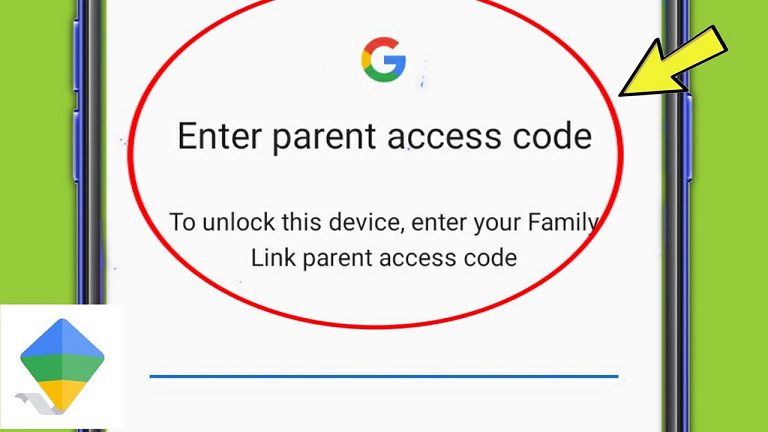
Parent Access Code:

You can also use a parent access code. Here’s how:

    • Open the Family Link app on your device.
    • Tap on “Menu” and then select “Parent access.”
    • The access code changes every few minutes. Enter this one-time use only number into your child’s device before it expires.

Remember, whether your child can control their own account settings or not, it doesn’t change the settings themselves. After making changes, it’s a good idea for parents to verify that the settings are correct. If you need further assistance, feel free to ask! 😊

How do I set up Family Link?

To set up Google Family Link, follow these steps:

1. Create a Google Account for Your Child:

  • Open the Family Link app or visit the Family Link setup page.
  • Tap Menu and select Add child.
  • Follow the on-screen instructions to create an account for your child.

2. Link Parent and Child Accounts:

  • If your child already has a Google account, Family Link will guide you through linking both accounts.
  • If your child doesn’t have a Google account, create one for them using the Family Link app.

3. Set Up Key Features:

  • Screen Time Limits:
    • Open Family Link, select your child, and tap Controls.
    • Under “Daily limit,” set the hours and minutes for screen time.
    • You can also change today’s limit from your parent device.
  • Location Tracking:
    • Use the Family Link app to check your child’s Android or compatible Fitbit device location.
  • App Management:
    • Decide which apps your child can download or purchase, block or allow apps, and manage app permissions.
  • Content Restrictions:
    • Restrict mature content on Google Play.

Remember, Family Link helps you manage your child’s online activities while keeping them safe. If you need further assistance, feel free to ask! 😊
Family Link Parent Access Code

How do I remove a device from Family Link?

To remove a device from Google Family Link, you have a few options:

  1. Using the Family Link App (Parent Device):

    • Open the Family Link app on your parent device.
    • Select your child.
    • Tap Controls and choose your child’s device.
    • Click Reset device & delete data. If you don’t see this option, you can remove the child’s account from Android settings on their device.
  2. From the Child’s Mobile Phone:

    • Open your phone settings.
    • Navigate to Apps & notifications.
    • Find and open the Family Link App (under “Google Family Link”).
    • Click Storage and cache and select Clear data.
    • Confirm the list of accounts you want to remove from Family Link.

Remember to follow the appropriate method based on your situation. If you need further assistance, feel free to ask! 😊

Last updated on June 20, 2024
Freddy John
View All Posts

Post navigation

Previous Post
Kia Connect Promo Code 2024 Redeem
Next Post
GT Bank NIN Link Code : How can I link my NIN to my GTB account?

Recent Posts

  • Social Security Electronic Benefits Update: Paper Checks Are Gone — Here’s What to Do
  • When Did Social Security Numbers Start? The Complete 1936 Story
  • How to Request a New Social Security Card (Free, Online & By Mail)
  • Social Security Max Contribution 2026: New $184,500 Limit Explained
  • How to Replace My Social Security Card: Free Online Method (2026)

Archives

  • June 2026
  • April 2026
  • March 2026
  • February 2026
  • January 2026
  • December 2025
  • November 2025
  • October 2025
  • September 2025
  • August 2025
  • July 2025
  • June 2025
  • May 2025
  • April 2025
  • March 2025
  • February 2025
  • January 2025
  • December 2024
  • November 2024
  • October 2024
  • September 2024
  • August 2024
  • July 2024
  • June 2024
  • May 2024
  • April 2024
  • March 2024
  • February 2024
  • January 2024
  • December 2023
  • November 2023
  • October 2023
  • September 2023
  • August 2023
  • July 2023
  • June 2023
  • May 2023
  • April 2023
  • March 2023
  • February 2023
  • January 2023
  • December 2022
  • November 2022
  • October 2022
  • September 2022
  • August 2022
  • July 2022
  • June 2022
  • May 2022
  • April 2022
  • March 2022
  • February 2022
  • January 2022
  • December 2021
  • November 2021
  • October 2021
  • September 2021
  • August 2021
  • July 2021
  • June 2021
  • May 2021
  • July 204

Categories

  • activate
  • Australia
  • BF6
  • Canada
  • Card
  • Error Fix
  • Games
  • India
  • Ireland
  • Italy
  • Kerala
  • Login
  • Lottery
  • Minecraft
  • news
  • Property
  • Result
  • Scam
  • Science Fair
  • Server
  • Social Security
  • South Africa
  • TV
  • UK
  • USA
  • Whois
Search
Categories
  • activate
  • Australia
  • BF6
  • Canada
  • Card
  • Error Fix
  • Games
  • India
  • Ireland
  • Italy
  • Kerala
  • Login
  • Lottery
  • Minecraft
  • news
  • Property
  • Result
  • Scam
  • Science Fair
  • Server
  • Social Security
  • South Africa
  • TV
  • UK
  • USA
  • Whois
Archives
  • June 2026
  • April 2026
  • March 2026
  • February 2026
  • January 2026
  • December 2025
  • November 2025
  • October 2025
  • September 2025
  • August 2025
  • July 2025
  • June 2025
  • May 2025
  • April 2025
  • March 2025
  • February 2025
  • January 2025
  • December 2024
  • November 2024
  • October 2024
  • September 2024
  • August 2024
  • July 2024
  • June 2024
  • May 2024
  • April 2024
  • March 2024
  • February 2024
  • January 2024
  • December 2023
  • November 2023
  • October 2023
  • September 2023
  • August 2023
  • July 2023
  • June 2023
  • May 2023
  • April 2023
  • March 2023
  • February 2023
  • January 2023
  • December 2022
  • November 2022
  • October 2022
  • September 2022
  • August 2022
  • July 2022
  • June 2022
  • May 2022
  • April 2022
  • March 2022
  • February 2022
  • January 2022
  • December 2021
  • November 2021
  • October 2021
  • September 2021
  • August 2021
  • July 2021
  • June 2021
  • May 2021
  • July 204
Copyright 2026 — Seminarsonly.com. All rights reserved.
Scroll to Top