Skip to content
Seminarsonly.com
  • Home
  • About
  • Contact Us
  • Disclaimer
  • Privacy Policy
  • facebook.com
  • twitter.com
  • t.me
  • instagram.com
  • youtube.com
Subscribe
Home ยป Authentication Failed due to Problem Navigating to the Single Sign-On URL Microsoft
Posted inLogin

Authentication Failed due to Problem Navigating to the Single Sign-On URL Microsoft

Posted by Freddy John September 12, 2024

Authentication Failed due to Problem Navigating to the Single Sign-On URL Microsoft

The error message “authentication failed due to problem navigating to the single sign-on URL” can occur when using Microsoft products and services that rely on single sign-on (SSO) for authentication, such as accessing Microsoft 365 applications through a corporate network.

Here are some possible reasons and solutions specific to Microsoft SSO issues:

Possible Reasons

  • Incorrect SSO Configuration: The SSO settings in your Microsoft 365 tenant or Azure AD might be misconfigured, leading to the incorrect SSO URL being generated.

  • AD FS Issues: If your organization uses Active Directory Federation Services (AD FS) for SSO, there could be issues with the AD FS server or its configuration preventing successful redirection to the SSO URL.

  • Conditional Access Policies: Microsoft Conditional Access policies might be blocking access to the SSO URL based on certain conditions, such as device compliance or location.

  • Browser Compatibility: The browser you’re using might not be fully compatible with Microsoft’s SSO implementation.
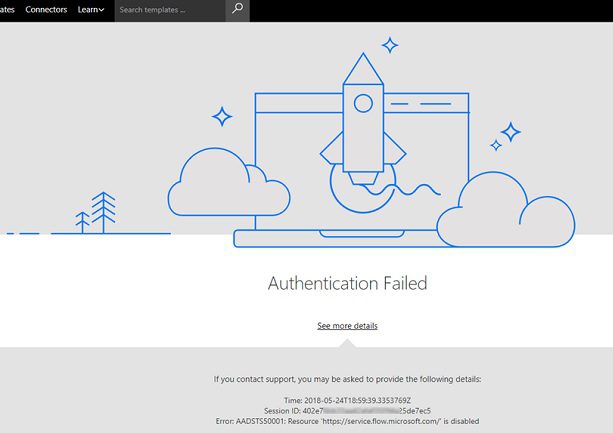
Authentication Failed

Potential Solutions:

  • Verify SSO Configuration: Work with your system administrator to check the SSO configuration in your Microsoft 365 tenant or Azure AD. Ensure that the correct SSO URL is being generated.

  • Check AD FS: If using AD FS, check the AD FS server status and configuration. Look for any errors or warnings in the AD FS event logs.

  • Review Conditional Access Policies: Review your organization’s Conditional Access policies to see if any of them might be blocking access to the SSO URL. If necessary, work with your administrator to adjust the policies.

  • Try a Different Browser: Try using a different supported browser, such as Microsoft Edge or Google Chrome. Make sure your browser is up to date.

  • Clear Browser Cache and Cookies: Clear your browser cache and cookies, as outdated data might be interfering with the SSO process.

  • Contact Microsoft Support: If you’re still having issues, contact Microsoft support for further assistance. They can help troubleshoot the problem and identify any issues with your Microsoft 365 tenant or Azure AD configuration.

Additional Considerations:

  • Azure AD Connect: If your organization uses Azure AD Connect to synchronize on-premises Active Directory with Azure AD, ensure that Azure AD Connect is running correctly and that there are no synchronization errors.

  • Multi-Factor Authentication: If multi-factor authentication (MFA) is enabled, ensure that you’re completing the MFA process correctly.

  • Third-Party SSO Providers: If your organization uses a third-party SSO provider, check with the provider’s support team for troubleshooting assistance.

Remember, these are just some general suggestions. The exact solution will depend on your specific environment and configuration. If you’re unsure how to proceed, it’s always recommended to seek help from your IT support team or Microsoft support.

Freddy John
View All Posts

Post navigation

Previous Post
What is the Cigna Healthy Today Card?
Next Post
Comenity Easy Pay Service : Paying Your Bill Online With Comenity EasyPay

Recent Posts

  • Social Security Electronic Benefits Update: Paper Checks Are Gone โ€” Here’s What to Do
  • When Did Social Security Numbers Start? The Complete 1936 Story
  • How to Request a New Social Security Card (Free, Online & By Mail)
  • Social Security Max Contribution 2026: New $184,500 Limit Explained
  • How to Replace My Social Security Card: Free Online Method (2026)

Archives

  • June 2026
  • April 2026
  • March 2026
  • February 2026
  • January 2026
  • December 2025
  • November 2025
  • October 2025
  • September 2025
  • August 2025
  • July 2025
  • June 2025
  • May 2025
  • April 2025
  • March 2025
  • February 2025
  • January 2025
  • December 2024
  • November 2024
  • October 2024
  • September 2024
  • August 2024
  • July 2024
  • June 2024
  • May 2024
  • April 2024
  • March 2024
  • February 2024
  • January 2024
  • December 2023
  • November 2023
  • October 2023
  • September 2023
  • August 2023
  • July 2023
  • June 2023
  • May 2023
  • April 2023
  • March 2023
  • February 2023
  • January 2023
  • December 2022
  • November 2022
  • October 2022
  • September 2022
  • August 2022
  • July 2022
  • June 2022
  • May 2022
  • April 2022
  • March 2022
  • February 2022
  • January 2022
  • December 2021
  • November 2021
  • October 2021
  • September 2021
  • August 2021
  • July 2021
  • June 2021
  • May 2021
  • July 204

Categories

  • activate
  • Australia
  • BF6
  • Canada
  • Card
  • Error Fix
  • Games
  • India
  • Ireland
  • Italy
  • Kerala
  • Login
  • Lottery
  • Minecraft
  • news
  • Property
  • Result
  • Scam
  • Science Fair
  • Server
  • Social Security
  • South Africa
  • TV
  • UK
  • USA
  • Whois
Search
Categories
  • activate
  • Australia
  • BF6
  • Canada
  • Card
  • Error Fix
  • Games
  • India
  • Ireland
  • Italy
  • Kerala
  • Login
  • Lottery
  • Minecraft
  • news
  • Property
  • Result
  • Scam
  • Science Fair
  • Server
  • Social Security
  • South Africa
  • TV
  • UK
  • USA
  • Whois
Archives
  • June 2026
  • April 2026
  • March 2026
  • February 2026
  • January 2026
  • December 2025
  • November 2025
  • October 2025
  • September 2025
  • August 2025
  • July 2025
  • June 2025
  • May 2025
  • April 2025
  • March 2025
  • February 2025
  • January 2025
  • December 2024
  • November 2024
  • October 2024
  • September 2024
  • August 2024
  • July 2024
  • June 2024
  • May 2024
  • April 2024
  • March 2024
  • February 2024
  • January 2024
  • December 2023
  • November 2023
  • October 2023
  • September 2023
  • August 2023
  • July 2023
  • June 2023
  • May 2023
  • April 2023
  • March 2023
  • February 2023
  • January 2023
  • December 2022
  • November 2022
  • October 2022
  • September 2022
  • August 2022
  • July 2022
  • June 2022
  • May 2022
  • April 2022
  • March 2022
  • February 2022
  • January 2022
  • December 2021
  • November 2021
  • October 2021
  • September 2021
  • August 2021
  • July 2021
  • June 2021
  • May 2021
  • July 204
Copyright 2026 โ€” Seminarsonly.com. All rights reserved.
Scroll to Top