Skip to content
Seminarsonly.com
  • Home
  • About
  • Contact Us
  • Disclaimer
  • Privacy Policy
  • facebook.com
  • twitter.com
  • t.me
  • instagram.com
  • youtube.com
Subscribe
Home ยป aka.ms/myrecoverykey Find Your Bitlocker Recovery Key
Posted inLogin

aka.ms/myrecoverykey Find Your Bitlocker Recovery Key

Posted by Freddy John July 7, 2025

When you go to aka.ms/myrecoverykey, it redirects you to the Microsoft Account page where you can:

  • Log in with the Microsoft account tied to your device.

  • View the BitLocker recovery keys for any devices associated with that account.


What is a BitLocker recovery key?

BitLocker is a Windows encryption feature that helps protect your data. If Windows detects a change (like hardware modification or an unauthorized access attempt), it may require a 48-digit recovery key to unlock the drive.


How to Locate the BitLocker Recovery Key in Your Microsoft Account

Accessing the Microsoft Account recovery keys

  1. Open a web browser and go toย https://account.microsoft.com/account.
  2. Clickย Sign inย and then enter the email address of your MSA.
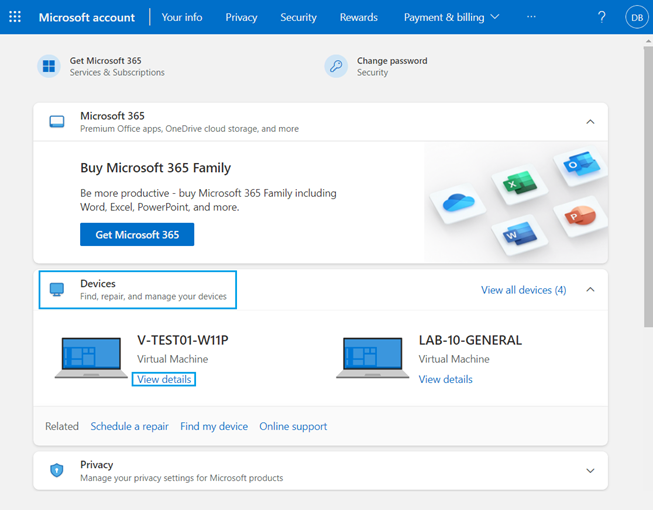
  3. Scroll down toย Devicesย and then clickย View detailsย for the device requesting the recovery key.
    Microsoft account desktop view
  4. Clickย Manage recovery keys.


    Note:ย Microsoft again asks you to log in to your MSA. Follow the prompts to log in.

Selecting the Recovery Key

Theย BitLocker recovery screen shows you which recovery key is required.

This is important when you have multiple computers, or your computer has multiple encrypted drives.

Reference theย Key IDย from theย BitLocker recovery event screen to locate the appropriate recovery key.

Also Read : https //secure.bcbssettlement.com

Note:ย Depending on the drive configuration, a computer can show multiple drives if the user chooses to encrypt additional drives.

  • OSVย = Operating System Volume
  • FDVย = Fixed Disk Volume (secondary disk drive)
  • RDVย = Removable Disk Volume (USB Key)

Enter the recovery key from theย BitLocker recovery keysย screen and then press Enter. The computer continues booting to the Windows desktop.


Youโ€™ll need to access this page if:

  • Your computer is asking for a BitLocker recovery key and wonโ€™t boot without it.

  • You forgot to save or print the recovery key when BitLocker was enabled.


Tips:

  • Try logging in with any Microsoft account youโ€™ve used on that PC.

  • If youโ€™re on a work/school device, your IT admin might hold the key.

  • If you saved the key manually (e.g., USB drive, printout, file), check those backups.

Last updated on July 8, 2025
Freddy John
View All Posts

Post navigation

Previous Post
Dobbies Club Plus Membership Renewal
Next Post
https //hah.docebosaas.com Login : Registration and Login – Docebo Learning Suite

Recent Posts

  • Social Security Electronic Benefits Update: Paper Checks Are Gone โ€” Here’s What to Do
  • When Did Social Security Numbers Start? The Complete 1936 Story
  • How to Request a New Social Security Card (Free, Online & By Mail)
  • Social Security Max Contribution 2026: New $184,500 Limit Explained
  • How to Replace My Social Security Card: Free Online Method (2026)

Archives

  • June 2026
  • April 2026
  • March 2026
  • February 2026
  • January 2026
  • December 2025
  • November 2025
  • October 2025
  • September 2025
  • August 2025
  • July 2025
  • June 2025
  • May 2025
  • April 2025
  • March 2025
  • February 2025
  • January 2025
  • December 2024
  • November 2024
  • October 2024
  • September 2024
  • August 2024
  • July 2024
  • June 2024
  • May 2024
  • April 2024
  • March 2024
  • February 2024
  • January 2024
  • December 2023
  • November 2023
  • October 2023
  • September 2023
  • August 2023
  • July 2023
  • June 2023
  • May 2023
  • April 2023
  • March 2023
  • February 2023
  • January 2023
  • December 2022
  • November 2022
  • October 2022
  • September 2022
  • August 2022
  • July 2022
  • June 2022
  • May 2022
  • April 2022
  • March 2022
  • February 2022
  • January 2022
  • December 2021
  • November 2021
  • October 2021
  • September 2021
  • August 2021
  • July 2021
  • June 2021
  • May 2021
  • July 204

Categories

  • activate
  • Australia
  • BF6
  • Canada
  • Card
  • Error Fix
  • Games
  • India
  • Ireland
  • Italy
  • Kerala
  • Login
  • Lottery
  • Minecraft
  • news
  • Property
  • Result
  • Scam
  • Science Fair
  • Server
  • Social Security
  • South Africa
  • TV
  • UK
  • USA
  • Whois
Search
Categories
  • activate
  • Australia
  • BF6
  • Canada
  • Card
  • Error Fix
  • Games
  • India
  • Ireland
  • Italy
  • Kerala
  • Login
  • Lottery
  • Minecraft
  • news
  • Property
  • Result
  • Scam
  • Science Fair
  • Server
  • Social Security
  • South Africa
  • TV
  • UK
  • USA
  • Whois
Archives
  • June 2026
  • April 2026
  • March 2026
  • February 2026
  • January 2026
  • December 2025
  • November 2025
  • October 2025
  • September 2025
  • August 2025
  • July 2025
  • June 2025
  • May 2025
  • April 2025
  • March 2025
  • February 2025
  • January 2025
  • December 2024
  • November 2024
  • October 2024
  • September 2024
  • August 2024
  • July 2024
  • June 2024
  • May 2024
  • April 2024
  • March 2024
  • February 2024
  • January 2024
  • December 2023
  • November 2023
  • October 2023
  • September 2023
  • August 2023
  • July 2023
  • June 2023
  • May 2023
  • April 2023
  • March 2023
  • February 2023
  • January 2023
  • December 2022
  • November 2022
  • October 2022
  • September 2022
  • August 2022
  • July 2022
  • June 2022
  • May 2022
  • April 2022
  • March 2022
  • February 2022
  • January 2022
  • December 2021
  • November 2021
  • October 2021
  • September 2021
  • August 2021
  • July 2021
  • June 2021
  • May 2021
  • July 204
Copyright 2026 โ€” Seminarsonly.com. All rights reserved.
Scroll to Top