Skip to content
Seminarsonly.com
  • Home
  • About
  • Contact Us
  • Disclaimer
  • Privacy Policy
  • facebook.com
  • twitter.com
  • t.me
  • instagram.com
  • youtube.com
Subscribe
Home » Ooty Kodaikanal Epass Registration 2025 : Tamil Nadu E Pass Registration
Ooty pass 2025
Posted inLogin

Ooty Kodaikanal Epass Registration 2025 : Tamil Nadu E Pass Registration

Posted by Freddy John April 8, 2025

​As of April 1, 2025, the Tamil Nadu government has reinstated the mandatory e-pass system for travelers visiting the hill stations of Ooty and Kodaikanal.

This measure aims to manage tourism flow and protect the environment during the peak season. The e-pass requirement is set to remain in effect until June 30, 2025.

Key Details:

  • Effective Dates: April 1, 2025, to June 30, 2025​

  • Purpose: Regulate tourism and safeguard the environment in Ooty and Kodaikanal​

  • Who Needs an E-Pass:

    • All vehicles entering Ooty and Kodaikanal with registration numbers outside the Nilgiris District​

    • Tourists, residents, and business visitors traveling in private vehicles​

  • Exemptions:

    • Vehicles registered within the Nilgiris District​

    • Government-operated buses​

    • Local residents

eregister. tnega. org

How to obtain Epass

Step – 1 – Visit the official website of https://tnega.tn.gov.in/

Step – 2 – Now, click on the option of Newly Launched Services, after which a box will open up on the screen.

Step – 3 – Here click on the state Tamil Nadu and then on the option of ePass_TN.

Step – 4 – Here, you will see an application form for TN e Pass so first read the form carefully.

Step – 5 – Now, Fill in the form carefully without any error.

Step – 6 – Tick on the declaration box after which you should get your registration ID.

How to Apply for TN ePass for Entry in Kodaikanal?

If you are someone traveling into Tamil Nadu, you will require an ePass too. The users have to follow these steps to apply for the TN ePass in such a case.

Step – 1 – First you have to visit the site of https://tnega.tn.gov.in/

Step – 2 – Next, you have to select from the option of whether you are traveling from any other state of India or from a foreign land.

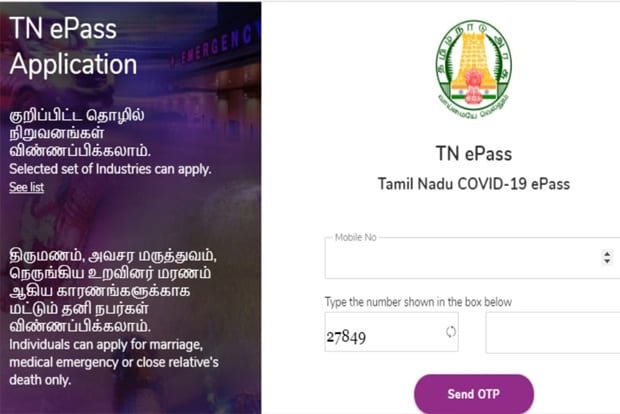
Step – 3 – On the next page, you have to provide your mobile number and have to enter the captcha code.

Step – 4 – Now click on Send OTP.

Step – 5 – On the next page, you have to provide the OTP that you have received on your mobile number to verify it.

Step – 6 – Now on the next page, you have to select from the ePass type that you wish to avail yourself.

Step – 7 – Depending upon the selection that you have made, a form will come up that you need to fill up.

Step – 8 – Now you have to upload the necessary documents such as a medical report, or a marriage invitation card, and others to prove your purpose of visit.

Step – 9 – The ePass will be only presented after the whole verification of the details provided by you and this can take time. Till this time, you will get an application number for checking the status.

Finally, after the ePass is approved, in order to get the ePass, you have to present your Government identities document such as aadhar card, electoral card, PAN card, driving license, employee card, and passport

Last updated on April 8, 2025
Freddy John
View All Posts

Post navigation

Previous Post
929 Area Code Text Message | Don’t Click Links
Next Post
Activate Kid Power Wild Kratts Wild Kratts Activate Kids Power

Recent Posts

  • Social Security Electronic Benefits Update: Paper Checks Are Gone — Here’s What to Do
  • When Did Social Security Numbers Start? The Complete 1936 Story
  • How to Request a New Social Security Card (Free, Online & By Mail)
  • Social Security Max Contribution 2026: New $184,500 Limit Explained
  • How to Replace My Social Security Card: Free Online Method (2026)

Archives

  • June 2026
  • April 2026
  • March 2026
  • February 2026
  • January 2026
  • December 2025
  • November 2025
  • October 2025
  • September 2025
  • August 2025
  • July 2025
  • June 2025
  • May 2025
  • April 2025
  • March 2025
  • February 2025
  • January 2025
  • December 2024
  • November 2024
  • October 2024
  • September 2024
  • August 2024
  • July 2024
  • June 2024
  • May 2024
  • April 2024
  • March 2024
  • February 2024
  • January 2024
  • December 2023
  • November 2023
  • October 2023
  • September 2023
  • August 2023
  • July 2023
  • June 2023
  • May 2023
  • April 2023
  • March 2023
  • February 2023
  • January 2023
  • December 2022
  • November 2022
  • October 2022
  • September 2022
  • August 2022
  • July 2022
  • June 2022
  • May 2022
  • April 2022
  • March 2022
  • February 2022
  • January 2022
  • December 2021
  • November 2021
  • October 2021
  • September 2021
  • August 2021
  • July 2021
  • June 2021
  • May 2021
  • July 204

Categories

  • activate
  • Australia
  • BF6
  • Canada
  • Card
  • Error Fix
  • Games
  • India
  • Ireland
  • Italy
  • Kerala
  • Login
  • Lottery
  • Minecraft
  • news
  • Property
  • Result
  • Scam
  • Science Fair
  • Server
  • Social Security
  • South Africa
  • TV
  • UK
  • USA
  • Whois
Search
Categories
  • activate
  • Australia
  • BF6
  • Canada
  • Card
  • Error Fix
  • Games
  • India
  • Ireland
  • Italy
  • Kerala
  • Login
  • Lottery
  • Minecraft
  • news
  • Property
  • Result
  • Scam
  • Science Fair
  • Server
  • Social Security
  • South Africa
  • TV
  • UK
  • USA
  • Whois
Archives
  • June 2026
  • April 2026
  • March 2026
  • February 2026
  • January 2026
  • December 2025
  • November 2025
  • October 2025
  • September 2025
  • August 2025
  • July 2025
  • June 2025
  • May 2025
  • April 2025
  • March 2025
  • February 2025
  • January 2025
  • December 2024
  • November 2024
  • October 2024
  • September 2024
  • August 2024
  • July 2024
  • June 2024
  • May 2024
  • April 2024
  • March 2024
  • February 2024
  • January 2024
  • December 2023
  • November 2023
  • October 2023
  • September 2023
  • August 2023
  • July 2023
  • June 2023
  • May 2023
  • April 2023
  • March 2023
  • February 2023
  • January 2023
  • December 2022
  • November 2022
  • October 2022
  • September 2022
  • August 2022
  • July 2022
  • June 2022
  • May 2022
  • April 2022
  • March 2022
  • February 2022
  • January 2022
  • December 2021
  • November 2021
  • October 2021
  • September 2021
  • August 2021
  • July 2021
  • June 2021
  • May 2021
  • July 204
Copyright 2026 — Seminarsonly.com. All rights reserved.
Scroll to Top