
cvigil.eci.gov.in Login : cVIGIL Login With Password
cVIGIL at cvigil.eci.gov.in, a user-friendly and easy to operate application, which can be used for reporting violations from the date of notifications for bye-election/ assembly/ parliamentary elections.
The uniqueness of the app is that it only allows Live Photo/ video with auto location capture from within the app to ensure digital evidence for flying squads to act upon in a time bound manner.
Sign In
To start the application installed in your mobile device, you need to log in to cvigil.eci.nic.in
Note: This application is compatible with 4.1 (Jelly Bean) and above Android version mobile devices. The application runs on good internet connection and GPS enabled settings in phone.
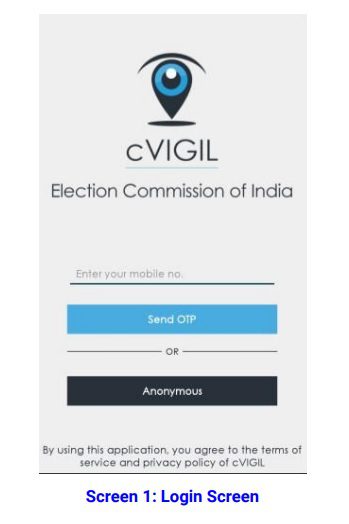
The Login screen gives a user two options to sign in the application:
1. Anonymously i.e. without sharing your personal details, or
2. By registering personal details, including name, address and mobile number.
How to Sign in using a Mobile Number
When you want to use your number to sign in, a window will open as you see in the screenshot above.
Step 1: Enter your mobile number
Step 2: Tap on Send OTP(One time password)
Note: In case of not receiving an OTP, tap on Resend OTP icon.
Step 3: You will be directed to User Profile screen on this app.
Step 4: To verify your account, enter the 4-digit OTP number sent on your mobile number.
Step 5: Enter your Name, Address, State, District, Assembly and Pin Code.
Step 6: Select Checkbox and click on Verify Now icon. You are now a registered user!
The app could be installed and used on any android (Jellybean and above)/iOS smartphone equipped with a camera, good internet connection and GPS access. By using this app, citizens can immediately report on incidents of political misconduct within minutes of having witnessed them and without having to rush to the office of the returning officer. cVIGIL connects vigilant citizens with District Control Room, Returning Officer and Field Unit (Flying Squads) / Static Surveillance Teams, thereby, creating a rapid and accurate reporting, action and monitoring system.
All is required, is to click a picture or a 2 minute video of the activity violating MCC and describe it shortly, before registering the complaint. GIS information captured with the complaint automatically flags it to the concerned District Control Room, permitting flying squads to be routed to the spot within few minutes. The cVIGIL operating model will operate as follows:
Step 1- A citizen clicks a picture or records a 2-minute video. The Photo / Video is uploaded on the app, along with an automated location mapping by the Geographic Information System. After its successful submission, the citizen gets a Unique ID to track and receive follow up updates on his mobile. A citizen can report many incidents in this manner and will get a unique id for each report for follow up updates. The app user has the option of registering complaints anonymously through cVIGIL App. In that case, the mobile number and other profile details are not sent to the system. However, in case of anonymous complaints, the user will not be getting further status messages because system will not be capturing the phone details. Citizens, however, have the option of following up on such complaints in person from the concerned returning officer.
Step 2- Once the citizen has reported the complaint, the information beeps in the District Control Room from where it is assigned to a Field Unit. A field unit consists of Flying Squads, Static Surveillance Team, Reserve team e.t.c. Each Field Unit will have a GIS-based mobile application called ‘cVIGIL Investigator’, which allows the field unit to directly reach the location by following the GIS cues and navigation technology and take action.
Step 3- After a Field Unit has acted upon the complaint, the field report is sent by them online through the Investigator App to the concerned returning officer for decision and disposal. If the incident is found correct, the information is sent to the National Grievance Portal of the Election Commission of India for further action and the vigilant citizen is informed about the status within 100 minutes.
cVIGIL App
cVIGIL provide time stamped evidentiary proof of model code of conduct / Expenditure Violation, having live photo/video with auto location data. This unique combination of timestamping, live photo with auto location can be fairly relied upon by election machinery to navigate to the right spot and take prompt action. The GIS-based dashboard provides strong decision tool to drop and dispose of frivolous and unrelated cases even before they are acted upon, thereby reducing the workload of election machinery on ghost complaints.

Presently there is a lack of fast information channel to transmit and track complaints on MCC violations. Delay in reporting of Model Code of Conduct (MCC) violations has often resulted in the culprits escaping detection from the flying squads of election commission entrusted to ensure enforcement of Model Code of Conduct. Further, lack of any documented, untampered, evidence in the form of pictures or videos was a major hurdle in establishing the veracity of a complaint ex-post facto. The Commission’s experience has also shown a significant percentage of reporting was false or inaccurate, which led to wastage of precious time of Field Units.
The new cVIGIL app launched by Election Commission of India is expected to fill in all these gaps and create a fast-track complaint reception and redressal system. ‘cVIGIL’ stands for Vigilant Citizen and emphasizes the proactive and responsible role citizens can play in the conduct of free and fair elections.
Citizens are, encouraged to use the ECI main website for lodging the other type of complaints or call the National Contact Centre at 1800111950 or State Contact Centre at 1950 for other complaints.
