
www Mindspark Login : How do I log into Mindspark?
Once you have successfully registered for Mindspark, you will receive the login details (username and password) on your registered mobile number and email from mindspark@ei-india.com.
There are two ways to log in:
1. Website – You can visit the link https://learn.mindspark.in and enter your login details to start your journey. To understand the steps in detail, you can click here
2. App (Only For Maths) –
To download on Google Play store, click here
To download on the App Store, click here
Once you have installed the App, you can enter the login credentials and start your journey of learning with fun.
Students can try Ei Mindspark for free with limited topics. To access all topics, students can subscribe to a package of their choice. To try it for free, click here Click here.
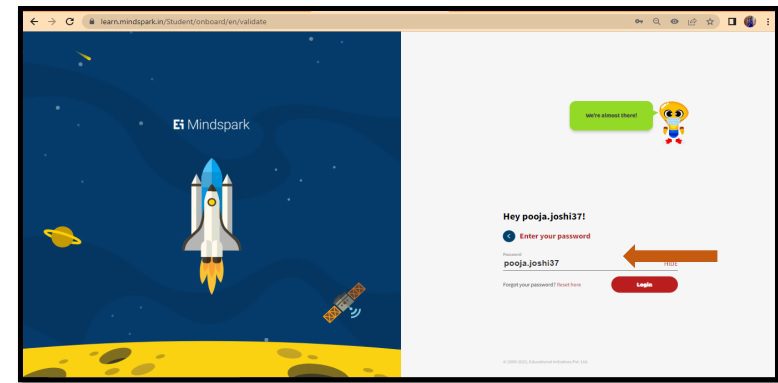
MINDSPARK MATHS- LOGIN GUIDE
1. Use google browser and login with the URL learn.mindspark.in Do not click from here. Type the URL in the browser and click ‘Enter’.
2. You will be led into the Mindspark login page. Enter the username provided by the school.
3. Next enter the password. For first time login, password is the same as the username.
4. Create a new password and re-enter the same.
5. You have logged into the Mindspark Home page. Click on the TOPICS tab.
6. Click onto the TOPICS tab.
7. You can access the topics activated by your teacher for you to practice.
Note: Students will get access to topics once the Teachers activate the topics.
Also Read : https //portal.naan mudhalvan.tn.gov.in/login Portal
How can I change my Ei Mindspark password?
You can follow the below steps to change your password:
1. Visit https://learn.mindspark.in
2. Enter your Ei Mindspark username (received on your registered email/phone number)
3. Click on the “Next” button
4. If you are logging in for the first time, enter the password received on your email/phone number and then proceed to set a password of your choice
5. In case you do not remember your password, click on the link – Forgot your password? Reset here and proceed to choose a password of your choice.
How do I activate topics in Ei Mindspark?
In case you are a school user, the topics will be activated by your teachers.
In case you are an Individual/Retail user, you can log in Ei Mindspark and start using the select topics available for the free trial. To unlock the other topics as well, you need to purchase a subscription
Does Ei Mindspark have an App?
Ei Mindspark Maths is available on an app.
To download on Google Play store, click here
To download on the App Store, click here
Mindspark
Ei Mindspark is a personalised learning software that allows children to effectively advance at their own pace. It helps children improve their skills in Mathematics, English and Science. It allows each student to follow a learning path that is based on their current level and at a pace they are comfortable with.
Ei Mindspark Maths is available for classes 1 to 10 — the classes that focus on developing key mathematical concepts in students. Ei Mindspark English currently focuses on classes 4 to 9 — the classes where students have learned the basics and need to focus on building competence, proficiency, fluency and confidence in the language. Ei Mindspark Science is available for classes 6 to 10 – the classes where students have learned the basics and need to develop robust understanding of concepts and internalise facts and equations as a part of their learning journey.
Also Read : Activate Uber Pro Card
Ei Mindspark Maths is aligned to ICSE, CBSE, International General Certificate of Secondary Education (IGCSE – adopted by countries around the world), Curriculum Assessment Policy Statements (CAPS – adopted by South Africa) and Common Core (adopted by the USA) syllabi. Ei Mindspark English follows national and international standards for literacy and covers the learning objectives described in CBSE, ICSE and Common Core syllabi. Ei Mindspark Science is aligned to ICSE and CBSE.
