
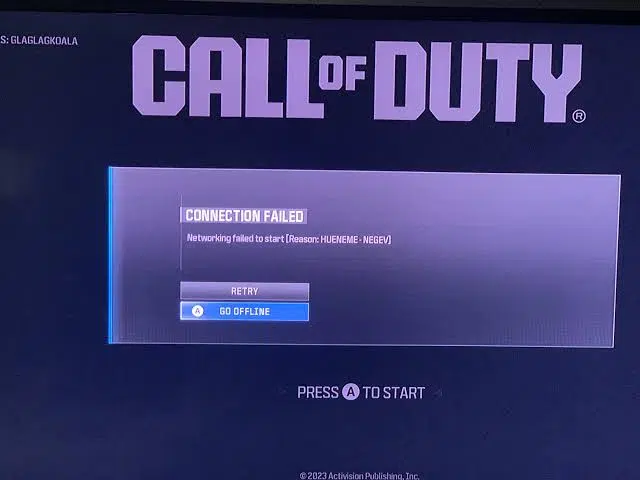
Quick Answer: How to Fix Call of Duty Error Hueneme Negev
The Call of Duty error HUENEME – NEGEV means “Networking Failed to Start.” Your game cannot establish a clean route to Activision’s servers. Fix it immediately with these steps:
- Power-Cycle Your Router: Unplug your router and modem from the wall for 60 seconds, then plug them back in. This is the #1 most successful fix.
- The Mobile Hotspot Trick: Connect your PC or console to your phone’s mobile hotspot. Launch the game and load into the main lobby, then switch back to your home Wi-Fi.
- Change Your DNS: Switch your network’s primary DNS to Cloudflare (1.1.1.1) or Google (8.8.8.8) to bypass ISP routing issues.
- Check Activision Servers: Before changing complex settings, verify that the game servers are actually online and not undergoing maintenance.
There are few things more frustrating than booting up your console or PC for a gaming session with friends, only to be stopped at the title screen. If your game is displaying the message “Networking Failed to Start” followed by the Call of Duty error Hueneme Negev, you are currently experiencing a handshake failure.
This network code is notorious across Warzone, Modern Warfare 3 (MW3), and Black Ops 6. The good news? It is almost never a problem with your expensive PC hardware or console. Instead, your Internet Service Provider (ISP) is struggling to communicate with Activision’s backend data centers. In this guide, we will walk you through the most reliable methods to re-establish your connection and get you back into the lobby.
Why Does the Hueneme Negev Error Happen?
Call of Duty utilizes an always-online architecture. When you launch the game, your device sends a digital “token” to Activision to log you in. The Hueneme Negev error triggers when that token gets lost in transit. The primary culprits include:
- Stale Network Sessions: Your router is holding onto a bad or expired internet session, causing packets to drop.
- ISP Congestion: Your internet provider’s specific route to the Call of Duty servers is experiencing a traffic jam.
- Strict NAT Types: A Strict or Moderate NAT type on your network is actively blocking the ports required for the handshake.
- Stuck Sign-in Tokens: Sometimes, the game client itself bugs out and refuses to refresh your login token until you restart the platform completely.
Sainsbury’s AI Camera Error: Self-Checkout Alerts & Controversies Explained
Step-by-Step Troubleshooting Matrix
Work your way down this list from the fastest, easiest fix to the more advanced network adjustments.
Advanced Fix: Enable UPnP for Open NAT
If you constantly get stuck at the login screen, your router might be blocking Activision’s handshake. Log into your router’s admin panel (usually by typing 192.168.1.1 into your browser). Navigate to “Advanced” or “NAT Forwarding” settings and turn on UPnP (Universal Plug and Play). This allows your game to automatically open the required ports.
Experiencing crashes during gameplay instead of just at login? Read our internal guide on How to Fix Fatal DirectX Errors in Call of Duty. If the servers are down globally, you can track the real-time status on the Official Activision Online Services page.
Related Topics
- “call of duty networking failed to start hueneme negev”
Keyword Intent: Error Identification. Explanation: This is the exact prompt displayed when your game cannot reach the matchmaking servers. Short Answer: It is a networking handshake failure. Reboot your router for 60 seconds to force your ISP to generate a clean connection session. - “hueneme negev error warzone fix ps5”
Keyword Intent: Console Troubleshooting. Explanation: PlayStation users frequently encounter this. Short Answer: Change your PS5 network settings to use a Custom DNS (8.8.8.8 as Primary, 8.8.4.4 as Secondary). You can also try going to settings and restoring your licenses. - “is call of duty down right now hueneme negev”
Keyword Intent: Server Status Check. Explanation: Sometimes this error isn’t your fault at all. Short Answer: If Activision is performing backend maintenance on Warzone or Black Ops 6, millions of players will see this error simultaneously. Check the official server status page before changing your settings. - “how to fix hueneme negev error with mobile hotspot”
Keyword Intent: Specific Workaround. Explanation: A popular bypass trick. Short Answer: Turn on your phone’s cellular hotspot and connect your gaming device to it. Launch CoD. Once you successfully bypass the start screen and enter the lobby, you can switch your connection back to your normal home Wi-Fi. - “does a vpn fix hueneme negev error”
Keyword Intent: Network Routing. Explanation: Wondering if a VPN will clear the roadblock. Short Answer: Usually, having a VPN *on* causes the error by routing you into congested paths. Turn it off. However, if your ISP has a genuinely broken route, turning a VPN on might actually bypass the bad node and fix it. Test both ways.
TL;DR – Quick Summary Guide
- The HUENEME – NEGEV error is a network connection issue preventing you from signing into Activision’s servers.
- The most successful fix is a Full Power Cycle: Unplug your router and modem for 60 seconds.
- If that fails, use the Mobile Hotspot trick to bypass the initial login screen, then switch back to your home internet.
- Always check the Activision Server Status page first, as global outages frequently trigger this exact code.
