
Quick Answer: How to Fix Roblox Origin DNS Error
The Roblox Origin DNS Error (often tied to Cloudflare Error 1016) means your internet service provider cannot resolve Roblox’s server IP address. To fix it immediately:
- Change Your DNS: Switch your PC’s DNS servers to Cloudflare (1.1.1.1) or Google (8.8.8.8).
- Flush Your DNS Cache: Open Command Prompt, type
ipconfig /flushdns, and press Enter. - Use a Free VPN: A VPN forces your connection through a different routing path, bypassing your local ISP’s broken DNS resolution.
- Restart Router: Power cycle your modem and router to clear temporary network glitches.
There are few things more annoying than trying to load into your favorite Roblox experience, only to be stopped by a grey screen stating “HttpError: DnsResolve” or the Roblox Origin DNS Error. Unlike a standard server outage, this error happens entirely on the network level, preventing your computer from translating “Roblox.com” into the numbers needed to connect to the game servers.
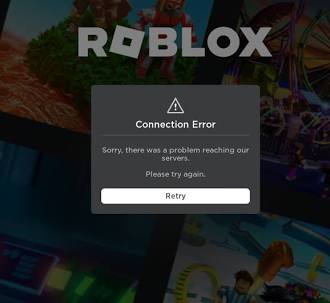
This is often related to a Cloudflare Error 1016, which is the infrastructure Roblox uses to route traffic globally. Whether your ISP is acting up or your local cache is corrupted, we will guide you through the exact steps to restore your connection.
Why Am I Getting a DNS Error on Roblox?
A Domain Name System (DNS) acts as the phonebook of the internet. When you launch Roblox, your PC asks the DNS for Roblox’s exact server location. If that “phonebook” is outdated or blocked, the connection fails. The main culprits include:
- ISP Routing Issues: Your Internet Service Provider’s default DNS servers might be down or struggling to communicate with Cloudflare.
- Stale DNS Cache: Your computer has saved an old, incorrect IP address for Roblox and refuses to look for the new one.
- Network Firewalls: Strict school, work, or third-party antivirus firewalls are actively blocking the DNS resolution for gaming sites.
Step-by-Step DNS Troubleshooting Methods
Follow these proven methods in order. Changing your DNS provider has the highest success rate for permanently resolving this issue.
For deeper insights into how Cloudflare’s public DNS architecture works to speed up gaming connections, you can read the Official Cloudflare 1.1.1.1 Documentation. If you are experiencing other connection failures, be sure to visit our Complete Guide to Fixing Roblox Error Codes.
Top 5 Searches & Keywords Explained
- “Roblox Error 1016 Origin DNS Error”
Keyword Intent: Root Cause Analysis. Answer: Error 1016 is a Cloudflare-specific error indicating that the server proxy cannot resolve the origin server’s DNS records. In Roblox’s case, it means your client cannot connect to the backend game servers. Flushing your DNS is the fastest fix. - “How to change DNS for Roblox on Windows 11”
Keyword Intent: Actionable Steps. Answer: Go to Settings > Network & internet > Wi-Fi (or Ethernet) > Hardware properties > Click ‘Edit’ next to DNS server assignment. Change from Automatic (DHCP) to Manual, toggle IPv4 ON, and enter 8.8.8.8. - “Roblox HttpError: DnsResolve fix”
Keyword Intent: Specific Code Troubleshooting. Answer: This is the exact script error that pops up on your screen during a DNS failure. It is completely localized to your network. Resetting your router and clearing your network cache will usually resolve it. - “Is 1.1.1.1 or 8.8.8.8 better for gaming?”
Keyword Intent: Optimization. Answer: Cloudflare (1.1.1.1) is generally tested to be slightly faster and more privacy-focused than Google (8.8.8.8), making it highly recommended for resolving latency and DNS errors in games like Roblox. - “Roblox Origin DNS error on school Wi-Fi”
Keyword Intent: Bypassing Restrictions. Answer: Educational institutions often block gaming traffic at the DNS level. Using a VPN or changing your device’s DNS to a public resolver is required to bypass this administrative block.
TL;DR – Key Takeaways
- The Origin DNS Error means your computer’s internet provider is failing to translate Roblox’s web address into a connectable IP address.
- The most reliable, permanent fix is manually changing your IPv4 DNS settings to a public provider like Google (8.8.8.8) or Cloudflare (1.1.1.1).
- Running the ipconfig /flushdns command in the Windows terminal clears out corrupted, locally saved connection data.
- If you are playing on a restricted network (like an office or school), activating a VPN is the easiest way to tunnel past the DNS block.
