

Quick Answer: How to Access PSC Thulasi Login My Profile
Logging into your Kerala PSC Thulasi One-Time Registration (OTR) profile is simple. Here is how to access your dashboard immediately:
- Step 1: Visit the official portal at thulasi.psc.kerala.gov.in.
- Step 2: Enter your exact User ID and Password (both are strictly case-sensitive).
- Step 3: Type in the randomly generated Access Code (Captcha).
- Step 4: Click Login to enter your “My Profile” dashboard and view active notifications or download hall tickets.
Securing a government job in Kerala starts with a single, crucial step: mastering the Kerala Public Service Commission (KPSC) Thulasi portal. Whether you are applying for a Secretarial Assistant post, downloading your physical efficiency test admit card, or checking examination results, your entire recruitment journey lives inside the PSC Thulasi Login My Profile dashboard.
Because the platform strictly enforces new rules in 2026—such as mandatory Aadhaar linking and photo validity limits—understanding how to maintain your profile is more critical than ever. Let’s break down everything you need to know about navigating the official KPSC OTR (One Time Registration) portal.
Common KPSC Thulasi Login Issues & How to Fix Them
Users frequently run into roadblocks when trying to apply for a post. If you are stuck on the login screen, here are the most effective fixes:
- “Apply Now” Button is Disabled: In 2026, the KPSC strictly enforces the 10-year photo validity policy. If your uploaded profile photo is from 2016 or earlier, the system will block you from applying. You must upload a recent image with your name and the date printed at the bottom.
- Aadhaar Verification Missing: For Gazetted and Police-category posts, linking your Aadhaar card to your OTR profile is now fully mandatory. Update this in your dashboard to restore functionality.
- Forgot Password / User ID: Do not create a second account (this can lead to permanent debarment!). Use the “Forgot Password” link by providing your User ID, Date of Birth, and Unique ID. Lost your User ID? Send an SMS to the official recovery number or call the KPSC helpdesk.
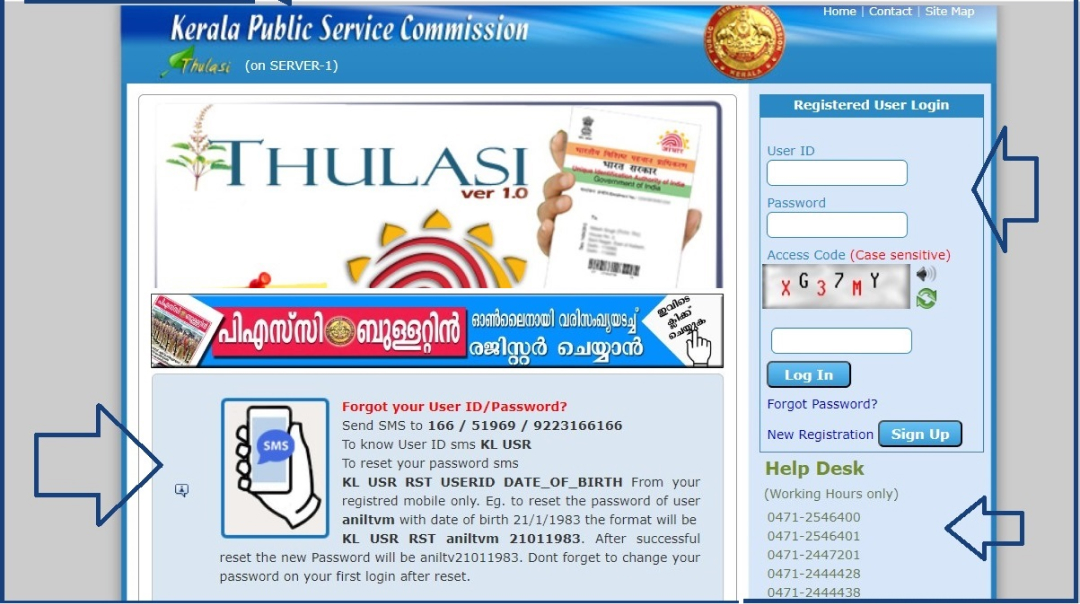
Essential PSC Thulasi Helpdesk Contacts & Updates
If you face technical glitches during the application window, use these official communication channels:
Top 5 Searches & Keywords Explained
- “PSC Thulasi Login My Profile password reset”
Keyword Intent: Recovery. Answer: Candidates often forget their login credentials. By clicking “Forgot Password” on the Thulasi homepage, you can reset it instantly using your User ID, Date of Birth, and the ID proof number (like Aadhaar or PAN) linked to your account. - “Kerala PSC Thulasi Apply Now button not showing”
Keyword Intent: Troubleshooting. Answer: This happens when your profile lacks a mandatory update. Usually, your profile picture has crossed the 10-year validity limit, or you haven’t linked your Aadhaar card for Gazetted positions. Update these to re-enable the button. - “How to download hall ticket from Kerala PSC Thulasi”
Keyword Intent: Navigation. Answer: Once logged into “My Profile,” navigate to the “Admission Ticket” tab. Hall tickets are usually uploaded 10 to 15 days prior to the written exam or physical efficiency test date. - “PSC Thulasi OTR registration login”
Keyword Intent: New User Sign-Up. Answer: OTR stands for One Time Registration. Instead of registering for every single job, candidates create a permanent profile containing their education, physical measurements, and documents. You use this same profile to apply for vacancies till you age out. - “Kerala PSC server down today”
Keyword Intent: Technical Status. Answer: During the final days of major recruitment notifications, the Thulasi portal often experiences heavy traffic. If the portal times out, attempt to log in during off-peak hours (late night or early morning) or clear your browser cache.
TL;DR – Key Takeaways
- One Profile for Life: Your Kerala PSC Thulasi “My Profile” is a permanent One Time Registration (OTR) hub used for all state recruitment applications.
- Keep Data Fresh: Ensure your profile picture is less than 10 years old, and your Aadhaar is linked to prevent your application access from being disabled.
- Secure Login: Both User ID and Passwords are case-sensitive. Double-check caps lock before logging in.
- Support is Available: If you lose your User ID or Password, do not make a fake secondary profile. Recover it via the official SMS facility or call the KPSC helpline at 0471-2546400.
