
The Hulu error code P-DEV313 is a playback failure that occurs when your device cannot successfully communicate with Hulu’s servers.
- Check the Servers: Before you troubleshoot your own TV, check Downdetector to see if Hulu is experiencing a widespread outage. If servers are down, you just need to wait.
- Disable VPNs & Ad-Blockers: Hulu aggressively blocks traffic from VPNs and proxies. Turn them off, as they are the most common cause of the P-DEV313 error.
- Power Cycle Your Setup: Unplug your smart TV (or streaming stick) and your Wi-Fi router from the wall for 60 seconds. This clears corrupted network caches that block streaming handshakes.
You finally have time to sit down and catch up on your favorite show, but instead of the opening credits, you are greeted by a bleak screen reading, “We’re having trouble playing this.” Getting hit with the Hulu error code P-DEV313 is incredibly frustrating, especially when your internet seems to be working fine for everything else.
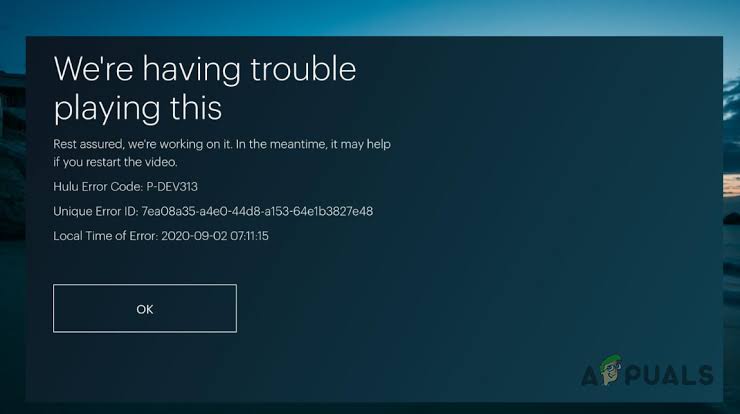
Unlike buffering issues, the P-DEV313 error is a specific communication roadblock. Your app is trying to request the video file, but Hulu’s servers are either rejecting the request or the connection is timing out. Fortunately, whether the issue is a strict network firewall on your end or a temporary glitch on Hulu’s end, this error is highly fixable. Below, we break down exactly how to restore your connection and get back to binge-watching.
Identifying the Cause of Error P-DEV313
Because this error stems from a failed server connection, you need to figure out where the connection is breaking. Usually, it boils down to one of the following roadblocks:
- VPN or Proxy Interference: Hulu’s geo-blocking systems are very strict. If it detects a VPN, it will immediately halt playback and throw this error.
- Corrupted Local Cache: Smart TVs and devices like Roku or Firestick store temporary files (cache) to load apps faster. If this data becomes corrupted, the app cannot authenticate your session.
- Browser Extensions: If you are watching on a PC or Mac, aggressive ad-blockers (or privacy-focused browsers like Brave) can block the tracking scripts Hulu requires to play video.
Step-by-Step Troubleshooting Guide
If Hulu’s servers are officially up and running, follow this troubleshooting matrix to resolve the problem on your local network.
| Troubleshooting Step | Why It Works | How to Do It |
|---|---|---|
| 1. Disable VPNs/Proxies | Restores your direct ISP connection, satisfying Hulu’s strict geo-location and copyright enforcement requirements. | Open your VPN app and disconnect. If built into your router, access your admin panel and disable the VPN tunnel. |
| 2. Clear App Cache | Deletes old, corrupted login tokens that are causing the app to fail during the server handshake. | Go to your device’s Settings > Apps > Hulu > Clear Cache. (On Roku, use the remote sequence to clear cache). |
| 3. Restart Router & Device | Flushes temporary memory and forces your TV to establish a fresh IP address connection with your router. | Unplug both your TV/streaming stick and your Wi-Fi router from power for 60 seconds. Plug the router in first. |
Special Considerations for PC & Mobile Users
If you are getting the P-DEV313 error on a laptop rather than a TV, the culprit is almost always your web browser. Extensions like uBlock Origin, Privacy Badger, or Ghostery can inadvertently block the specific domains Hulu uses to deliver video content. Try opening an “Incognito” or “Private” window. Because extensions are usually disabled in private browsing, if Hulu works there, you know an extension is causing the conflict.
For mobile users, switching from Wi-Fi to cellular data can quickly diagnose if the issue is tied to your home network’s DNS. If you frequently experience network drops across multiple streaming platforms, you might want to check out our guide to optimizing Smart TV network connections. If the problem persists for days, it is highly recommended to reach out to the official Hulu Help Center, as your account may need to be refreshed on the backend.
TL;DR Summary
- The Hulu error code P-DEV313 is a network playback error meaning your device cannot communicate with Hulu’s servers.
- Always start by checking Downdetector; if Hulu is experiencing a widespread outage, troubleshooting your TV will not help.
- Disable all VPNs, proxy servers, and ad-blockers, as Hulu will block video playback if it detects masked IP addresses.
- Perform a hard reset by unplugging your TV and your Wi-Fi router from the wall for 60 seconds to clear network caches.
- On PCs, try streaming from an Incognito window to bypass interfering browser extensions.
