
The Scotiabank error code 503 (Service Unavailable) almost always indicates a server-side problem. It means Scotiabank’s servers are either overwhelmed with traffic or undergoing scheduled maintenance.
- Check for Outages: Before troubleshooting, check sites like DownDetector or the official Scotiabank Help Twitter account.
- Wait it Out: Since this is a server error, the most effective solution is to wait 15-30 minutes and try logging in again.
- Clear Cache/Toggle Network: If the servers are up but you’re still stuck, clear your app cache or toggle between Wi-Fi and cellular data to force a fresh connection.
Trying to pay a bill or check your balance, only to be met with the dreaded Scotiabank error code 503? It is a frustrating experience, especially when you need access to your funds immediately. Unlike errors that indicate you’ve typed your password incorrectly, a 503 error message essentially means, “It’s not you, it’s us.”
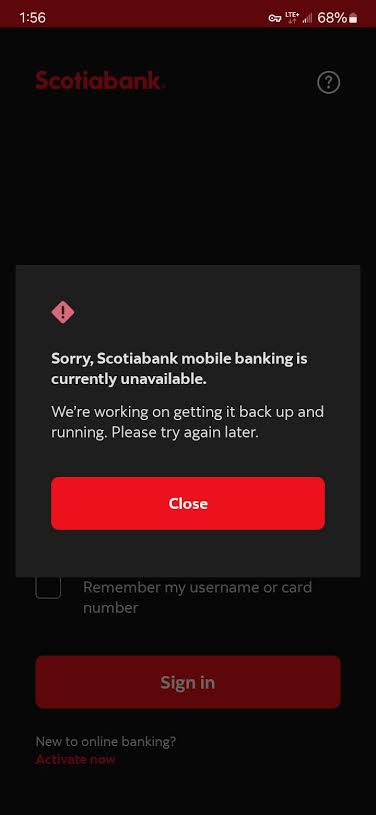
This error can occur on both the Scotiabank mobile app and the desktop online banking portal. In this guide, we will break down exactly what this HTTP status code means in the context of banking, why it happens, and what limited steps you can take to bypass it.
What Does the 503 Service Unavailable Error Mean?
In web terminology, an HTTP 503 status code means “Service Unavailable.” When the Scotiabank app throws this error, it is telling you that the server hosting your account information is temporarily unable to handle your login request.
- Scheduled Maintenance: Banks frequently update their backend systems during off-peak hours (usually late night/early morning on weekends). During these windows, the servers are intentionally taken offline.
- Server Overload: If there is a massive spike in users trying to log in simultaneously (for example, on the 1st or 15th of the month when direct deposits hit), the server may become overwhelmed and drop connections.
- Unexpected Outages: Sometimes, things just break. A misconfigured database or a failing server node can trigger localized 503 errors.
FabFitFun Not Working? Check If the Site is Down & Fix Customization Errors
How to Troubleshoot When You Can’t Log In
Because a 503 error is a server-side problem, you cannot fix the root cause yourself. However, sometimes your device caches a bad connection state. Here is what you can do to ensure the problem isn’t sticking around locally:
| Action | Why It Might Work | How to Do It |
|---|---|---|
| Toggle Airplane Mode | Forces your phone to establish a brand-new connection to the network and DNS servers. | Turn on Airplane mode for 10 seconds, then turn it off and retry the app. |
| Clear App Cache (Android) | Removes corrupted temporary files that might be trying to load an old, cached error page. | Settings > Apps > Scotiabank > Storage > Clear Cache. |
| Switch to Desktop | Sometimes the mobile API server is down, but the main web portal is still functioning. | Try logging in via a browser on your PC or Mac instead of the phone app. |
When Will It Be Fixed?
If you have tried the steps above and are still seeing the 503 error, you must wait for Scotiabank’s IT team to resolve the server issue. Maintenance windows usually last between 2 and 4 hours. If it is an unexpected outage during the day, it is typically resolved much faster as it is deemed a critical incident.
If you are experiencing connection issues across multiple apps and not just Scotiabank, the problem might be your local network configuration. You can review our guide on general network troubleshooting to ensure your router isn’t blocking secure traffic.
TL;DR Summary
- The Scotiabank error code 503 means “Service Unavailable,” indicating a problem with the bank’s servers, not your account.
- It is most commonly caused by scheduled late-night maintenance or a sudden surge in login traffic overwhelming the system.
- You cannot fix a true 503 error on your end; you must wait for Scotiabank to restore server functionality.
- You can try switching from Wi-Fi to cellular data, clearing your app cache, or logging in via a desktop browser to bypass potential local caching issues.
