
If you’re staring at “Error running remote compact task: Selected model is at capacity. Please try a different model,” you’re not alone — and it’s not something broken on your end. Here’s what’s actually happening and how to get back to work in the next two minutes.
⚡ Quick Answer
This error means the AI model you selected (usually inside OpenAI Codex) has hit a temporary capacity or rate limit on OpenAI’s servers while trying to compact or run your session — it is not a bug in your project or your account. Click “Try Again,” manually switch to a different available model from the model picker, or wait 5-10 minutes and retry. If it keeps happening across many users at once, it is almost always a server-side capacity event, not something you caused.
📋 TL;DR
- The error fires when a specific model (not your whole account) is temporarily overloaded on OpenAI’s backend.
- It shows up most often during the “compact” step, which compresses long conversation context.
- Switching models or retrying after a short wait resolves it in the large majority of cases.
- Recurring capacity errors on a specific model are usually tied to demand spikes right after new model releases.
- Your work and context are not lost — a failed compact just needs to be re-run or done manually.
What Does “Selected Model Is at Capacity” Actually Mean?
This error is most commonly reported inside OpenAI Codex — the desktop app, VS Code extension, and CLI — though similar “at capacity” messages appear across other AI tools when a specific model’s inference capacity is temporarily saturated. It usually surfaces during a “remote compact” task, which is the background process that summarizes and shrinks a long conversation so it fits back inside the model’s context window.
In plain terms: your request reached OpenAI’s servers, found the specific model queue full, and got turned away with a message telling you to pick a different model rather than silently failing or hanging. That’s actually useful — it’s an explicit signal, not a generic timeout.
Why This Happens
- Demand spikes on one model: When a specific model (say, a newly released GPT version) gets a surge of simultaneous requests, its capacity pool fills up faster than less popular models.
- Compact tasks are resource-heavy: Compacting a long session requires the model to re-read and summarize a large amount of context, which competes for the same limited inference slots as regular requests.
- Regional or time-of-day load: Capacity pressure often clusters around peak usage hours in major time zones.
- Short-lived backend incidents: Occasionally this is tied to a broader, temporary service disruption rather than routine load.
How to Fix It: Step-by-Step
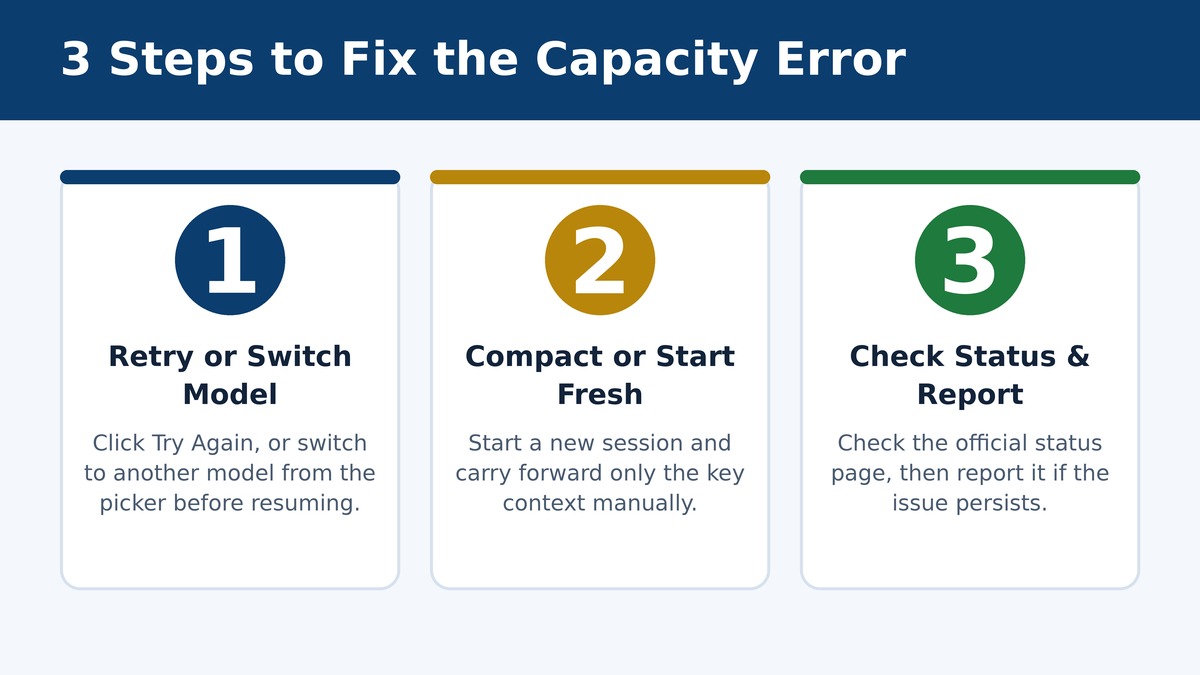
Work through these in order. Most people are unblocked at step 1 or 2.
| Step | What To Do | Why It Works |
|---|---|---|
| 1. Retry immediately | Click “Try Again” on the error, or re-run the same command a few seconds later. | Capacity pools refill within seconds as other requests complete. |
| 2. Switch models manually | Open the model selector and pick an alternate available model before resuming. | Different models draw from separate capacity pools, so an overloaded one doesn’t affect others. |
| 3. Start a fresh session | If compaction keeps failing on a long thread, begin a new session and paste in only the key context. | Avoids repeatedly triggering the resource-heavy compact step that is failing. |
| 4. Wait 5-10 minutes | Step away and retry after a short cooldown, especially during known peak hours. | Most capacity errors clear on their own once the demand spike settles. |
| 5. Update the app/CLI | Make sure you’re on the latest Codex app, extension, or CLI version. | Newer releases often include better retry and backoff handling for exactly this error. |
| 6. Check status & report it | Check the official OpenAI status page; if it’s an active incident, report your case with details for tracking. | Confirms whether it’s a known, wider issue rather than something local to your setup. |
Is This Your Problem or an OpenAI-Side Issue?
Community reports on the OpenAI developer forum and GitHub’s Codex issue tracker show this error appearing repeatedly across many unrelated users and setups within the same short windows, which is a strong signal of server-side capacity pressure rather than an individual account or configuration fault.
| Signal | Likely Cause |
|---|---|
| Error clears after switching models | One model’s capacity pool was full — server-side, not your account. |
| Error persists on every model you try | Possibly a broader outage — check the status page before troubleshooting further. |
| Only happens on very long sessions | The compact task itself is resource-heavy; break sessions up sooner. |
| Others online report the exact same message right now | Confirmed community pattern — treat it as a temporary capacity event, not a personal issue. |
How to Prevent It Going Forward
- Compact or start new sessions proactively before a conversation gets extremely long, instead of waiting until the app forces a compact.
- Keep a secondary model in mind as a fallback so you can switch instantly instead of troubleshooting mid-task.
- Avoid running your heaviest, most context-hungry tasks during known peak hours if you can schedule around it.
- Keep your Codex app, browser extension, or CLI updated, since retry and backoff behavior for this exact error has been actively improved in recent releases.
Frequently Asked Questions
Does this error mean I lost my conversation or work?
No. The failure happens at the compact/request step, not to your saved history. Your prior messages remain intact; you simply need to retry the action or continue in a new session.
Is “selected model is at capacity” the same as a rate limit error?
They’re related but not identical. A rate limit is tied to your account’s usage allowance, while a capacity error reflects overall demand on a specific model’s infrastructure at that moment, regardless of your personal usage.
Why does this happen specifically during “remote compact” tasks?
Compacting a long session asks the model to process and summarize a large amount of context at once, which is more resource-intensive than a typical short exchange, making it more likely to hit a capacity ceiling during busy periods.
Will this get permanently fixed?
OpenAI’s engineering team has discussed adding an interactive recovery picker and better automatic retry/backoff handling for this exact error class in the Codex app, which should reduce how often users see it directly.
Related reading: check our live AI tool outage tracker for real-time status, and browse our full tech error fixes hub for more AI and software troubleshooting guides.
Sources: OpenAI Developer Community thread, OpenAI Codex GitHub issue tracker.
