
Last updated: July 16, 2026 | Reviewed by Freddy John, Editor
Quick answer
Wattpad error 131 shows up in two common ways. On the Android or iOS app, it usually appears as “The operation couldn’t be completed (WPNetworkErrorDomain error 131),” a connection problem between the app and Wattpad’s servers. On the web, while saving or uploading a story, it often points to an unsupported image format, since Wattpad only accepts gif, jpeg, jpg, or png images. Start by checking status.wattpad.com, then work through the app-side fixes below.
TLDR: Wattpad error 131 in brief
- In the mobile app, it is usually a WPNetworkErrorDomain connection error affecting login, loading, or syncing.
- On the web, it often appears while saving or uploading a story, commonly linked to an unsupported image format.
- Wattpad’s own Help Center confirms it only accepts gif, jpeg, jpg, or png images for stories and covers.
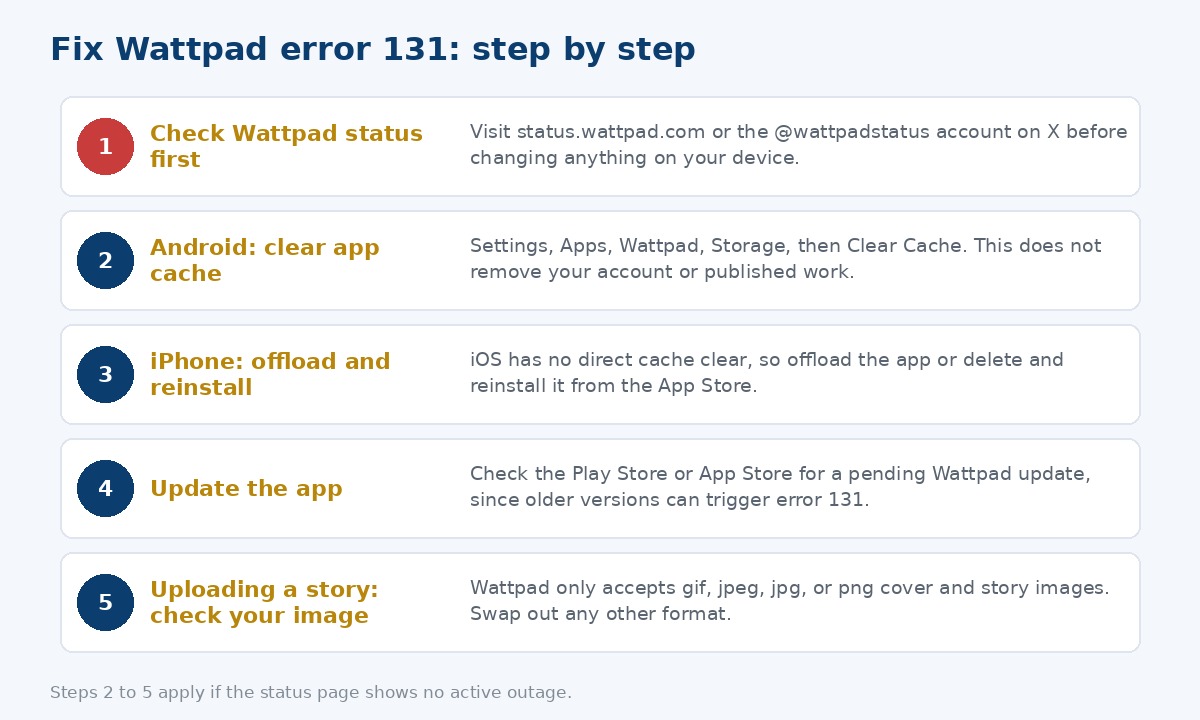
- Always check status.wattpad.com or the @wattpadstatus account on X before troubleshooting your device.
- Clearing cache, updating the app, and reinstalling resolve most app-side cases.
- If you are mid-upload, save your draft in a separate document first so you do not lose your work.
On this page
What Wattpad error 131 means
Wattpad’s own Help Center article on error messages explains that errors on the platform can come from bugs, connection issues, server issues, or messages that simply describe how a feature works. It does not publish one single official definition tied only to the number 131, so what follows is based on Wattpad’s documented error categories together with consistent, widely reported user experience.
The two most common versions of this error
- Mobile app (Android or iOS): a popup reading “The operation couldn’t be completed. (WPNetworkErrorDomain error 131)” that blocks login, loading your library, or syncing.
- Web, while saving or uploading: a message like “An error occurred. Please try again later. (Error code: 131),” frequently reported alongside an image in an unsupported format.
- Both point back to the same underlying idea in Wattpad’s own documentation: the app or site could not complete a request, either because of a connection or server issue, or because something in your upload does not meet Wattpad’s requirements.
Also Read : CE-35659-8 PlayStation Error
Why it happens
- A weak or fluctuating WiFi or mobile data connection.
- Outdated or corrupted app cache data on your device.
- Running an older version of the app that is out of sync with Wattpad’s current servers.
- Temporary server load or maintenance on Wattpad’s side.
- An in-story or cover image that is not a gif, jpeg, jpg, or png file.
- In some regional reports, a specific mobile carrier having trouble reaching Wattpad’s servers.
Is Wattpad down right now
Before clearing caches or reinstalling anything, rule out a server-side issue first.
- Check the official Wattpad Status page, which tracks site-wide platform issues across the app and web.
- Follow the @wattpadstatus account on X for real-time updates during wider outages.
- Note that the status page covers major, site-wide problems. A single-account or single-device issue, like a bad image format on your own story, will not show up there.
Note: if Wattpad’s own status page shows an active incident, no troubleshooting on your device will fix error 131. Wait for Wattpad to resolve it, and save any unpublished writing elsewhere in the meantime.
How to fix it by platform
| Platform | What to try |
|---|---|
| Android | Settings, Apps, Wattpad, Storage, Clear Cache, then Clear Data if the issue continues. Check the Play Store for an update. |
| iPhone / iPad | Offload the app from Settings, General, iPhone Storage, or delete and reinstall it. Check the App Store for an update first. |
| Web browser | Log out and back in, clear your browser cache, and confirm any images you are uploading are gif, jpeg, jpg, or png. |
| Any platform | Switch between WiFi and mobile data, restart your router, and restart your device to rule out a local connection issue. |
If it happens while saving or uploading a story
Wattpad’s Help Center specifically documents an “Image is in an unsupported format” error for story uploads and updates, and confirms the platform only accepts images formatted as gif, jpeg, jpg, or png.
- Check the format of your cover image and any images inside the chapter, and remove or convert anything that is not gif, jpeg, jpg, or png.
- If there is no image involved at all and the error still appears, it is more likely a temporary server issue rather than a formatting problem.
- Before retrying, copy your unsaved text into a separate document so a failed save does not cost you your work.
- If the problem is limited to one specific chapter or image, try uploading a different chapter to see if the error follows you or stays with that one file.
Frequently asked questions
What does Wattpad error 131 mean?
Most often it is a WPNetworkErrorDomain connection error in the mobile app, or a save and upload error on the web frequently linked to an unsupported image format. Wattpad’s Help Center documents these general categories without a single official explanation tied only to the number 131.
Is Wattpad down if I see error 131?
Not necessarily. Check the official Wattpad Status page before assuming a full outage, since a weak connection or outdated app can also cause it.
How do I fix Wattpad error 131 on Android?
Clear the app cache through Settings, Apps, Wattpad, Storage, Clear Cache, make sure the app is updated, and restart your device.
How do I fix Wattpad error 131 on iPhone?
Offload or reinstall the app from the App Store, and make sure you are on the latest version.
Why does error 131 happen when I upload or save a story?
It is frequently linked to a cover or in-story image that is not gif, jpeg, jpg, or png, which is the accepted format range confirmed in Wattpad’s own Help Center.
For a live view of Wattpad’s current uptime, browse our full App Errors section for more troubleshooting guides. For Wattpad’s own documentation, see their official error messages help article.
