
Last updated: July 16, 2026 | Reviewed by Freddy John, Editor
Quick answer
Fortnite matchmaking error #1 shows Epic Games’ own message: “Weird, we couldn’t connect to the match.” Epic says this is mainly caused by server maintenance or a network connection issue. Before changing any settings, check status.epicgames.com to see if it is a server-side problem. If the status page is clear, a restart, a file verification, and a manual region switch fix most cases within minutes.
TLDR: Matchmaking error #1 in brief
- Official Epic Games wording: “Weird, we couldn’t connect to the match.”
- Epic attributes it mainly to server maintenance or network issues, not a fixed bug.
- Fortnite is currently on Chapter 7 Season 3, Runners, which began June 6, 2026 and runs through August 19, 2026.
- New content updates, including today’s scheduled patch, tend to bring error spikes as player volume surges.
- Always check status.epicgames.com before troubleshooting your own device or network.
- If Epic’s status page is clear, restart, verify files, and try a manual matchmaking region.
On this page
What matchmaking error #1 means
Per Epic Games’ own Fortnite Battle Royale support page, matchmaking error #1 displays the message: “Weird. We couldn’t connect to the match. You can try again, but if the problem continues, check our status page.” Epic explains that matchmaking errors like this one are, in their words, mainly caused by a server maintenance or a network connection issue.
Important points to remember
- The error can appear in both Battle Royale and Creative mode queues.
- It is a generic connection failure code, not a description of the exact root cause on your end.
- Epic’s own guidance is to try again first, then check the status page if it repeats.
- It is different from error #2, which is usually a content or eligibility issue, and error #3, which specifically means matchmaking queues are full.
Also Read : Wattpad Error 131
Why you might see it today
Fortnite is currently in Chapter 7 Season 3: Runners, which launched on June 6, 2026 and is scheduled to run through August 19, 2026. Epic Games’ published 2026 content roadmap also lists a patch, version 41.20, targeted for release on July 16, 2026, the same day this guide was last updated.
Community reports across previous Fortnite updates have repeatedly linked spikes in matchmaking error #1 to the hours right after a major patch goes live, since large numbers of players attempting to queue at once puts extra load on matchmaking servers, even when Epic has not declared a formal outage. If you are seeing the error shortly after a new update or patch note drops, this kind of temporary load spike is one of the more common explanations.
Is Fortnite down right now
Before changing any settings on your own device, rule out a server-side issue first.
- Check the official Epic Games Public Status page for any active incident affecting sessions, matchmaking, or lobbies.
- Follow the official Fortnite Status account on X for real-time updates during widespread outages.
- Note that Epic has also scheduled routine maintenance windows for Epic Online Services this season, during which matchmaking is temporarily unavailable by design, not because of a bug.
- You can also check our own Fortnite server status tracker for a quick community-reported view alongside the official status.
Note: if the official Epic Games status page shows an active incident affecting sessions or matchmaking, no troubleshooting on your device will fix matchmaking error #1. Wait for Epic to resolve it on their end.
How to fix matchmaking error #1
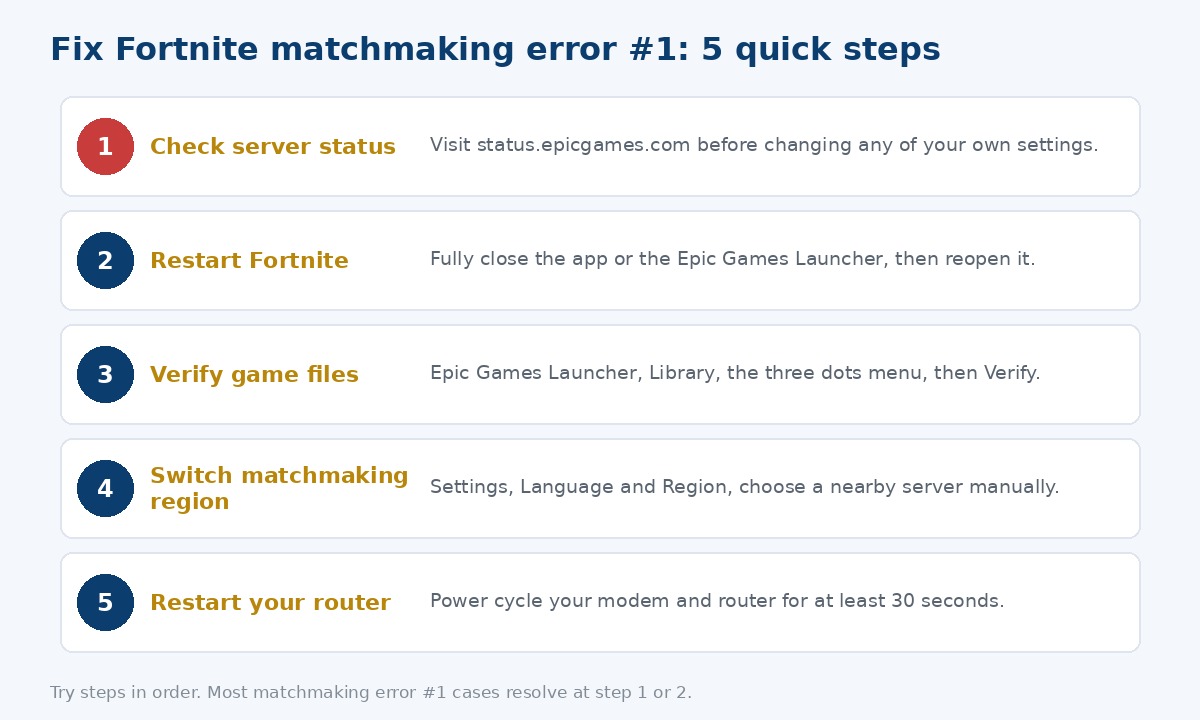
If Epic’s status page shows everything operational, work through these steps in order.
| Step | What to do | Why it helps |
|---|---|---|
| 1. Restart Fortnite | Fully close the app or Epic Games Launcher, then reopen it | Clears a stale connection handshake with the matchmaking service |
| 2. Verify game files | Epic Games Launcher, Library, the three dots menu, then Verify | Repairs files that may have been corrupted during a recent update |
| 3. Switch matchmaking region | Settings, Language and Region, choose a nearby server manually | Routes you away from a specific node that may be having issues |
| 4. Check custom matchmaking key | Mode selection screen, Custom Key, clear the field if one is entered | A leftover key can restrict you from public matchmaking queues |
| 5. Restart router and modem | Power cycle both for at least 30 seconds | Clears a stale local network connection to Epic’s servers |
Error #1 vs error #2 vs error #3
Epic Games groups these under the same support article since they are all matchmaking failures, but each points to a different likely cause.
| Error | Epic’s message | Likely cause |
|---|---|---|
| #1 | Weird, we couldn’t connect to the match | General server or network connection issue |
| #2 | Trouble connecting to content beacon service, or no permission to play this content | Content service hiccup, or trying to join a tournament you are not eligible for |
| #3 | Looks like all the Battle Buses headed out are full | Matchmaking queues are at capacity, usually resolves in a few minutes |
Frequently asked questions
What does Fortnite matchmaking error #1 mean?
Epic Games’ own support page shows the message “Weird, we couldn’t connect to the match” for this error, and attributes it mainly to server maintenance or a network connection issue.
Is Fortnite down today because of matchmaking error #1?
Not necessarily. It can reflect a genuine Epic Games server issue, or a local network hiccup, an outdated game version, or heavy player load right after an update. Check status.epicgames.com first.
Why am I getting this error more often after a Fortnite update?
New patches bring large numbers of players online at once, increasing load on matchmaking servers. Spikes in error #1 have repeatedly been reported in the hours right after major updates.
What is the fastest fix for matchmaking error #1?
Check the status page first. If there is no reported outage, restart Fortnite, verify game files, and try a manual matchmaking region.
Is matchmaking error #1 the same as error #2 or #3?
No. Error #1 is a general connection failure, error #2 usually points to a content or eligibility issue, and error #3 specifically means matchmaking queues are full.
For a live view of Fortnite’s current uptime, see our Fortnite server status tracker, or browse our full Gaming Errors section for other Epic Games troubleshooting guides. For the official word, see Epic’s own matchmaking error support article.
