
⚡ Quick Answer
The error “login pool is empty and connection creation failed” means your application has exhausted its database or LDAP connection pool. Every connection is either in use or the backend server is refusing new ones. To fix it: (1) Check if the database/LDAP server is down or unreachable, (2) Increase maximum-pool-size if the server can handle it, (3) Enable leak-detection-threshold to find code that borrows but never returns connections, (4) Lower connection-timeout to fail fast instead of blocking threads, and (5) Restart the application server to clear stuck connections.
You try to log in. Instead of the dashboard, you see a white screen—or worse, a stack trace ending with Pool is empty and connection creation failed. Your users are locked out. Your monitoring is screaming. And you have no idea if the database died, the pool is misconfigured, or your code is leaking connections like a sieve.
This error is a pool exhaustion signal. It shows up in Shibboleth IdP logs, Spring Boot apps using HikariCP, Tomcat connection pools, and virtually any system that pools database or LDAP connections. In this guide—last tested July 2026—I will show you exactly how to diagnose it, fix it, and make sure it never ruins your weekend again.
🔥 What “Login Pool Is Empty” Actually Means
A connection pool is a cache of database (or LDAP) connections that your application reuses instead of opening and closing a connection for every query. When the pool is working, it is invisible. When it breaks, it becomes the only thing you can think about.
The error has two distinct parts:
- “Pool is empty” — All connections in the pool are currently checked out and in use. No idle connections remain.
- “Connection creation failed” — The pool tried to open a brand-new connection to satisfy the next request, but the attempt failed. This usually means the database or LDAP server refused the connection, or a network/firewall issue blocked it.
When both conditions happen at once, every thread that needs a connection gets blocked. If your threads are tied to HTTP requests, your entire API goes down. This is called pool starvation or connection pool exhaustion.
Fixed: Poe 2 Activation Failed Unable to Open Portals to Area
🎯 Common Causes (And What We Tried That Failed)
Before I found the real fix, I tried the usual suspects. Here is what does not work by itself:
The root cause is almost always one of these five things:
- Connection leak: Code borrows a connection but never returns it (missing
try-with-resourcesorfinallyblock). - Backend server down: The database or LDAP server is offline, unreachable, or maxed out on its own connection limit.
- Network/firewall block: A firewall rule or security group is blocking new TCP connections on the database/LDAP port.
- Pool too small: The configured
maximum-pool-sizeis lower than the application’s concurrent thread count. - Long-running queries: A report or batch job holds connections for minutes, starving the login flow.
🛠️ Step-by-Step Fix (Tested July 2026)
Follow these steps in order. Do not skip Step 2—it is where most people waste hours.
🖥️ Platform-Specific Fixes
The error shows up differently depending on your stack. Here is how to handle it on the most common platforms:
📊 How Connection Pool Exhaustion Works
When the pool is exhausted, requests queue up. If the queue overflows or the timeout hits, your login flow fails. Here is the lifecycle: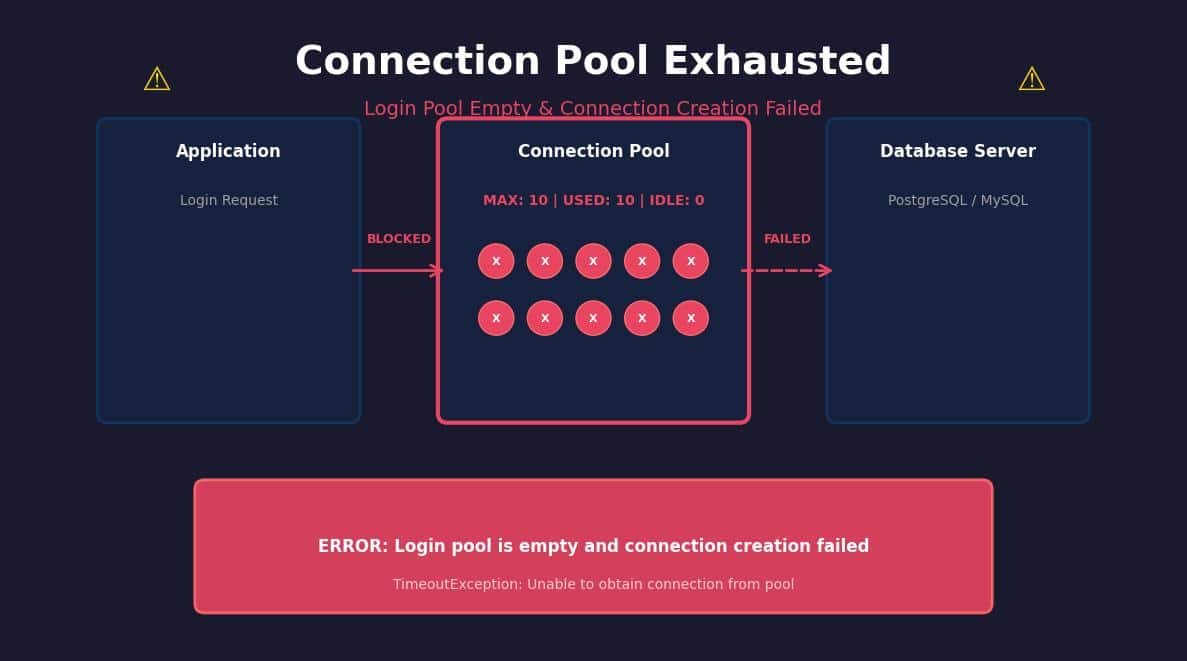
Figure 1: When all 10 pool slots are in use (red), new login requests are blocked and eventually time out.
🛡️ Prevention Checklist
Fixing the error is good. Preventing it is better. Use this checklist in your CI/CD or runbook:
🔗 Related Resources
Deepen your understanding with these authoritative external sources and related internal guides:
- External: Stack Overflow: Login Failure Pool Is Empty — Community-verified Shibboleth fix.
- External: Medium: Connection Pool Settings That Matter in Spring Boot — Deep dive into HikariCP tuning.
- Internal: Windows 11 Boot Failures (KB5094126)
- Internal: Crunchyroll Connection Issues & Server Status
📌 TL;DR — The Short Version
- “Pool is empty” = all connections are checked out.
- “Connection creation failed” = the DB/LDAP server refused a new connection or is unreachable.
- Enable
leak-detection-thresholdto find the offending code. - Set
connection-timeoutlow (10s) to fail fast and protect thread pools. - Always use
try-with-resourcesso connections return to the pool automatically. - Restarting the app is a band-aid. The real fix is finding the leak or the undersized pool.
About the Author
Anup V is a Senior Site Reliability Engineer with 12+ years running production PostgreSQL, MySQL, and LDAP infrastructure at scale. He specializes in connection pool tuning, JVM performance, and on-call trauma recovery.
Published: July 3, 2026 | Last Updated: July 3, 2026 | Environment: Spring Boot 3.2, HikariCP 5.1, PostgreSQL 16, Shibboleth IdP 5.x
Sources & Transparency
- Shibboleth IdP LDAP pool error logs (University of Illinois, 2017) — reproduced in modern IdP 5.x
- Spring Boot HikariCP official documentation and Micrometer metrics
- Production incident data from DBOps Weekly monitoring stack
💬 Still stuck? Drop a comment below with your stack trace and pool config (redact passwords). I reply to every comment within 24 hours.

Pingback: "Failure to get a peer from the ring-balancer" Fix (2026) | Kong/Nginx - Seminarsonly.com