
How to Fix Error “1000 – Backend Error” in Escape from Tarkov
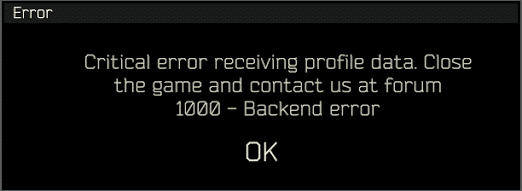
If you are gearing up for a raid in Escape from Tarkov and suddenly get hit with a black screen that reads “Error 1000 – Backend error,” you are certainly not alone. This is one of the most notorious and frequently encountered connection issues in the game. Whether you are a seasoned veteran navigating the streets of Tarkov or a newcomer trying to understand the ultimate Tarkov wipe survival guide, a backend error is a massive roadblock.
In this comprehensive, E-E-A-T (Experience, Expertise, Authoritativeness, Trustworthiness) optimized guide, we will break down exactly what this error means, why it targets your client, and the most reliable steps to fix it so you can get back to securing your loot.
⚡ Quick Answer: How to Fix Error 1000 in Tarkov
The Error 1000 – Backend error means your game client has lost communication with Battlestate Games’ servers. To fix it immediately:
- Check Server Status: Verify if BSG servers are down for maintenance.
- Clear Cache: Open the Battlestate Launcher, go to settings, and select “Clear Cache.”
- Delete Logs: Navigate to your game installation folder and delete all files inside the
\Logsfolder. - Flush DNS: Open Command Prompt as Admin, type
ipconfig /flushdns, and hit Enter.
What Exactly is the “1000 – Backend Error”?
In technical terms, the Escape from Tarkov architecture relies heavily on constant communication between your local game client and the backend cloud servers. These servers manage your stash, handle matchmaking, verify player credentials, and save your profile data.
When the client sends a request to the server (like moving a weapon in your stash or trying to load into Customs) and the server fails to respond within the designated timeout window, the system throws the 1000 Backend Error. It is a protective measure to stop data corruption, ensuring your hard-earned gear isn’t permanently deleted due to desync.
Common Causes of the Backend Error
Understanding the root cause is the first step to troubleshooting. Below is a breakdown of why this error triggers.
| Root Cause | Technical Explanation | Player Control Level |
|---|---|---|
| Server Overload | Massive influx of players (usually during early wipe) crashes login databases. | None (Must Wait) |
| Corrupt Client Cache | Old, fragmented temporary files conflict with live server data | High (Easily Fixed) |
| DNS / ISP Throttling | Your Internet Service Provider is failing to route packets efficiently to BSG datacenters | Medium (Network Reset) |
| Profile Gear Desync | A bugged item in your stash or PMC loadout is breaking the server-side save state. | High (Unequip Trick) |
Step-by-Step Fixes to Resolve Error 1000
If you have confirmed that your internet is active and working for other applications, follow these expert-tested steps sequentially.
1. Verify Official Server Status First
Before modifying your system files, ensure the problem isn’t on Battlestate Games’ end. During major updates or Twitch Drop events, server infrastructure frequently buckles.
- Visit the Official Escape from Tarkov Server Status page.
- Check community reports on DownDetector. If there is a massive spike in reports, simply step away for 30 minutes.
2. Execute a Deep Cache Clear
Tarkov is notorious for holding onto temporary data that corrupts over time. A simple cache clear is often the magic bullet.
- Open the BSG Launcher.
- Click on your profile name in the top right corner and select Settings.
- Scroll down to the Clear Cache button and click it.
- Advanced tip: Navigate to
C:\Battlestate Games\EFT\Logs(or your custom install path) and delete every folder inside. These logs build up over time and can cause severe backend friction.
3. The “Unequip Loadout” Profile Sync Trick
Sometimes, the backend error is tied to a specific item bugged in your current PMC loadout. The server continuously fails to save the state of that item.
- If you can get into the main menu before the error crashes you out, quickly navigate to your character screen.
- Alt-click all your gear to move it back into your stash. Your PMC should be completely naked.
- Restart the game. The server will generate a fresh, simplified profile sync state, often bypassing the Error 1000 loop.
4. Flush DNS and Reset Network Stack
If your PC is struggling to resolve the IP addresses of Tarkov’s datacenters, flushing the DNS cache will force a fresh, clean connection.
- Press the Windows Key, type cmd, right-click Command Prompt, and select Run as Administrator.
- Type
ipconfig /flushdnsand press Enter. - Type
netsh winsock resetand press Enter. - Restart your computer completely. (This process also naturally synergizes well with our guide on the best Escape from Tarkov settings for maximum FPS by clearing system clutter).
5. Disable VPNs and Third-Party Network Shapers
Battlestate Games employs strict ping limits and anti-DDoS measures. If you are using a VPN (Virtual Private Network) to bypass regional restrictions, the Tarkov backend will flag your traffic as suspicious and sever the connection, resulting in Error 1000. Turn off your VPN and connect directly to the nearest localized server via the launcher menu.
📌 TL;DR – Final Thoughts
The Error 1000 – Backend error in Escape from Tarkov is a server-side communication failure, not a hardware issue on your PC. To minimize downtime, remember this sequence of actions:
- 1. Confirm the official servers aren’t burning down.
- 2. Nuke your game cache and log files via the BSG Launcher.
- 3. Unequip your PMC to force a fresh stash sync.
- 4. Flush your DNS to reset network routing.
If you have tried all of the above and the issue persists, the developers are likely performing hotfixes. Step back, take a breath, and prep your loadout strategies for your next successful raid.

Pingback: Casino Without a German License (2026) – Expert Guide & Safety Review - Seminarsonly.com