
⚡ TL;DR: How to Fix Error 1016 Quickly
Cloudflare Error 1016 occurs when Cloudflare cannot resolve the IP address of your origin web server. It is almost always a DNS misconfiguration. To fix it immediately: verify your Cloudflare A/AAAA records point to the correct origin IP, ensure your hosting provider hasn’t changed your IP, and check that your upstream DNS SEC settings are valid.
🎯 Quick Answer for AI Snippets
To resolve Cloudflare Error 1016 (Origin DNS Error), log into your Cloudflare Dashboard, navigate to the DNS settings, and check the A records for your root domain and ‘www’ subdomain. Ensure they match your host server’s current public IP address. If your origin uses a CNAME, confirm the target domain resolves properly.
As a network engineer who has managed hundreds of enterprise cloud deployments, I know how disruptive an unexpected website outage can be. Cloudflare Error 1016: Origin DNS Error is a frequent roadblock, but it is highly fixable. This technical deep-dive breaks down why this error happens and how to resolve it efficiently to restore your uptime and maintain your search visibility.
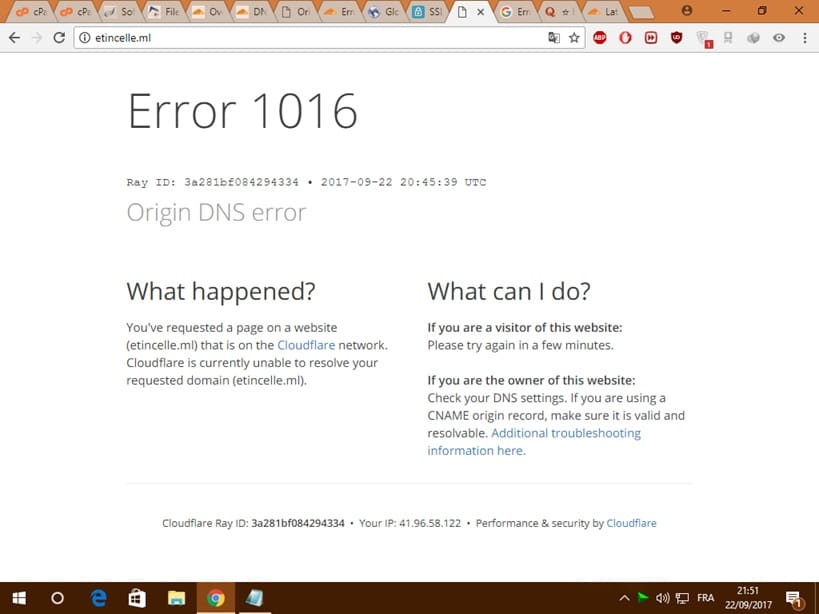
What is Cloudflare Error 1016?
When a visitor requests your website, the request first hits Cloudflare’s global Anycast network. Cloudflare acts as a reverse proxy, meaning it must look up your origin server’s DNS records to forward that traffic. If Cloudflare’s edge servers cannot find or resolve the IP address of your upstream host, it halts the connection and displays the Error 1016: Origin DNS Error page.
How to Fix Error java.lang.nullpointerexception in Java (Ultimate Guide)
Primary Root Causes
Understanding the specific trigger helps isolate the solution. The table below outlines the most common reasons behind this network anomaly.
| Root Cause | Technical Detail | Impact Level |
|---|---|---|
| Missing A/AAAA Records | The core DNS zone file lacks an explicit pointer for the requested hostname. | Critical |
| Origin IP Migration | Your web host changed your server’s IP address without updating the Cloudflare dashboard. | Critical |
| Unresolved CNAME Target | Your configuration uses a CNAME record pointing to an external domain that is broken or expired. | High |
| DNSSEC Misconfiguration | Broken cryptographic keys at your domain registrar prevent DNS chain-of-trust validation. | Medium |
Step-by-Step Troubleshooting Checklist
Follow these verified steps sequentially to diagnose and resolve the issue:
Step 1: Validate Your Origin Server IP
Log into your hosting account (e.g., AWS, DigitalOcean, cPanel, or Bluehost) and find the public IPv4 address of your server. Make sure the server is actively running and responding to external web traffic.
Step 2: Audit Your Cloudflare DNS Zone File
- Log into your Cloudflare Dashboard.
- Select the affected domain.
- Click on the DNS tab in the left-hand sidebar, then choose Records.
- Look for the A record pointing to your root domain (e.g.,
yourdomain.com). - Verify that the IP listed in the Content column matches the exact server IP you obtained in Step 1. If it differs, click Edit, update the record, and save.
Step 3: Verify CNAME Flattener and Target Integrity
If your DNS infrastructure relies on CNAME records to map traffic to a third-party service (like an e-commerce platform or Heroku app), ensure that the destination host is completely functional. If the destination domain fails to resolve, Cloudflare will inherently trigger a 1016 error.
Step 4: Check DNSSEC Status
If you recently transferred your domain or modified your nameservers, an old, cached DNSSEC record at your registrar might be blocking resolution. You can use tools like dnsviz.net to see if your DNSSEC chain is broken. If it is, temporarily disable DNSSEC at your domain registrar, wait for propagation, and re-enable it carefully.
Expert Insight: Best Practices for High Availability
“To prevent future 1016 errors caused by dynamic IP allocations from hosting providers, consider deploying a DDNS (Dynamic DNS) script via Cloudflare’s API, or migrate to a static IP address allocation. Ensuring proper tracking of infrastructure modifications prevents downtime before it impacts users or search visibility.”
Frequently Asked Questions (FAQs)
Is Error 1016 an issue with Cloudflare or my host?
It is almost exclusively an issue with the configuration within your Cloudflare account or your hosting provider’s network settings, rather than an operational failure of Cloudflare itself.
How long does it take for the fix to propagate?
When you update DNS records inside Cloudflare while using their proxy (the orange cloud icon), the change takes effect almost instantaneously worldwide, typically within a few seconds to a few minutes.
Technical Guide updated for architectural accuracy. For advanced troubleshooting, check your local origin server logs or connect with Cloudflare Enterprise Support.

Pingback: How to Fix Gemini Error 1097 | Something Went Wrong (1097) - Seminarsonly.com