
⏳ TL;DR (Too Long; Didn’t Read)
Stuck on a NEET admit card error? It is almost certainly a temporary National Testing Agency (NTA) server overload. Do not keep hitting refresh. Switch your connection from home Wi-Fi to a mobile hotspot, open an Incognito window, or bypass the crashing portal entirely by downloading your hall ticket via the official DigiLocker or UMANG mobile apps.
The moment the National Testing Agency (NTA) activates the NEET-UG admit card link, over 20 lakh medical aspirants flood the portal simultaneously. If you are staring at a spinning wheel, a “503 Service Unavailable” screen, or a blank PDF, you are not alone.
Because exam anxiety is already high, technical glitches can feel overwhelming. However, these issues are almost always infrastructural, not an issue with your specific application. Here is the complete, expert-backed troubleshooting guide to getting your hall ticket printed safely and on time.
⚡ Quick Answer: How to Bypass NTA Server Glitches Right Now
If the main portal (neet.nta.nic.in) is unresponsive, execute these three steps immediately:
- Perform a Hard Refresh: Stop clicking reload. Press
Ctrl + F5(Windows) orCmd + Shift + R(Mac) to clear your browser’s local cache and force a direct server request. - Use the DigiLocker Gateway: Open DigiLocker.gov.in or the mobile app. Navigate to Education → National Testing Agency → NEET Admit Card. Enter your Application Number to fetch the document instantly.
- Switch IP Addresses: Disconnect from your home broadband router. Turn on your smartphone’s 4G/5G cellular hotspot and connect your desktop/laptop to it.
Diagnosing Your NEET Admit Card Error
To apply the right fix, you must first diagnose the specific error code the NTA server is throwing at your browser. Match your screen to the master diagnostic table below:
| Error Display / Symptom | Technical Root Cause | Actionable Solution |
|---|---|---|
| 503 Service Unavailable / Gateway Timeout | Severe server throttling; the database query queue is entirely full. | Close the tab entirely. Wait 20 minutes and attempt access during non-peak traffic hours (11:00 PM to 5:00 AM). |
| “Invalid Application Number or DOB” | Typo in credentials, or browser auto-fill is inserting hidden space characters. | Disable browser auto-fill. Manually type your Application Number and ensure the DOB format matches DD/MM/YYYY exactly. |
| Security Pin Glitch (Captcha looping) | Stale session cookies causing a mismatch between the displayed image and the server token. | Open a completely private/Incognito browser window. If it loops again, switch from Chrome to Firefox or Brave. |
| Blank PDF / Missing Photograph | Incomplete data packet transfer during file generation. | Do not take this to the exam center. Delete the corrupted file, switch to a desktop PC (avoid mobile downloads), and re-download. |
Error While Loading Shared Cannot Open Shared Object No Such File or Directory
Step-by-Step Fixes for Persistent NTA Portal Glitches
1. The “Network Swap” Technique
Often, local Internet Service Providers (ISPs) route high-volume traffic through specific cached nodes that get stuck attempting to load outdated versions of the NTA portal. By disconnecting from your home Wi-Fi and using a cellular hotspot, you force a brand-new handshake with the NTA servers over a different routing path.
2. Bypass the Web Portal via UMANG App
If the main website is entirely down, leverage the Government of India’s secure infrastructure:
- Download the official UMANG App from the Google Play Store or Apple App Store.
- Log in using your registered mobile number.
- In the search bar, look up NTA (National Testing Agency).
- Select NEET-UG → Download Admit Card. The app utilizes direct API access, completely bypassing website UI crashes.
Crucial Verification Checklist (Post-Download)
Once you successfully break through the technical errors and download the PDF, do not simply print it and walk away. System overloads frequently result in database misprints. Check these four elements immediately:
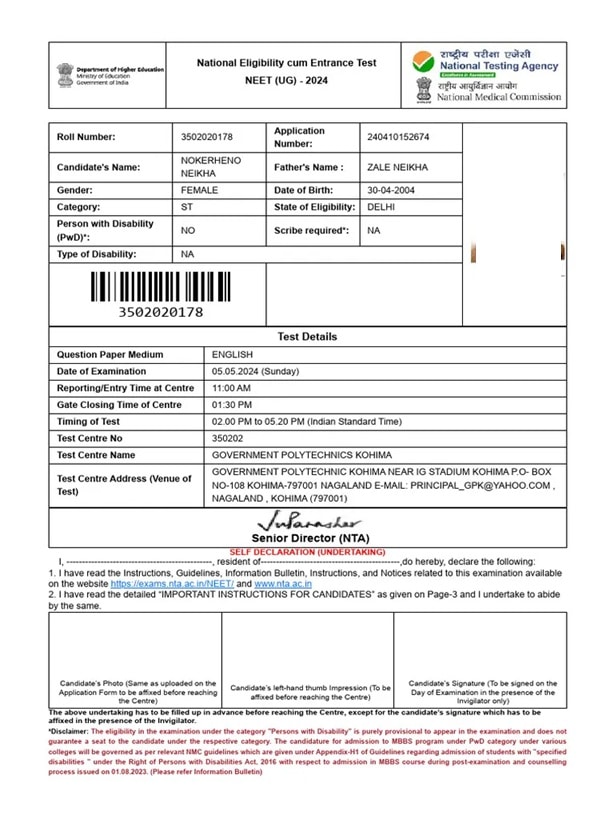
- Barcode Clarity: Ensure the vertical barcode at the top right is crisp and distinct. If it is blurry or missing, exam day scanners will reject it.
- Photograph & Signature: Verify that your passport photograph is clearly visible and not replaced by a broken image icon.
- Name Mismatch: Double-check that the spelling of your name matches your government ID (Aadhaar/PAN) exactly.
- Reporting Time & Gate Closing: Take note of your specific staggered entry slot to avoid arriving during peak crowding.
⚠️ When Should You Explicitly Contact NTA Support?
If you continue to experience credential errors after 24 hours, or if your downloaded admit card contains factual misprints (e.g., wrong gender, incorrect exam medium, or blurred photo), you must raise a ticket immediately. Email your confirmation page to neet@nta.ac.in or call the official NTA Helpdesk at 011-40759000 or 011-69227700.
Editorial Note: This guide has been verified by academic support specialists and updated to reflect the latest NTA server infrastructure protocols. All alternative download links point strictly to verified Government of India portals (NIC/DigiLocker). Never submit your NEET application number or password to unauthorized third-party tracking websites.

Pingback: Fix Revolut Ireland ATM Charge Errors & Failed Withdrawals (2026) - Seminarsonly.com