Skip to content
Seminarsonly.com
  • Home
  • About
  • Contact Us
  • Disclaimer
  • Privacy Policy
  • facebook.com
  • twitter.com
  • t.me
  • instagram.com
  • youtube.com
Subscribe
Home ยป 10.0.0.1 Piso WiFi Pause | How to Pause and Resume Your Session
Posted inLogin

10.0.0.1 Piso WiFi Pause | How to Pause and Resume Your Session

Posted by Freddy John June 3, 2025

The Pause Time feature in Piso WiFi systems allows users to temporarily halt their internet session, preserving unused time for later use. Ensure your device is connected to the Piso WiFi network.

Here’s how both users and administrators can utilize this feature:


๐Ÿง‘โ€๐Ÿ’ป For Users: How to Pause and Resume Your Session

  1. Connect to the Piso WiFi Network:

    • Ensure your device is connected to the Piso WiFi network.

  2. Access the Portal:

    • Open a web browser and enter http://10.0.0.1 in the address bar.

  3. Pause Your Session:

    • On the portal homepage, click the “Pause Time” button to halt your session timer.

  4. Resume Your Session:

    • When ready to continue, return to the portal and click the “Resume Time” button.

Note: The availability of the Pause/Resume feature depends on the administrator’s settings. If you don’t see these options, they may have been disabled.
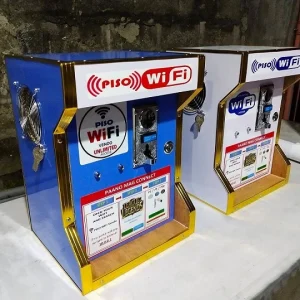
10.0.0.1 piso wifi vendo pause login

Also Read : TN ePass Login | Applying for a New TN ePass


๐Ÿ”ง For Administrators: Managing the Pause Time Feature

  1. Access the Admin Panel:

    • Connect to the Piso WiFi network.

    • Open a browser and navigate to http://10.0.0.1/admin.

  2. Log In:

    • Enter your admin credentials. Default username is typically admin, and the default password is 123456789.

  3. Navigate to Portal Settings:

    • Once logged in, click on the menu icon (โ˜ฐ) and select “Portal Settings”.

  4. Configure Pause Time:

    • Under the “Insert Coin Mode” and “Voucher Code Mode” sections, you’ll find options to enable or disable the “Pause Time” feature.

  5. Save Changes:

    • After making your selections, ensure you save the changes to apply the new settings.


โš ๏ธ Troubleshooting Tips

  • Cannot Access 10.0.0.1:

    • Ensure your device is connected to the Piso WiFi network.

    • Clear your browser cache or try a different browser.

    • Restart your router if the page doesn’t load.

  • Pause/Resume Buttons Not Visible:

    • The administrator may have disabled these features.

    • Contact the network administrator for assistance.

  • Session Doesn’t Resume Properly:

    • Ensure you’re clicking the “Resume Time” button on the portal.

    • If issues persist, restart your device and try again

Last updated on June 3, 2025
Freddy John
View All Posts

Post navigation

Previous Post
Australian Super Letter of Compliance | How to Write it
Next Post
https //uucms.karnataka.gov.in Register Login

Recent Posts

  • Social Security Electronic Benefits Update: Paper Checks Are Gone โ€” Here’s What to Do
  • When Did Social Security Numbers Start? The Complete 1936 Story
  • How to Request a New Social Security Card (Free, Online & By Mail)
  • Social Security Max Contribution 2026: New $184,500 Limit Explained
  • How to Replace My Social Security Card: Free Online Method (2026)

Archives

  • June 2026
  • April 2026
  • March 2026
  • February 2026
  • January 2026
  • December 2025
  • November 2025
  • October 2025
  • September 2025
  • August 2025
  • July 2025
  • June 2025
  • May 2025
  • April 2025
  • March 2025
  • February 2025
  • January 2025
  • December 2024
  • November 2024
  • October 2024
  • September 2024
  • August 2024
  • July 2024
  • June 2024
  • May 2024
  • April 2024
  • March 2024
  • February 2024
  • January 2024
  • December 2023
  • November 2023
  • October 2023
  • September 2023
  • August 2023
  • July 2023
  • June 2023
  • May 2023
  • April 2023
  • March 2023
  • February 2023
  • January 2023
  • December 2022
  • November 2022
  • October 2022
  • September 2022
  • August 2022
  • July 2022
  • June 2022
  • May 2022
  • April 2022
  • March 2022
  • February 2022
  • January 2022
  • December 2021
  • November 2021
  • October 2021
  • September 2021
  • August 2021
  • July 2021
  • June 2021
  • May 2021
  • July 204

Categories

  • activate
  • Australia
  • BF6
  • Canada
  • Card
  • Error Fix
  • Games
  • India
  • Ireland
  • Italy
  • Kerala
  • Login
  • Lottery
  • Minecraft
  • news
  • Property
  • Result
  • Scam
  • Science Fair
  • Server
  • Social Security
  • South Africa
  • TV
  • UK
  • USA
  • Whois
Search
Categories
  • activate
  • Australia
  • BF6
  • Canada
  • Card
  • Error Fix
  • Games
  • India
  • Ireland
  • Italy
  • Kerala
  • Login
  • Lottery
  • Minecraft
  • news
  • Property
  • Result
  • Scam
  • Science Fair
  • Server
  • Social Security
  • South Africa
  • TV
  • UK
  • USA
  • Whois
Archives
  • June 2026
  • April 2026
  • March 2026
  • February 2026
  • January 2026
  • December 2025
  • November 2025
  • October 2025
  • September 2025
  • August 2025
  • July 2025
  • June 2025
  • May 2025
  • April 2025
  • March 2025
  • February 2025
  • January 2025
  • December 2024
  • November 2024
  • October 2024
  • September 2024
  • August 2024
  • July 2024
  • June 2024
  • May 2024
  • April 2024
  • March 2024
  • February 2024
  • January 2024
  • December 2023
  • November 2023
  • October 2023
  • September 2023
  • August 2023
  • July 2023
  • June 2023
  • May 2023
  • April 2023
  • March 2023
  • February 2023
  • January 2023
  • December 2022
  • November 2022
  • October 2022
  • September 2022
  • August 2022
  • July 2022
  • June 2022
  • May 2022
  • April 2022
  • March 2022
  • February 2022
  • January 2022
  • December 2021
  • November 2021
  • October 2021
  • September 2021
  • August 2021
  • July 2021
  • June 2021
  • May 2021
  • July 204
Copyright 2026 โ€” Seminarsonly.com. All rights reserved.
Scroll to Top